> ## Documentation Index
> Fetch the complete documentation index at: https://docs.usehindsight.com/llms.txt
> Use this file to discover all available pages before exploring further.
# Set Up Plays
> Turn closed-lost deals into a ranked, actionable win-back list
**Plays is in preview.** The capability is rolling out to workspaces — setup steps and screens may change as it reaches general availability.
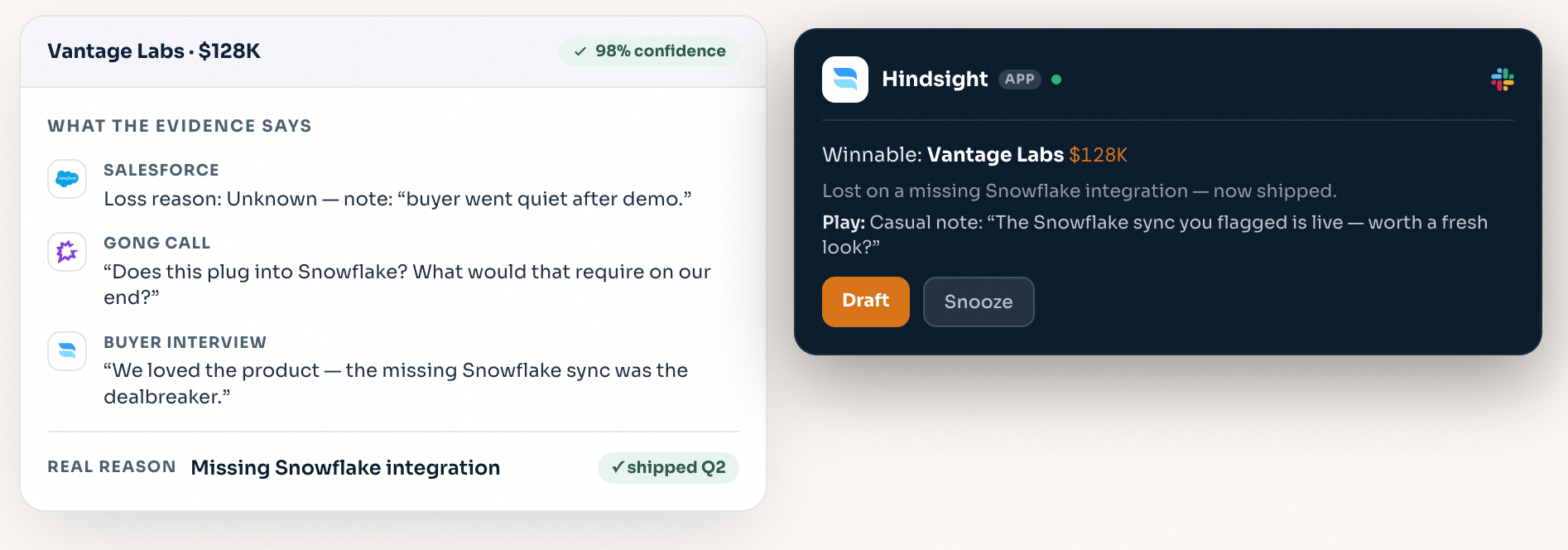
Most of your pipeline ends up in the loss column, and a lot of it was never truly unwinnable — the deal was high-fit but lost to execution, or lost on a gap you've since shipped. **Plays** finds those deals, reconstructs the real reason they stalled, and hands reps a specific, ready-to-run win-back motion.
Plays sit on top of your [Deal Reviews](/deals-quickstart) — the verified record and scored decision drivers Hindsight already built for every deal are exactly what make a play targetable.
 ***
## What a Play is
A Play is a reusable win-back motion defined by two things:
* **Enrollment criteria** — filters over your closed deals and their scored Deal Review fields. A deal that matches gets enrolled automatically. For example:
> **Auto-enroll closed deals where**
> product fit ≥ 4 / 5 **and** customer fit ≥ 4 / 5 **and** loss reason is *sales execution*
* **The play itself** — the motion reps run on enrolled deals, e.g. *"VP outreach — LinkedIn connect + event invite, opened with why they really passed."*
Because enrollment runs off the verified record, each play is a live, ranked list of genuinely winnable deals — not a static report.
***
## What a Play is
A Play is a reusable win-back motion defined by two things:
* **Enrollment criteria** — filters over your closed deals and their scored Deal Review fields. A deal that matches gets enrolled automatically. For example:
> **Auto-enroll closed deals where**
> product fit ≥ 4 / 5 **and** customer fit ≥ 4 / 5 **and** loss reason is *sales execution*
* **The play itself** — the motion reps run on enrolled deals, e.g. *"VP outreach — LinkedIn connect + event invite, opened with why they really passed."*
Because enrollment runs off the verified record, each play is a live, ranked list of genuinely winnable deals — not a static report.
 ***
## Set up a Play
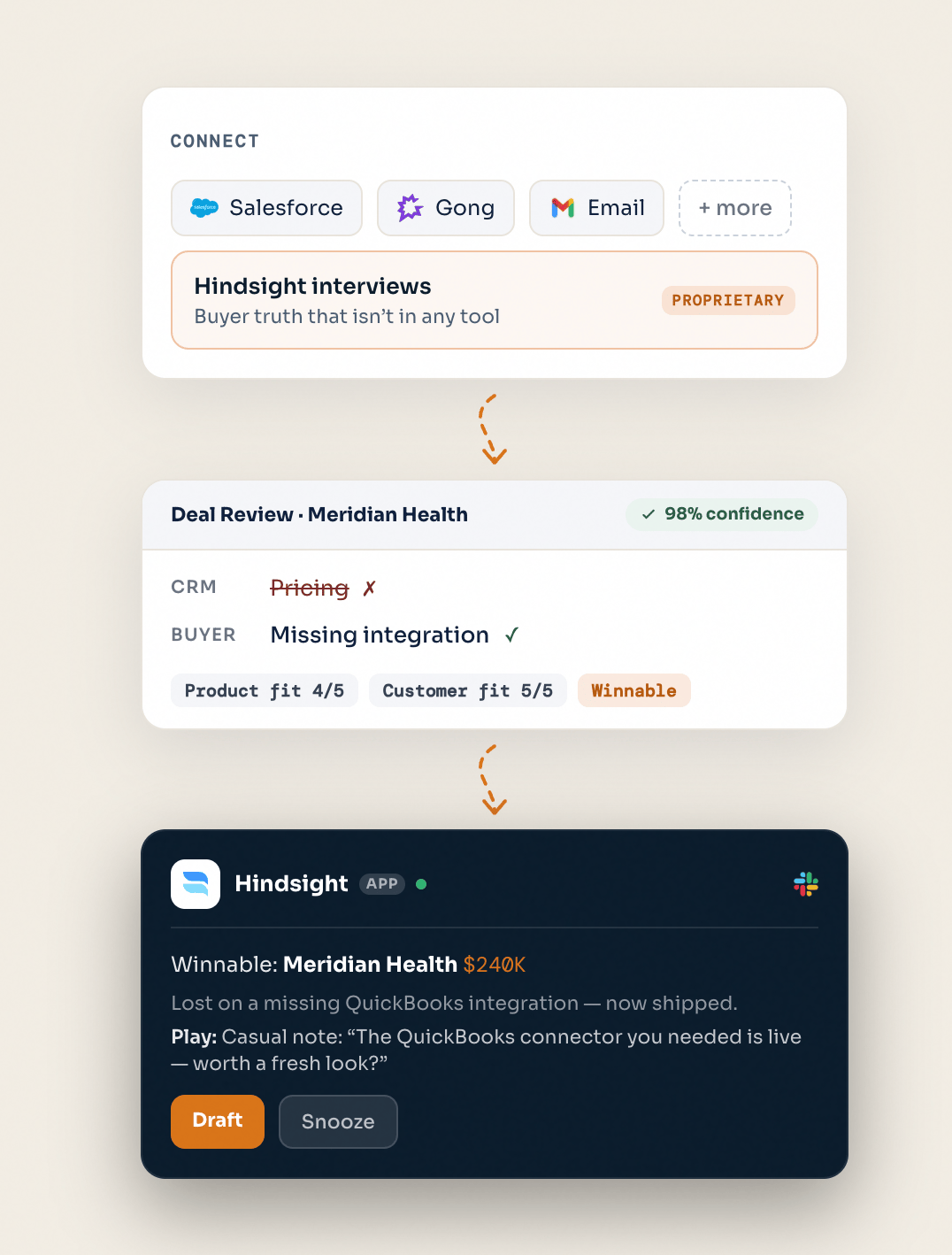
Pick the closed deals this play should target. Combine CRM fields and Hindsight's scored Deal Review fields — product fit, customer fit, decision drivers, loss reason, competitor — to isolate a winnable segment (e.g. *high-fit deals lost to execution*, or *lost on a feature that's now shipped*).
Hindsight generates a **recommended play** for each opportunity from its deal context and competitive signals — the angle, who to reach, and why they really passed. Review and adjust the motion to match how your team sells.
Link enablement assets to the play so reps have the right collateral in hand — battlecards, one-pagers, or a refreshed comparison that reflects what changed since the deal closed.
Winnable deals are routed to the rep in Slack. From the thread, reps **draft tailored outreach** with messaging adapted to the play type — one click, grounded in the real loss reason. Reps and admins can opt into **email notifications** when a new play opportunity is ready to act on.
***
## Track outcomes
Each play tracks revenue as deals move through it — **in play**, **engaged**, and **won** — so you can see which win-back motions actually convert and double down on them.
***
## What's Next
Plays run on your Deal Reviews — make sure your closed deals are analyzed and scored.
Use Recipes and Claude Skills to surface win-back segments and draft outreach at scale.
***
## Set up a Play
Pick the closed deals this play should target. Combine CRM fields and Hindsight's scored Deal Review fields — product fit, customer fit, decision drivers, loss reason, competitor — to isolate a winnable segment (e.g. *high-fit deals lost to execution*, or *lost on a feature that's now shipped*).
Hindsight generates a **recommended play** for each opportunity from its deal context and competitive signals — the angle, who to reach, and why they really passed. Review and adjust the motion to match how your team sells.
Link enablement assets to the play so reps have the right collateral in hand — battlecards, one-pagers, or a refreshed comparison that reflects what changed since the deal closed.
Winnable deals are routed to the rep in Slack. From the thread, reps **draft tailored outreach** with messaging adapted to the play type — one click, grounded in the real loss reason. Reps and admins can opt into **email notifications** when a new play opportunity is ready to act on.
***
## Track outcomes
Each play tracks revenue as deals move through it — **in play**, **engaged**, and **won** — so you can see which win-back motions actually convert and double down on them.
***
## What's Next
Plays run on your Deal Reviews — make sure your closed deals are analyzed and scored.
Use Recipes and Claude Skills to surface win-back segments and draft outreach at scale.