> ## Documentation Index
> Fetch the complete documentation index at: https://docs.usehindsight.com/llms.txt
> Use this file to discover all available pages before exploring further.
# Salesforce Integration
> Sync Hindsight with Salesforce CRM for Deal Analysis
## Overview
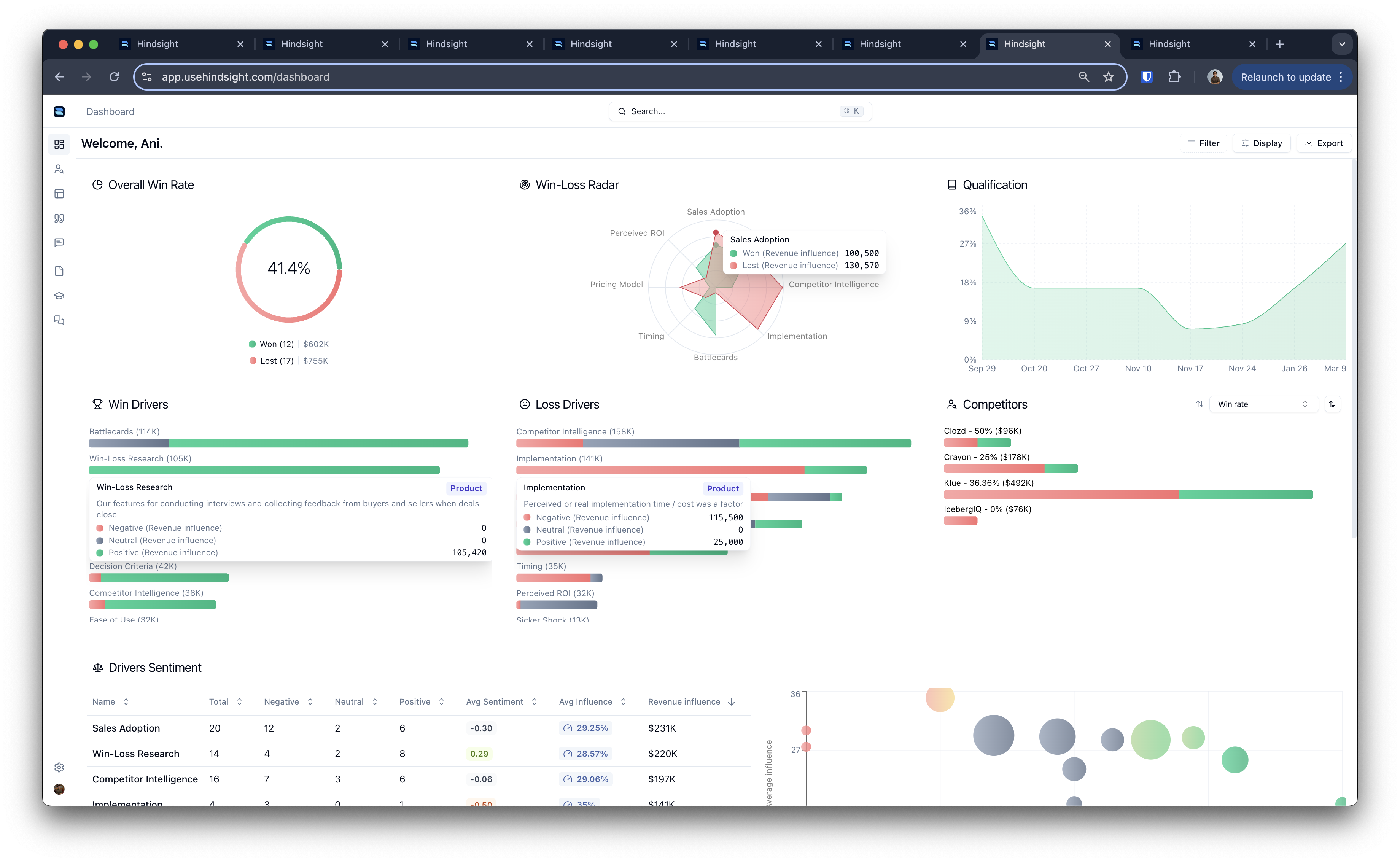
Hindsight connects to Salesforce via OAuth to sync your deals and analyze them for competitive win-loss insights. This guide will help you set up the integration and start using it effectively.
 For support, please reach out via your Slack Connect channel or via [email](mailto:support@usehindsight.com)
### How it Works
When you connect Hindsight to your Salesforce CRM, you'll be able to **import specific Opportunities into Hindsight**. Hindsight will analyze these Opportunities to extract competitive insights based on your decision drivers.
For support, please reach out via your Slack Connect channel or via [email](mailto:support@usehindsight.com)
### How it Works
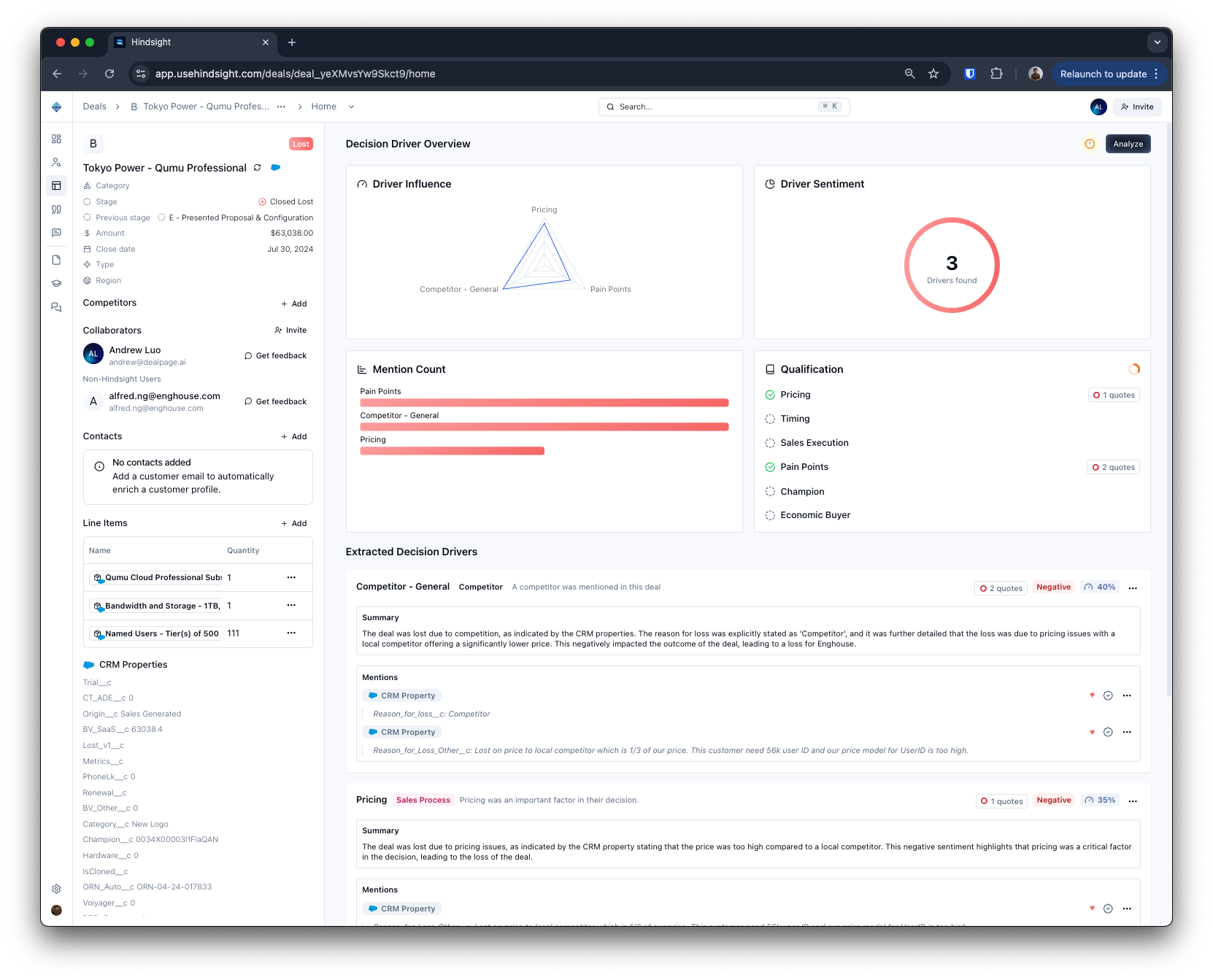
When you connect Hindsight to your Salesforce CRM, you'll be able to **import specific Opportunities into Hindsight**. Hindsight will analyze these Opportunities to extract competitive insights based on your decision drivers.
You can set up **automation rules** in Hindsight that automatically import Opportunities based on custom criteria. You can use your Salesforce data to **filter in the Win-Loss dashboard** and analyze your Opportunities based on specific criteria, such as stage, amount, or close date.
 ### Daily Sync
**Opportunties are synced for the latest data every 12 hours**. This means that any changes made to your Opportunities in Salesforce will be reflected in Hindsight automatically.
Hindsight listens to opportunities via webhooks to make this seamless for users.
Deal Import Automation only applies to deals that meet your criteria AND which have closed within 12 hours of the sync.
If you make changes to your Deal Import Automation rules, these changes will be applied on the next Daily Sync.
If you'd like to pull in deals immediately or from outside the 12 hour window, you can manually import them via the [Deals](https://app.usehindsight.com/deals) page.
### Supported Objects
Hindsight only syncs objects associated with the Opportunities that you import. This includes:
* Opportunity
* Account
* Contacts
* Custom Fields
* Feed Items
* Emails
* Meetings
### Daily Sync
**Opportunties are synced for the latest data every 12 hours**. This means that any changes made to your Opportunities in Salesforce will be reflected in Hindsight automatically.
Hindsight listens to opportunities via webhooks to make this seamless for users.
Deal Import Automation only applies to deals that meet your criteria AND which have closed within 12 hours of the sync.
If you make changes to your Deal Import Automation rules, these changes will be applied on the next Daily Sync.
If you'd like to pull in deals immediately or from outside the 12 hour window, you can manually import them via the [Deals](https://app.usehindsight.com/deals) page.
### Supported Objects
Hindsight only syncs objects associated with the Opportunities that you import. This includes:
* Opportunity
* Account
* Contacts
* Custom Fields
* Feed Items
* Emails
* Meetings
 ### Segments
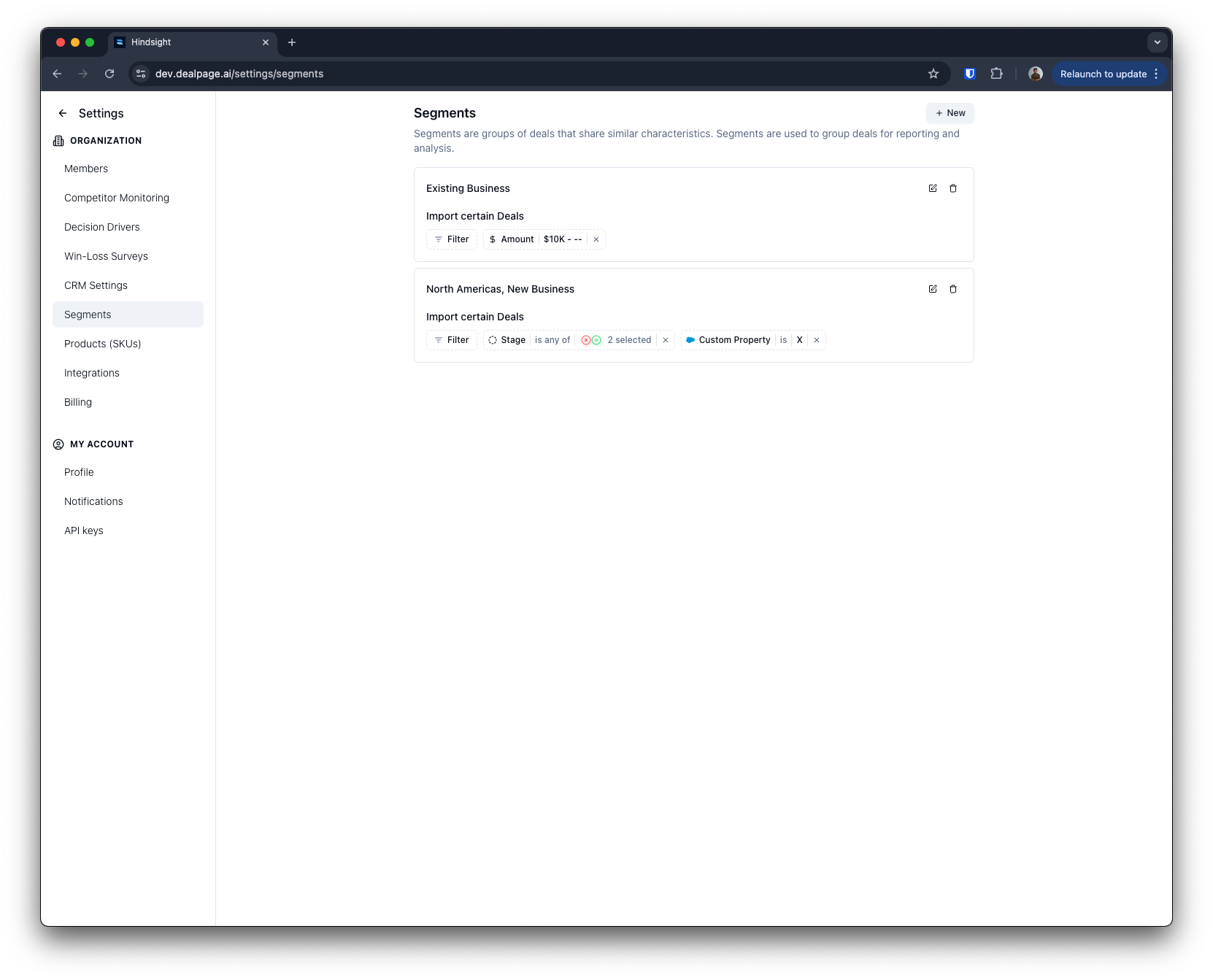
**You can configure [segments](https://app.usehindsight.com/settings/segments) in Hindsight to filter your Opportunities based on custom criteria.** This allows you to analyze specific subsets of your Opportunities, such as those with a certain stage, amount, or close date.
Segments are useful for analyzing your Opportunities based on specific criteria, such as:
* Opportunities with a certain stage or pipeline (e.g. "Closed Won, New Business")
* Opportunities with a certain amount (e.g. "> \$10,000")
* Opportunities with a certain close date (e.g. "Next 30 days")
* Opportunities with a certain account type (e.g. "Enterprise")
* Opportunities with a certain product (e.g. "Product A")
* Opportunities with a certain region (e.g. "North America")
### Segments
**You can configure [segments](https://app.usehindsight.com/settings/segments) in Hindsight to filter your Opportunities based on custom criteria.** This allows you to analyze specific subsets of your Opportunities, such as those with a certain stage, amount, or close date.
Segments are useful for analyzing your Opportunities based on specific criteria, such as:
* Opportunities with a certain stage or pipeline (e.g. "Closed Won, New Business")
* Opportunities with a certain amount (e.g. "> \$10,000")
* Opportunities with a certain close date (e.g. "Next 30 days")
* Opportunities with a certain account type (e.g. "Enterprise")
* Opportunities with a certain product (e.g. "Product A")
* Opportunities with a certain region (e.g. "North America")
 ## Connecting Salesforce
### Authorization
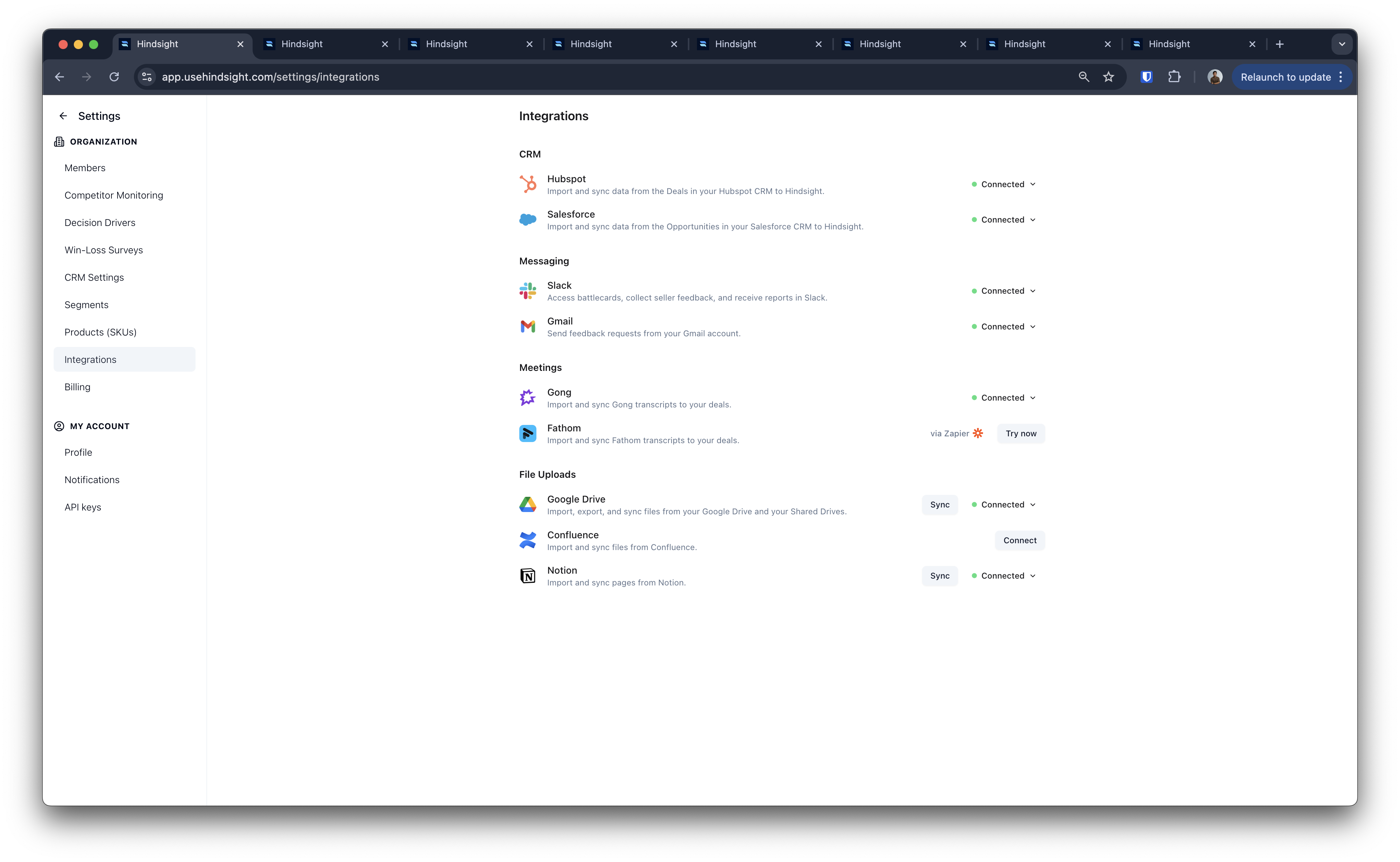
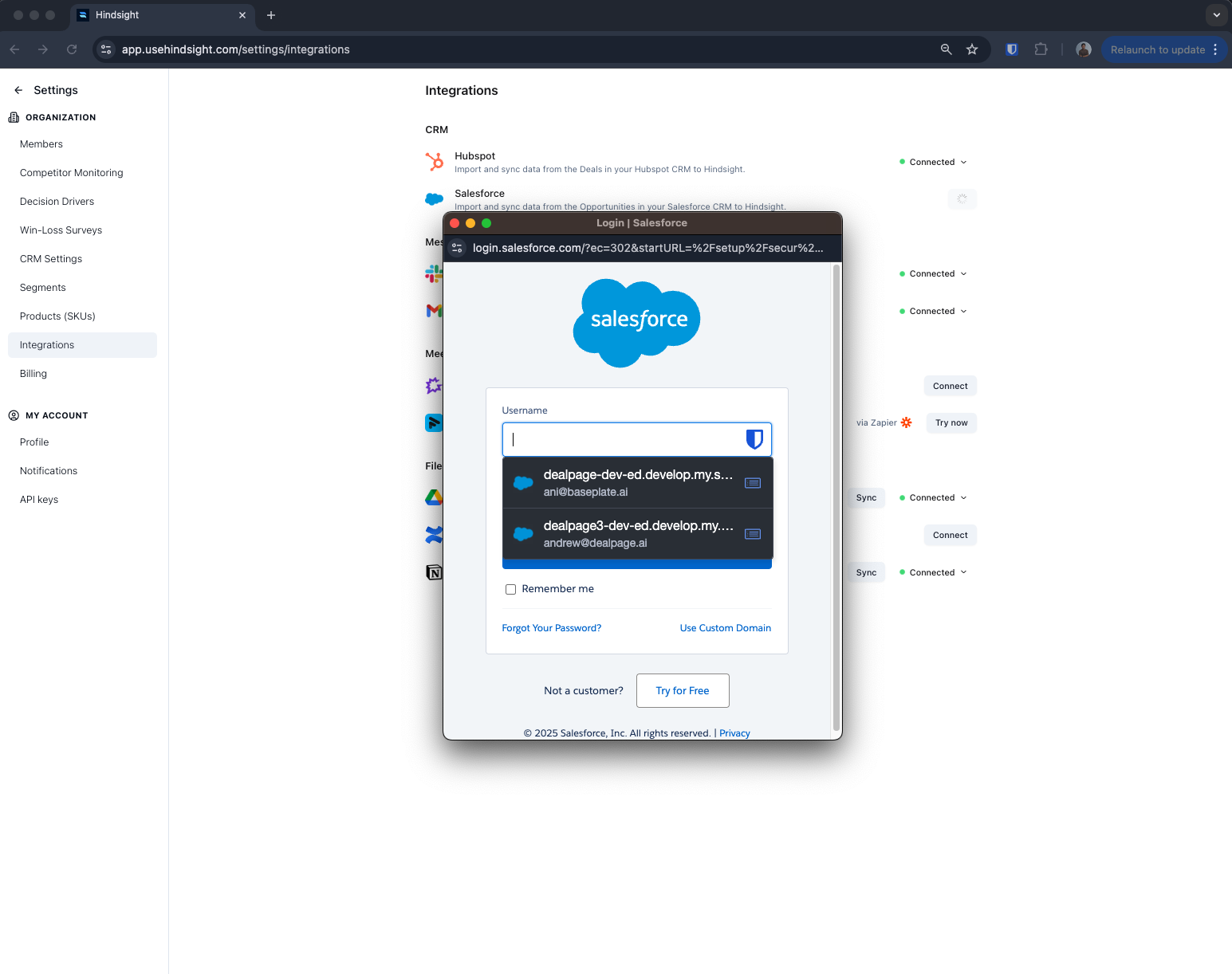
**Authorizing Salesforce requires admin access to your Salesforce account.** Click "Connect" on the [integrations](https://app.usehindsight.com/settings/integrations) page and follow the authorization steps.
This will redirect you to the Salesforce authorization page. Click "Allow" to authorize Hindsight to access your Salesforce account. If you're having issues, contact your Salesforce admin.
## Connecting Salesforce
### Authorization
**Authorizing Salesforce requires admin access to your Salesforce account.** Click "Connect" on the [integrations](https://app.usehindsight.com/settings/integrations) page and follow the authorization steps.
This will redirect you to the Salesforce authorization page. Click "Allow" to authorize Hindsight to access your Salesforce account. If you're having issues, contact your Salesforce admin.
 ### Import Rules
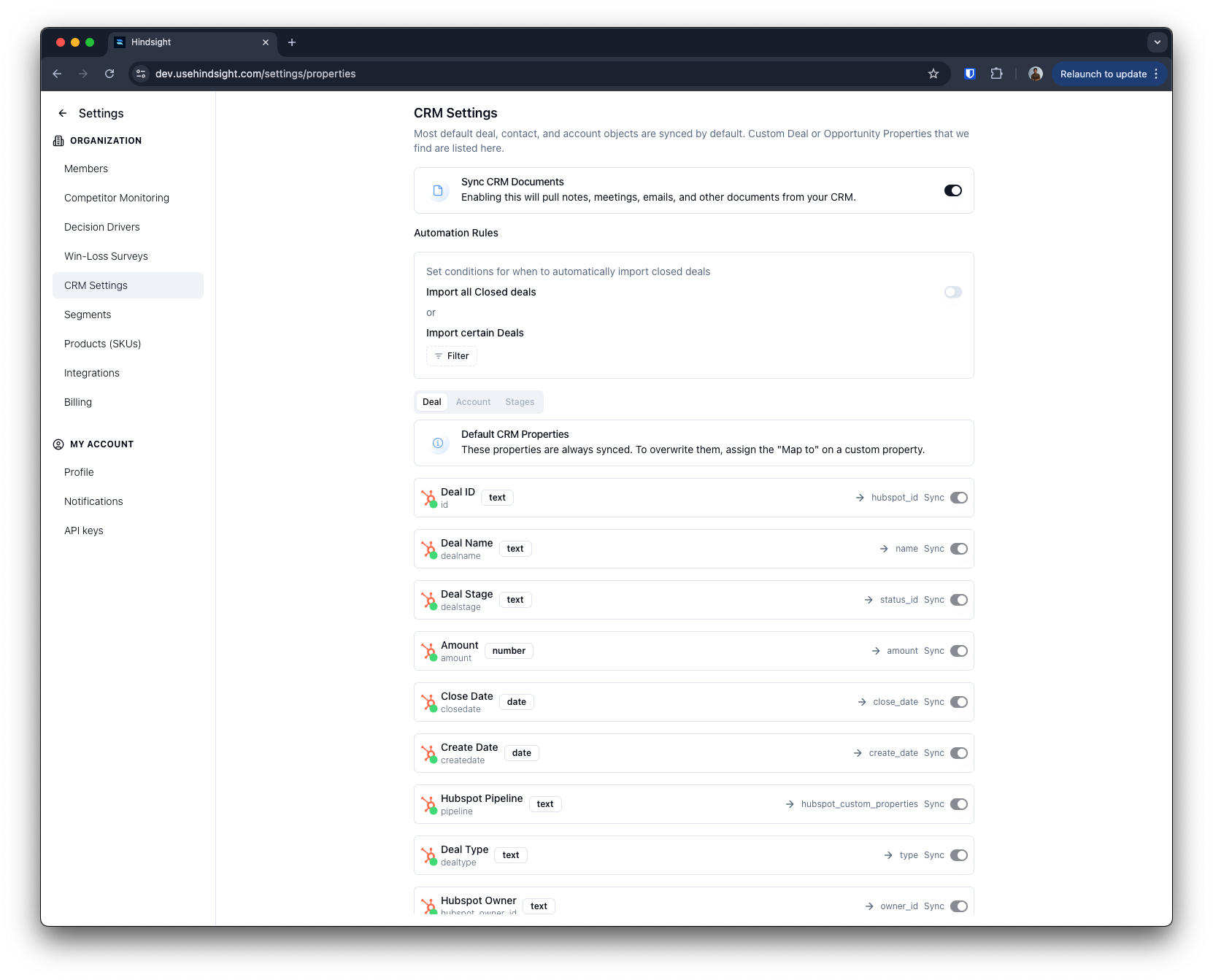
Setting up import rules allows you to **automatically import Opportunities into Hindsight** based on custom criteria. This is useful for keeping Hindsight's insights up-to-date without manual intervention.
We recommend filtering to Closed Won and Lost opportunities. You can also filter by custom fields, such as "Region" or "Product", to analyze specific subsets of your Opportunities.
### Import Rules
Setting up import rules allows you to **automatically import Opportunities into Hindsight** based on custom criteria. This is useful for keeping Hindsight's insights up-to-date without manual intervention.
We recommend filtering to Closed Won and Lost opportunities. You can also filter by custom fields, such as "Region" or "Product", to analyze specific subsets of your Opportunities.
 ## Security
Hindsight treats your Salesforce credentials and data as sensitive by default. The integration is built to meet the OAuth hardening controls that modern security programs (including Salesforce's own partner requirements) expect.
### OAuth Token Controls
| Control | Status | What it does |
| -------------------------------------- | ------------------------------------------- | ---------------------------------------------------------------------------------------------------------------------------------------------------------------------- |
| **PKCE** (Proof Key for Code Exchange) | Enforced | The authorization flow uses PKCE (S256), preventing authorization-code interception. |
| **Refresh Token Rotation** | Enforced | Each token refresh issues a new refresh token and invalidates the previous one, so a stolen token stops working after its first use. |
| **Idle Token TTL (30 days)** | Enforced | Refresh tokens expire after 30 days of inactivity, eliminating indefinitely-lived credentials. |
| **IP-Bound Token Refresh** | {/* PICK ONE — see note below */} Available | Token-refresh requests originate exclusively from Hindsight's dedicated, self-hosted integration layer, enabling refresh requests to be bound to an approved IP range. |
### How Credentials Are Handled
* **Never exposed to the browser.** OAuth is brokered entirely server-side. Access and refresh tokens are held only by Hindsight's integration layer and are never returned to the client.
* **Encrypted at rest.** Tokens are stored encrypted in an internal-only database with no public network exposure.
* **Least-privilege scopes.** Hindsight requests only the specific Salesforce API scopes required for the features you use, not broad or full-account access.
* **Revocable at any time.** Disconnecting Salesforce from the [Integrations](https://app.usehindsight.com/settings/integrations) page immediately revokes Hindsight's access.
## Customization
### Opportunity Stages
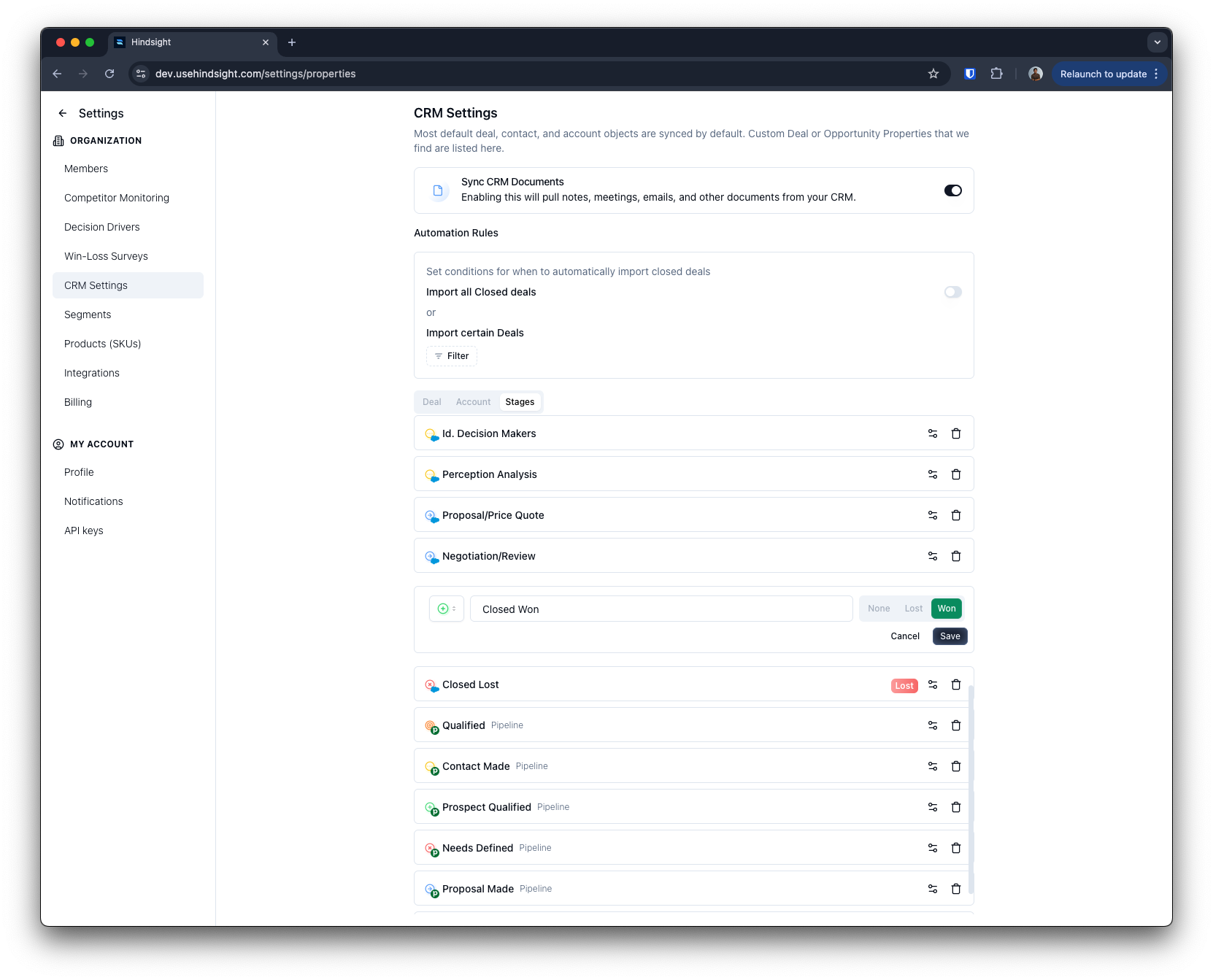
To help Hindsight understand your custom opportunity stages, navigate to the [CRM Settings](https://app.usehindsight.com/settings/properties) and click the "Stages" tab.
**Mark your custom opportunity stages as "Closed Won" or "Closed Lost"** to help Hindsight analyze your Opportunities correctly. This will allow Hindsight to tag your Opportunities with the correct status and provide accurate win-loss insights.
## Security
Hindsight treats your Salesforce credentials and data as sensitive by default. The integration is built to meet the OAuth hardening controls that modern security programs (including Salesforce's own partner requirements) expect.
### OAuth Token Controls
| Control | Status | What it does |
| -------------------------------------- | ------------------------------------------- | ---------------------------------------------------------------------------------------------------------------------------------------------------------------------- |
| **PKCE** (Proof Key for Code Exchange) | Enforced | The authorization flow uses PKCE (S256), preventing authorization-code interception. |
| **Refresh Token Rotation** | Enforced | Each token refresh issues a new refresh token and invalidates the previous one, so a stolen token stops working after its first use. |
| **Idle Token TTL (30 days)** | Enforced | Refresh tokens expire after 30 days of inactivity, eliminating indefinitely-lived credentials. |
| **IP-Bound Token Refresh** | {/* PICK ONE — see note below */} Available | Token-refresh requests originate exclusively from Hindsight's dedicated, self-hosted integration layer, enabling refresh requests to be bound to an approved IP range. |
### How Credentials Are Handled
* **Never exposed to the browser.** OAuth is brokered entirely server-side. Access and refresh tokens are held only by Hindsight's integration layer and are never returned to the client.
* **Encrypted at rest.** Tokens are stored encrypted in an internal-only database with no public network exposure.
* **Least-privilege scopes.** Hindsight requests only the specific Salesforce API scopes required for the features you use, not broad or full-account access.
* **Revocable at any time.** Disconnecting Salesforce from the [Integrations](https://app.usehindsight.com/settings/integrations) page immediately revokes Hindsight's access.
## Customization
### Opportunity Stages
To help Hindsight understand your custom opportunity stages, navigate to the [CRM Settings](https://app.usehindsight.com/settings/properties) and click the "Stages" tab.
**Mark your custom opportunity stages as "Closed Won" or "Closed Lost"** to help Hindsight analyze your Opportunities correctly. This will allow Hindsight to tag your Opportunities with the correct status and provide accurate win-loss insights.
 ### Custom Properties
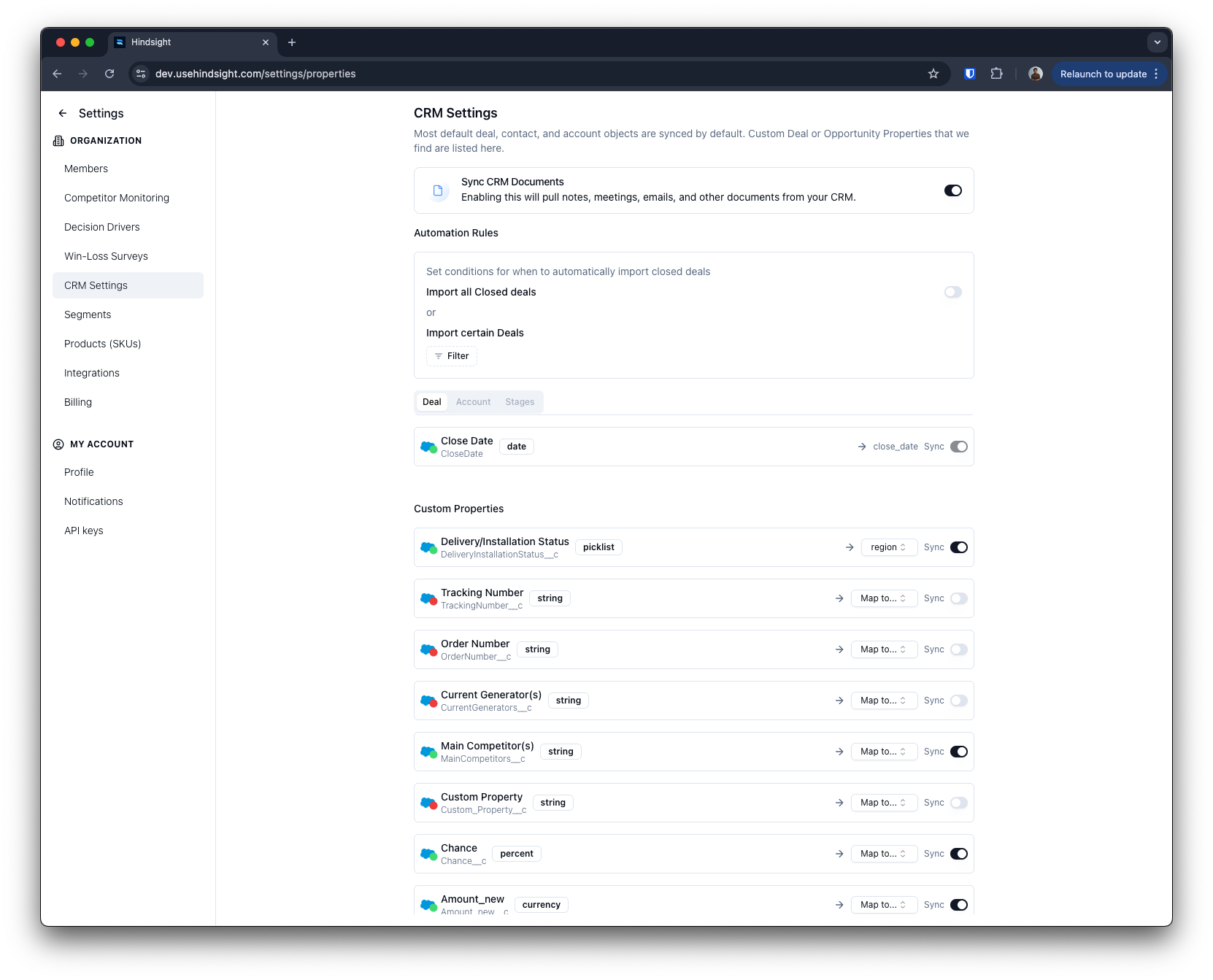
You can customize the properties that Hindsight uses to analyze your opportunities in [CRM Settings](https://app.usehindsight.com/settings/properties) on the "Deals", "Accounts", and "Contacts". Having more properties makes analysis and sync slower, so "turn off"
You can map your custom properties to Hindsight's default properties like "Region", "Type", and "Amount". Properties that are "Synced" but not mapped to a Hindsight property will still be analyzed and available for filtering.
### Custom Properties
You can customize the properties that Hindsight uses to analyze your opportunities in [CRM Settings](https://app.usehindsight.com/settings/properties) on the "Deals", "Accounts", and "Contacts". Having more properties makes analysis and sync slower, so "turn off"
You can map your custom properties to Hindsight's default properties like "Region", "Type", and "Amount". Properties that are "Synced" but not mapped to a Hindsight property will still be analyzed and available for filtering.
 ## Push to CRM
After Hindsight analyzes a deal, it automatically writes structured win-loss data back to the corresponding Salesforce Opportunity. This lets your team access insights directly in Salesforce without leaving their workflow.
### How It Works
Once analysis is complete, Hindsight patches the Opportunity record in Salesforce with a set of custom fields. These fields are created on your Salesforce Opportunity object under the `WL_` namespace. **You must run the field setup from the [Integrations](https://app.usehindsight.com/settings/integrations) page before data will appear** — Hindsight will not write to fields that don't exist yet.
### Default Fields
Hindsight populates the following fields on each analyzed Opportunity:
#### Core Metadata
| Salesforce Field | Label | Type | Description |
| --------------------- | ---------------------- | ---- | ----------------------------------------- |
| `WL_Date_Analyzed__c` | Win/Loss Analysis Date | Date | Date the win-loss analysis was completed. |
#### Primary Win/Loss Reason
| Salesforce Field | Label | Type | Description |
| ------------------------------- | ----------------------- | ------------ | ----------------------------------------------------------------------------------------------------------------------------------------- |
| `WL_Reason_Primary__c` | Primary Win/Loss Reason | Text (255) | Short label of the main reason for win/loss (e.g. "Pricing", "Ease of Use"). |
| `WL_Reason_Primary_Category__c` | Primary Reason Category | Picklist | Higher-level category. One of: `product`, `sales_execution`, `relationship`, `pricing`, `competitor`, `implementation`, `buyer_behavior`. |
| `WL_Reason_Primary_Impact__c` | Primary Reason Impact | Number (0–1) | Normalized impact score, where 1.0 = highest impact. |
| `WL_Reason_Primary_Summary__c` | Primary Reason Summary | Long Text | 1–2 sentence plain-language summary of the primary reason. |
#### Secondary Win/Loss Reason
| Salesforce Field | Label | Type | Description |
| --------------------------------- | ------------------------- | ------------ | ------------------------------------------------- |
| `WL_Reason_Secondary__c` | Secondary Reason | Text (255) | Label for the second-most impactful reason. |
| `WL_Reason_Secondary_Category__c` | Secondary Reason Category | Picklist | Same category options as primary reason. |
| `WL_Reason_Secondary_Impact__c` | Secondary Reason Impact | Number (0–1) | Normalized impact score for the secondary reason. |
| `WL_Reason_Secondary_Summary__c` | Secondary Reason Summary | Long Text | Summary of the secondary reason's impact. |
#### Competitor Intelligence
| Salesforce Field | Label | Type | Description |
| ------------------------------- | ----------------------- | ---------- | --------------------------------------------------------------------------------- |
| `WL_Competitor__c` | Primary Competitor | Text (255) | Name of the primary competitor identified in the deal (if any). |
| `WL_Competitor_Is_Incumbent__c` | Competitor Is Incumbent | Picklist | Whether the competitor was the incumbent. Values: `true` (Yes) or `false` (No). |
| `WL_Competitor_Outcome__c` | Competitor Outcome | Picklist | How the competitor featured in the deal: `mentioned`, `evaluated`, or `selected`. |
| `WL_Competitor_Reason__c` | Competitor Reason | Long Text | Positioning summary and key differentiators for the competitor. |
#### Quantitative Scores
All scores are on a **1–5 scale**.
| Salesforce Field | Label | Type | Description |
| ----------------------------- | --------------------- | ------ | ---------------------------------------------------------- |
| `WL_Product_Fit_Score__c` | Product Fit Score | Number | How well the product matched the buyer's requirements. |
| `WL_Sales_Execution_Score__c` | Sales Execution Score | Number | Quality of the sales team's execution throughout the deal. |
| `WL_Relationship_Score__c` | Relationship Score | Number | Strength of the buyer relationship. |
| `WL_Price_Sensitivity__c` | Price Sensitivity | Number | How price-sensitive the buyer was. |
| `WL_Competitive_Intensity__c` | Competitive Intensity | Number | How competitive the deal environment was. |
#### Narrative
| Salesforce Field | Label | Type | Description |
| ------------------ | ---------- | ---------------- | ---------------------------------------------------------------------------------------------- |
| `WL_Deal_Story__c` | Deal Story | Long Text (2000) | Executive summary narrative of what happened in the deal — useful for coaching and enablement. |
### Custom Field Mappings
In addition to the default fields above, you can map **custom questions** and **custom metrics** configured in your Hindsight workspace to any Salesforce Opportunity field. To set this up, navigate to [Settings → Questions](https://app.usehindsight.com/settings/questions) and assign a Salesforce field API name to each question or metric.
When Hindsight writes to Salesforce, any custom answer or metric with a field mapping will be included in the same update as the default fields.
## Push to CRM
After Hindsight analyzes a deal, it automatically writes structured win-loss data back to the corresponding Salesforce Opportunity. This lets your team access insights directly in Salesforce without leaving their workflow.
### How It Works
Once analysis is complete, Hindsight patches the Opportunity record in Salesforce with a set of custom fields. These fields are created on your Salesforce Opportunity object under the `WL_` namespace. **You must run the field setup from the [Integrations](https://app.usehindsight.com/settings/integrations) page before data will appear** — Hindsight will not write to fields that don't exist yet.
### Default Fields
Hindsight populates the following fields on each analyzed Opportunity:
#### Core Metadata
| Salesforce Field | Label | Type | Description |
| --------------------- | ---------------------- | ---- | ----------------------------------------- |
| `WL_Date_Analyzed__c` | Win/Loss Analysis Date | Date | Date the win-loss analysis was completed. |
#### Primary Win/Loss Reason
| Salesforce Field | Label | Type | Description |
| ------------------------------- | ----------------------- | ------------ | ----------------------------------------------------------------------------------------------------------------------------------------- |
| `WL_Reason_Primary__c` | Primary Win/Loss Reason | Text (255) | Short label of the main reason for win/loss (e.g. "Pricing", "Ease of Use"). |
| `WL_Reason_Primary_Category__c` | Primary Reason Category | Picklist | Higher-level category. One of: `product`, `sales_execution`, `relationship`, `pricing`, `competitor`, `implementation`, `buyer_behavior`. |
| `WL_Reason_Primary_Impact__c` | Primary Reason Impact | Number (0–1) | Normalized impact score, where 1.0 = highest impact. |
| `WL_Reason_Primary_Summary__c` | Primary Reason Summary | Long Text | 1–2 sentence plain-language summary of the primary reason. |
#### Secondary Win/Loss Reason
| Salesforce Field | Label | Type | Description |
| --------------------------------- | ------------------------- | ------------ | ------------------------------------------------- |
| `WL_Reason_Secondary__c` | Secondary Reason | Text (255) | Label for the second-most impactful reason. |
| `WL_Reason_Secondary_Category__c` | Secondary Reason Category | Picklist | Same category options as primary reason. |
| `WL_Reason_Secondary_Impact__c` | Secondary Reason Impact | Number (0–1) | Normalized impact score for the secondary reason. |
| `WL_Reason_Secondary_Summary__c` | Secondary Reason Summary | Long Text | Summary of the secondary reason's impact. |
#### Competitor Intelligence
| Salesforce Field | Label | Type | Description |
| ------------------------------- | ----------------------- | ---------- | --------------------------------------------------------------------------------- |
| `WL_Competitor__c` | Primary Competitor | Text (255) | Name of the primary competitor identified in the deal (if any). |
| `WL_Competitor_Is_Incumbent__c` | Competitor Is Incumbent | Picklist | Whether the competitor was the incumbent. Values: `true` (Yes) or `false` (No). |
| `WL_Competitor_Outcome__c` | Competitor Outcome | Picklist | How the competitor featured in the deal: `mentioned`, `evaluated`, or `selected`. |
| `WL_Competitor_Reason__c` | Competitor Reason | Long Text | Positioning summary and key differentiators for the competitor. |
#### Quantitative Scores
All scores are on a **1–5 scale**.
| Salesforce Field | Label | Type | Description |
| ----------------------------- | --------------------- | ------ | ---------------------------------------------------------- |
| `WL_Product_Fit_Score__c` | Product Fit Score | Number | How well the product matched the buyer's requirements. |
| `WL_Sales_Execution_Score__c` | Sales Execution Score | Number | Quality of the sales team's execution throughout the deal. |
| `WL_Relationship_Score__c` | Relationship Score | Number | Strength of the buyer relationship. |
| `WL_Price_Sensitivity__c` | Price Sensitivity | Number | How price-sensitive the buyer was. |
| `WL_Competitive_Intensity__c` | Competitive Intensity | Number | How competitive the deal environment was. |
#### Narrative
| Salesforce Field | Label | Type | Description |
| ------------------ | ---------- | ---------------- | ---------------------------------------------------------------------------------------------- |
| `WL_Deal_Story__c` | Deal Story | Long Text (2000) | Executive summary narrative of what happened in the deal — useful for coaching and enablement. |
### Custom Field Mappings
In addition to the default fields above, you can map **custom questions** and **custom metrics** configured in your Hindsight workspace to any Salesforce Opportunity field. To set this up, navigate to [Settings → Questions](https://app.usehindsight.com/settings/questions) and assign a Salesforce field API name to each question or metric.
When Hindsight writes to Salesforce, any custom answer or metric with a field mapping will be included in the same update as the default fields.