> ## Documentation Index
> Fetch the complete documentation index at: https://docs.usehindsight.com/llms.txt
> Use this file to discover all available pages before exploring further.
# Platform Overview
> An AI-ready layer on top of your GTM data — query verified deal and competitive intelligence over MCP and the REST API.
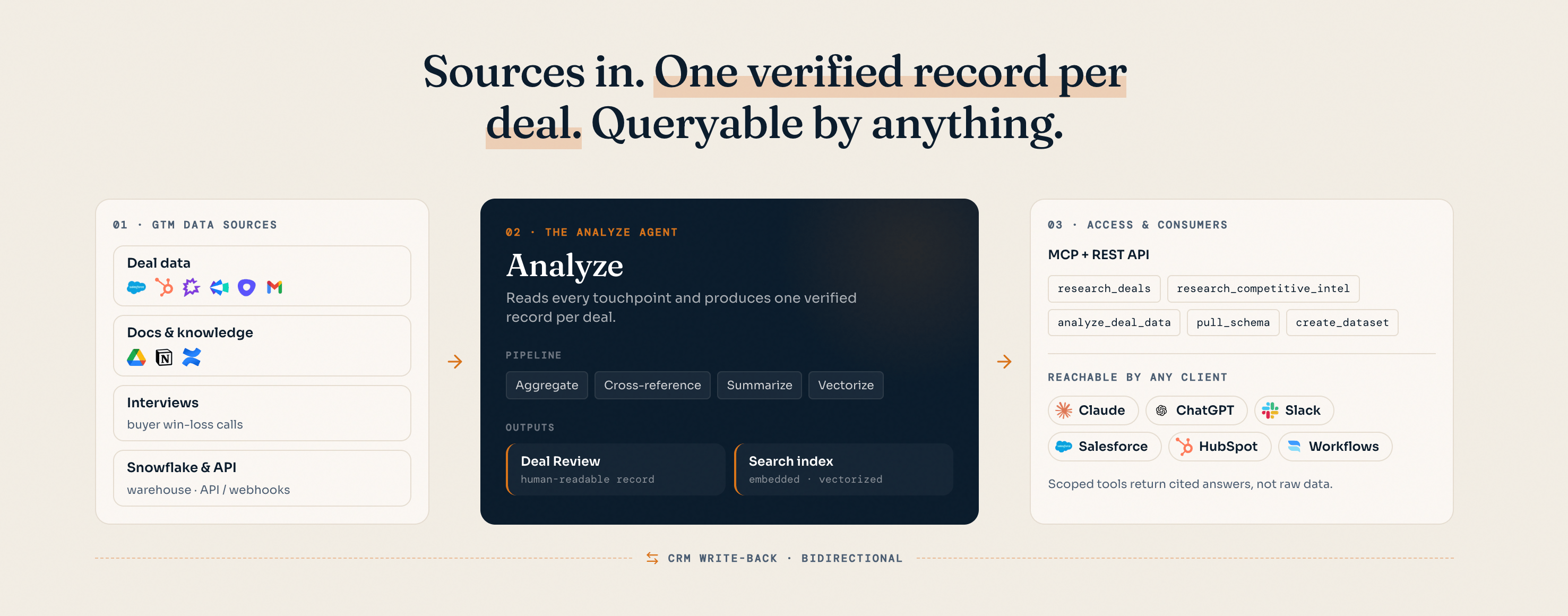
Hindsight is an **AI-ready layer on top of your GTM data**. It turns scattered, noisy revenue data — calls, emails, CRM notes, documents — into **one verified record per deal** that AI agents can reason over directly, through the [Model Context Protocol (MCP)](/integrations/mcp) or the [REST API](/integrations/api).
If you're a **RevOps** leader, this is the layer that makes your pipeline data trustworthy enough to act on. If you're an **AI engineer**, this is a clean tool surface you can point Claude, ChatGPT, Cursor, or your own agents at — without building the retrieval, ranking, and verification pipeline yourself.
 ***
## The problem it solves
GTM data is hard for agents to use directly. Three things get in the way:
Deal context is split across call recordings, email threads, CRM fields, and documents — no single place an agent can read.
CRM fields are incomplete and transcripts are noisy. Agents reasoning over raw data inherit the noise and hallucinate.
Feeding raw, unstructured data to an agent burns tokens and latency on retrieval the model has to redo every time.
***
## How it works
At the core is the **Analyze Engine**. It connects to your source systems and, for every deal, aggregates the relevant calls, emails, CRM records, and documents, then cross-references, summarizes, and vectorizes them into **one verified record per deal**.
That record is what every tool reads from. Because the work of retrieval and verification happens once — up front, server-side — agents get clean, cited answers instead of raw transcripts to wade through.
Each record is grounded in source documents with citations and confidence scoring, so answers trace back to what was actually said.
Records update as new deals close and tracked competitor pages change — battlecards and intel stay live without manual upkeep.
### Data sources
**Your CRM is the backbone — and the only required source.** Connect Salesforce or HubSpot and Hindsight pulls each opportunity and its associated objects, along with the related account and contact objects. You control exactly which properties come across from the **CRM settings page** in your dashboard. For many teams that's enough on its own — the CRM is already the centralizer, and Hindsight builds the verified record from what's there.
**Context sources are optional enrichment.** When you want more than what lives on the CRM record — full call transcripts and the actual content behind a deal — connect dedicated sources and Hindsight ingests the full signal:
| Type | Sources |
| -------------- | -------------------------------------------------------------------------------------- |
| CRM (required) | Salesforce, HubSpot |
| Calls | Gong, Clari, Outreach Kaia, Fathom, Fireflies, Avoma |
| API | Upload any document or transcript directly — see [REST API uploads](/integrations/api) |
Hindsight is **format-flexible**: PDFs, Office files, Markdown, audio, and video are all ingested, and call recordings are transcribed automatically.
**Warehouse your data in Snowflake?** On the Enterprise plan, Hindsight can ingest directly via a Snowflake data share — no manual exports or uploads required.
### Sync & analysis cadence
Hindsight pulls the latest from your connected integrations **every 12 hours** while a deal is open, and continues for **14 days after it closes**. Deal analysis re-runs on **every stage change** and whenever **new context sources are uploaded** — so the verified record stays current as the deal moves.
***
## How you access it
Hindsight is built API-first. There are two ways to query the verified layer, plus packaged integrations on top of them.
Individual tools your AI assistant orchestrates directly. Best for Claude, ChatGPT, Cursor, Cline, or your own MCP client. **Start here for agent use cases.**
A single endpoint that runs Hindsight's agent server-side and returns a complete, cited answer. Best for Glean, Slack bots, and search interfaces that want a finished response.
**Rule of thumb:** use **MCP** when *your* model should decide which tools to call and how to chain them. Use the **REST API** when you want Hindsight to do the orchestration and hand you a synthesized answer with citations.
Authentication is the same for both — a Bearer API key scoped to your workspace. Generate one from **Settings → API Keys** in the [Hindsight app](https://app.usehindsight.com/settings/keys).
***
## Tools available
The MCP server exposes the verified layer as a focused set of tools. They fall into seven groups. Most agent workflows start with **`fetch_hindsight_context`** to learn the workspace's competitors and deal stages, then branch into the relevant group.
### Context & schema
Orient the agent before it queries — what competitors and stages exist, and what fields the deal grid has.
| Tool | Description |
| ------------------------- | ---------------------------------------------------------------------------------------- |
| `fetch_hindsight_context` | Fetch competitors and deal stages needed to use the other tools. Usually the first call. |
| `pull_schema` | Fetch the CRM field schema for your workspace — field names and types for the deal grid. |
### Deals & pipeline
Find, triage, and read individual deals and their underlying documents.
| Tool | Description |
| ----------------------- | ---------------------------------------------------------------------- |
| `select_deal` | Filter and list deals by criteria. Returns lean rows for fast triage. |
| `get_deal` | Get full details for specific deals by ID. |
| `search_across_deals` | Search all deal documents across the entire pipeline. |
| `search_deal_documents` | Deep search within specific deals. |
| `pull_full_document` | Fetch full document content by ID when retrieved chunks aren't enough. |
### Competitive intelligence
Query your competitive content and saved intel.
| Tool | Description |
| --------------------------- | ------------------------------------------ |
| `search_competitive_assets` | Search battlecards and competitive assets. |
| `search_competitive_intel` | Search pre-saved competitive intelligence. |
### Knowledge base
| Tool | Description |
| ----------------------- | ----------------------------------------------------------------- |
| `search_knowledge_base` | Search your company's messaging docs, playbooks, and positioning. |
### Live web research
Reach beyond stored data for current market and competitor information.
| Tool | Description |
| --------------- | ---------------------------------------------------- |
| `search_web` | Live web search for competitive and market research. |
| `scrape_url` | Extract content from a specific URL. |
| `map_site_urls` | Discover and map the structure of a website. |
### Quantitative analysis
Build and analyze structured datasets from the deal grid for win-rate, trend, and segment questions.
| Tool | Description |
| ------------------------- | ---------------------------------------------------------- |
| `create_dataset` | Build a structured dataset from your deal pipeline. |
| `analyze_dealgrid_subset` | Filter and analyze a quantitative subset of the deal grid. |
### Write back
| Tool | Description |
| ---------------------- | ----------------------------------- |
| `upload_deal_document` | Upload a document to a deal by URL. |
The canonical tool list is generated from the live MCP server. Names and parameters can change between releases — call `tools/list` against the [MCP endpoint](/integrations/mcp) for the exact current surface.
***
## Who it's for
A trustworthy system of record for win-loss, competitive attribution, and rep performance — without hand-maintaining battlecards or CRM hygiene.
A clean, cited tool surface for your own agents and apps. Skip building the retrieval and verification pipeline; query the verified layer over MCP or REST.
### Trust & governance
User-scoped OAuth, role-based access control, and SOC 2 compliance. Every answer is scoped to your workspace and traceable to its source documents.
***
## Next steps
Wire Hindsight into Claude, ChatGPT, Cursor, or your own MCP client.
Get complete, cited answers from a single endpoint.
Generate a workspace-scoped key from the dashboard.
***
## The problem it solves
GTM data is hard for agents to use directly. Three things get in the way:
Deal context is split across call recordings, email threads, CRM fields, and documents — no single place an agent can read.
CRM fields are incomplete and transcripts are noisy. Agents reasoning over raw data inherit the noise and hallucinate.
Feeding raw, unstructured data to an agent burns tokens and latency on retrieval the model has to redo every time.
***
## How it works
At the core is the **Analyze Engine**. It connects to your source systems and, for every deal, aggregates the relevant calls, emails, CRM records, and documents, then cross-references, summarizes, and vectorizes them into **one verified record per deal**.
That record is what every tool reads from. Because the work of retrieval and verification happens once — up front, server-side — agents get clean, cited answers instead of raw transcripts to wade through.
Each record is grounded in source documents with citations and confidence scoring, so answers trace back to what was actually said.
Records update as new deals close and tracked competitor pages change — battlecards and intel stay live without manual upkeep.
### Data sources
**Your CRM is the backbone — and the only required source.** Connect Salesforce or HubSpot and Hindsight pulls each opportunity and its associated objects, along with the related account and contact objects. You control exactly which properties come across from the **CRM settings page** in your dashboard. For many teams that's enough on its own — the CRM is already the centralizer, and Hindsight builds the verified record from what's there.
**Context sources are optional enrichment.** When you want more than what lives on the CRM record — full call transcripts and the actual content behind a deal — connect dedicated sources and Hindsight ingests the full signal:
| Type | Sources |
| -------------- | -------------------------------------------------------------------------------------- |
| CRM (required) | Salesforce, HubSpot |
| Calls | Gong, Clari, Outreach Kaia, Fathom, Fireflies, Avoma |
| API | Upload any document or transcript directly — see [REST API uploads](/integrations/api) |
Hindsight is **format-flexible**: PDFs, Office files, Markdown, audio, and video are all ingested, and call recordings are transcribed automatically.
**Warehouse your data in Snowflake?** On the Enterprise plan, Hindsight can ingest directly via a Snowflake data share — no manual exports or uploads required.
### Sync & analysis cadence
Hindsight pulls the latest from your connected integrations **every 12 hours** while a deal is open, and continues for **14 days after it closes**. Deal analysis re-runs on **every stage change** and whenever **new context sources are uploaded** — so the verified record stays current as the deal moves.
***
## How you access it
Hindsight is built API-first. There are two ways to query the verified layer, plus packaged integrations on top of them.
Individual tools your AI assistant orchestrates directly. Best for Claude, ChatGPT, Cursor, Cline, or your own MCP client. **Start here for agent use cases.**
A single endpoint that runs Hindsight's agent server-side and returns a complete, cited answer. Best for Glean, Slack bots, and search interfaces that want a finished response.
**Rule of thumb:** use **MCP** when *your* model should decide which tools to call and how to chain them. Use the **REST API** when you want Hindsight to do the orchestration and hand you a synthesized answer with citations.
Authentication is the same for both — a Bearer API key scoped to your workspace. Generate one from **Settings → API Keys** in the [Hindsight app](https://app.usehindsight.com/settings/keys).
***
## Tools available
The MCP server exposes the verified layer as a focused set of tools. They fall into seven groups. Most agent workflows start with **`fetch_hindsight_context`** to learn the workspace's competitors and deal stages, then branch into the relevant group.
### Context & schema
Orient the agent before it queries — what competitors and stages exist, and what fields the deal grid has.
| Tool | Description |
| ------------------------- | ---------------------------------------------------------------------------------------- |
| `fetch_hindsight_context` | Fetch competitors and deal stages needed to use the other tools. Usually the first call. |
| `pull_schema` | Fetch the CRM field schema for your workspace — field names and types for the deal grid. |
### Deals & pipeline
Find, triage, and read individual deals and their underlying documents.
| Tool | Description |
| ----------------------- | ---------------------------------------------------------------------- |
| `select_deal` | Filter and list deals by criteria. Returns lean rows for fast triage. |
| `get_deal` | Get full details for specific deals by ID. |
| `search_across_deals` | Search all deal documents across the entire pipeline. |
| `search_deal_documents` | Deep search within specific deals. |
| `pull_full_document` | Fetch full document content by ID when retrieved chunks aren't enough. |
### Competitive intelligence
Query your competitive content and saved intel.
| Tool | Description |
| --------------------------- | ------------------------------------------ |
| `search_competitive_assets` | Search battlecards and competitive assets. |
| `search_competitive_intel` | Search pre-saved competitive intelligence. |
### Knowledge base
| Tool | Description |
| ----------------------- | ----------------------------------------------------------------- |
| `search_knowledge_base` | Search your company's messaging docs, playbooks, and positioning. |
### Live web research
Reach beyond stored data for current market and competitor information.
| Tool | Description |
| --------------- | ---------------------------------------------------- |
| `search_web` | Live web search for competitive and market research. |
| `scrape_url` | Extract content from a specific URL. |
| `map_site_urls` | Discover and map the structure of a website. |
### Quantitative analysis
Build and analyze structured datasets from the deal grid for win-rate, trend, and segment questions.
| Tool | Description |
| ------------------------- | ---------------------------------------------------------- |
| `create_dataset` | Build a structured dataset from your deal pipeline. |
| `analyze_dealgrid_subset` | Filter and analyze a quantitative subset of the deal grid. |
### Write back
| Tool | Description |
| ---------------------- | ----------------------------------- |
| `upload_deal_document` | Upload a document to a deal by URL. |
The canonical tool list is generated from the live MCP server. Names and parameters can change between releases — call `tools/list` against the [MCP endpoint](/integrations/mcp) for the exact current surface.
***
## Who it's for
A trustworthy system of record for win-loss, competitive attribution, and rep performance — without hand-maintaining battlecards or CRM hygiene.
A clean, cited tool surface for your own agents and apps. Skip building the retrieval and verification pipeline; query the verified layer over MCP or REST.
### Trust & governance
User-scoped OAuth, role-based access control, and SOC 2 compliance. Every answer is scoped to your workspace and traceable to its source documents.
***
## Next steps
Wire Hindsight into Claude, ChatGPT, Cursor, or your own MCP client.
Get complete, cited answers from a single endpoint.
Generate a workspace-scoped key from the dashboard.