> ## Documentation Index
> Fetch the complete documentation index at: https://docs.usehindsight.com/llms.txt
> Use this file to discover all available pages before exploring further.
# Feature Comparisons
> AI-powered competitive feature analysis with evidence-backed insights
## Overview
Feature Comparisons provide technical deep-dives into competitor products that help you understand your competitive strengths and weaknesses. Using AI-powered analysis across multiple data sources, you can quickly build comprehensive competitive assessments without spending hours researching documentation or debating with your product team.
The system automatically stays up-to-date with new competitor releases and intelligence.
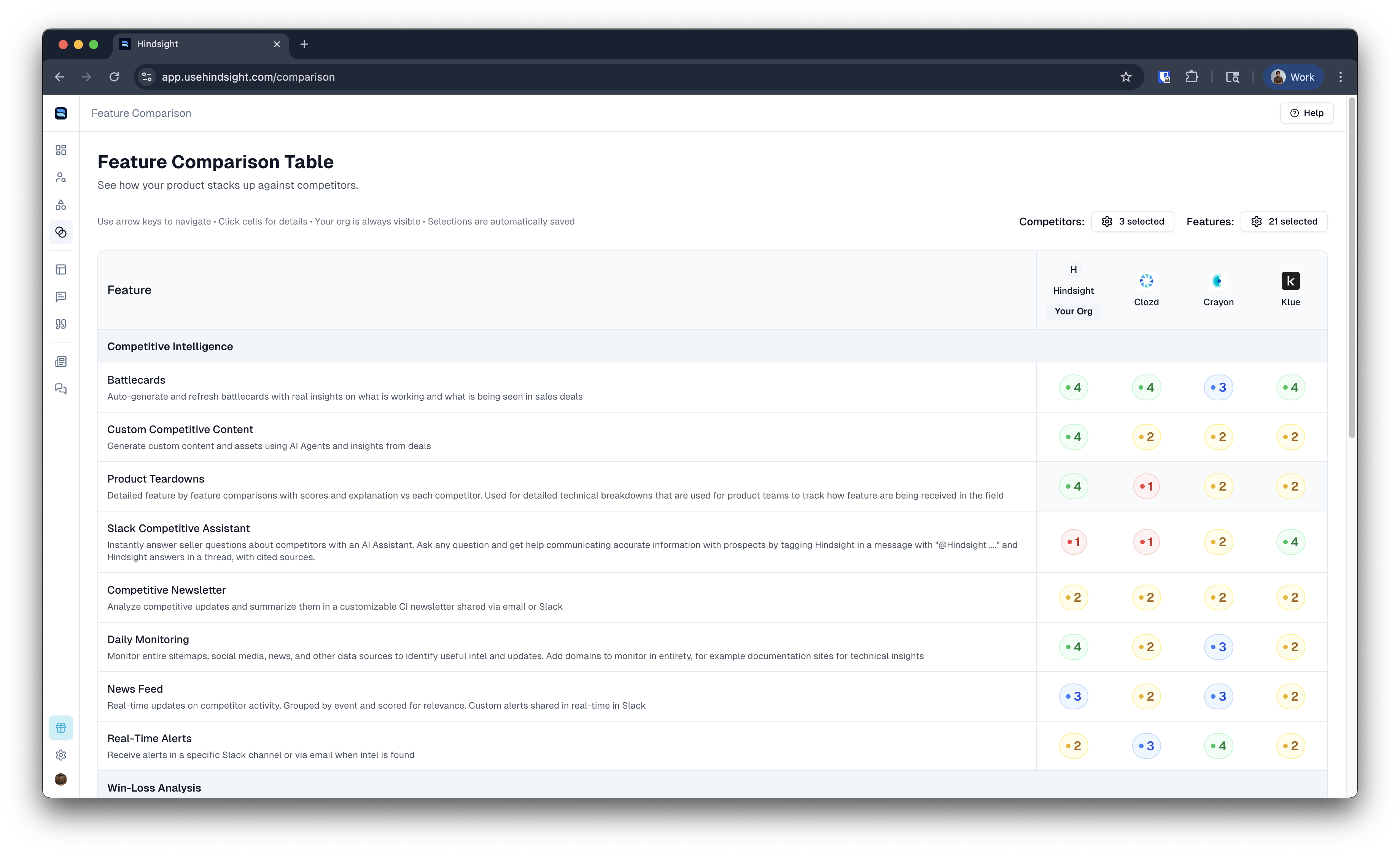 These visual comparisons (sometimes known as Harvey Ball charts) give you instant insight into your competitive landscape.
## How it Works
Building Feature Comparisons is streamlined with our new AI-powered workflow:
### 1. Set Up Your Features
First, define the features you want to track in the **Features** section:
* Navigate to **Settings > Features** to create your feature catalog
* Add specific capabilities like "SSO Integration," "API Rate Limiting," or "Custom Dashboards"
* Include detailed descriptions to help AI understand the feature scope
* Organize by product and product area for better analysis
### 2. Generate Competitive Analysis
For each competitor, Hindsight automatically analyzes their feature support:
* Visit any competitor's page and click **"Generate Analysis"**
* AI researches across documents, websites, and your deal intelligence
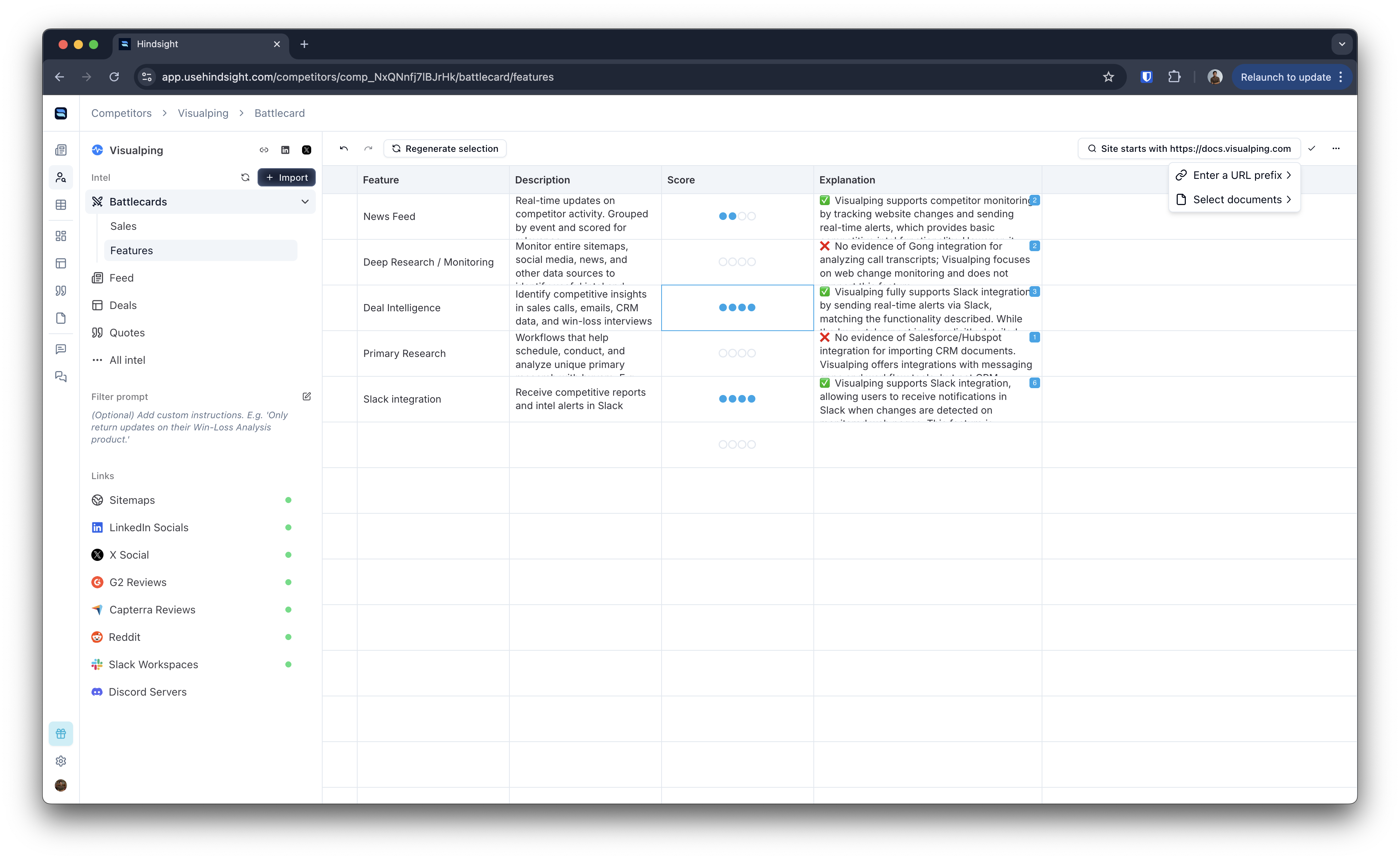
* Each feature receives a 1-4 score with detailed explanation
* Source documents are automatically cited for verification
### 3. Review and Collaborate
The analysis provides a collaborative workspace for your team:
* **Edit Scores**: Manually adjust AI assessments with team knowledge
* **Add Context**: Enhance explanations with insider insights
* **Source Management**: Link assessments to specific evidence documents
* **Team Reviews**: Product managers and engineers can validate findings
### 4. View Complete Comparison
Access the comprehensive comparison matrix at **Comparison > Feature Matrix**:
* Side-by-side feature comparison across all competitors
* Interactive grid with detailed explanations on click
* Filter by specific features or competitors of interest
## Scoring System
Each feature receives a standardized 1-4 score:
* **1 - Not Supported** 🔴: Feature is not available or very limited
* **2 - Limited Support** 🟡: Basic implementation with significant limitations
* **3 - Good Support** 🔵: Solid implementation covering most use cases
* **4 - Excellent Support** 🟢: Comprehensive implementation, potentially best-in-class
This scoring provides consistent evaluation across features and competitors, making it easy to identify competitive gaps and strengths.
## Enhanced Data Sources
When building Feature Comparisons, Hindsight analyzes multiple intelligence sources:
### 1. Internal Intelligence
* **Competitor Documents**: Any competitive documents you've uploaded like existing teardowns, battlecards, etc.
* **Deal Intelligence**: Features mentioned in your CRM in competitive deals and conversations
* **Call Transcripts**: Sales conversations where features were discussed
* **Email Threads**: Written communications mentioning competitor capabilities
### 2. External Research
* **Documentation Crawling**: Automated analysis of competitor documentation sites
* **Website Analysis**: Product pages, feature announcements, and marketing materials
* **Release Notes**: Latest product updates and feature releases
* **Community Discussions**: Public forums and user communities (where available)
### 3. Customer Intelligence
* **Deal Quotes**: Customer statements about competitor features from your deals
* **Win/Loss Feedback**: Insights from interviews with buyers about competitors
* **Reference Calls**: Intelligence gathered from customer reference conversations
All sources are automatically cited, giving you confidence in the analysis and ability to drill down into specific evidence.
## Competitive Analysis Workflow
### Individual Competitor Analysis
Visit any competitor's page to see their detailed feature breakdown:
These visual comparisons (sometimes known as Harvey Ball charts) give you instant insight into your competitive landscape.
## How it Works
Building Feature Comparisons is streamlined with our new AI-powered workflow:
### 1. Set Up Your Features
First, define the features you want to track in the **Features** section:
* Navigate to **Settings > Features** to create your feature catalog
* Add specific capabilities like "SSO Integration," "API Rate Limiting," or "Custom Dashboards"
* Include detailed descriptions to help AI understand the feature scope
* Organize by product and product area for better analysis
### 2. Generate Competitive Analysis
For each competitor, Hindsight automatically analyzes their feature support:
* Visit any competitor's page and click **"Generate Analysis"**
* AI researches across documents, websites, and your deal intelligence
* Each feature receives a 1-4 score with detailed explanation
* Source documents are automatically cited for verification
### 3. Review and Collaborate
The analysis provides a collaborative workspace for your team:
* **Edit Scores**: Manually adjust AI assessments with team knowledge
* **Add Context**: Enhance explanations with insider insights
* **Source Management**: Link assessments to specific evidence documents
* **Team Reviews**: Product managers and engineers can validate findings
### 4. View Complete Comparison
Access the comprehensive comparison matrix at **Comparison > Feature Matrix**:
* Side-by-side feature comparison across all competitors
* Interactive grid with detailed explanations on click
* Filter by specific features or competitors of interest
## Scoring System
Each feature receives a standardized 1-4 score:
* **1 - Not Supported** 🔴: Feature is not available or very limited
* **2 - Limited Support** 🟡: Basic implementation with significant limitations
* **3 - Good Support** 🔵: Solid implementation covering most use cases
* **4 - Excellent Support** 🟢: Comprehensive implementation, potentially best-in-class
This scoring provides consistent evaluation across features and competitors, making it easy to identify competitive gaps and strengths.
## Enhanced Data Sources
When building Feature Comparisons, Hindsight analyzes multiple intelligence sources:
### 1. Internal Intelligence
* **Competitor Documents**: Any competitive documents you've uploaded like existing teardowns, battlecards, etc.
* **Deal Intelligence**: Features mentioned in your CRM in competitive deals and conversations
* **Call Transcripts**: Sales conversations where features were discussed
* **Email Threads**: Written communications mentioning competitor capabilities
### 2. External Research
* **Documentation Crawling**: Automated analysis of competitor documentation sites
* **Website Analysis**: Product pages, feature announcements, and marketing materials
* **Release Notes**: Latest product updates and feature releases
* **Community Discussions**: Public forums and user communities (where available)
### 3. Customer Intelligence
* **Deal Quotes**: Customer statements about competitor features from your deals
* **Win/Loss Feedback**: Insights from interviews with buyers about competitors
* **Reference Calls**: Intelligence gathered from customer reference conversations
All sources are automatically cited, giving you confidence in the analysis and ability to drill down into specific evidence.
## Competitive Analysis Workflow
### Individual Competitor Analysis
Visit any competitor's page to see their detailed feature breakdown:
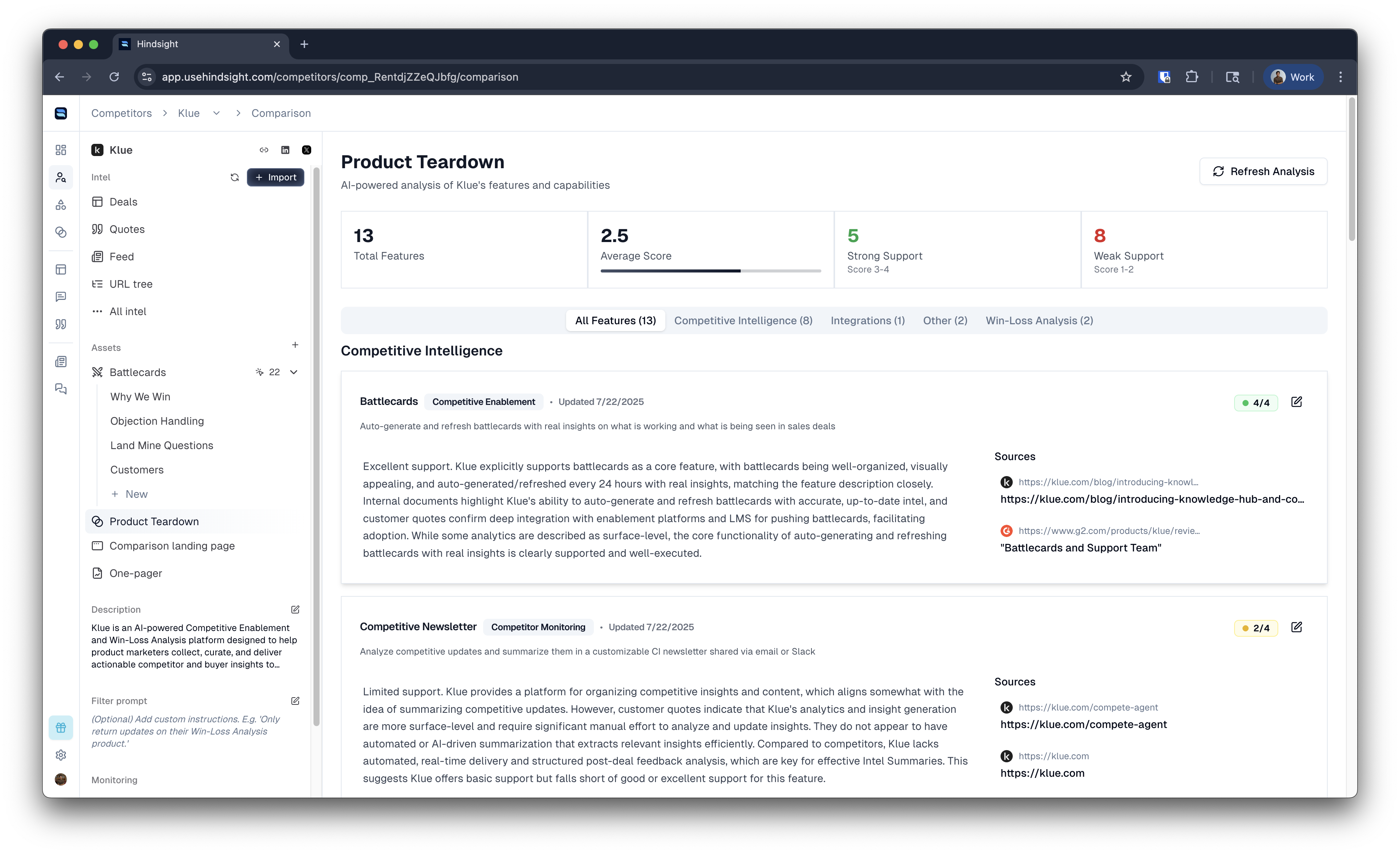 1. **Product Teardown**: Organized view of all feature assessments
2. **Source Documentation**: Evidence backing each assessment
3. **Recent Updates**: Latest changes to competitor capabilities
4. **Team Collaboration**: Comments and discussions on specific features
### Keeping Analysis Current
* **Auto-Refresh**: Scheduled updates run automatically based on new competitor intelligence
* **Manual Refresh**: Force refresh when you know capabilities have changed
* **Version History**: Track how competitor capabilities evolve over time
## Advanced Customization
### Source Filtering
Control which sources Hindsight uses for analysis:
* **Documentation Only**: Limit analysis to official product documentation
* **Specific Domains**: Focus on particular websites or documentation sites
* **Internal Only**: Use only your uploaded competitor documents
* **Exclude Sources**: Remove unreliable or outdated sources from analysis
1. **Product Teardown**: Organized view of all feature assessments
2. **Source Documentation**: Evidence backing each assessment
3. **Recent Updates**: Latest changes to competitor capabilities
4. **Team Collaboration**: Comments and discussions on specific features
### Keeping Analysis Current
* **Auto-Refresh**: Scheduled updates run automatically based on new competitor intelligence
* **Manual Refresh**: Force refresh when you know capabilities have changed
* **Version History**: Track how competitor capabilities evolve over time
## Advanced Customization
### Source Filtering
Control which sources Hindsight uses for analysis:
* **Documentation Only**: Limit analysis to official product documentation
* **Specific Domains**: Focus on particular websites or documentation sites
* **Internal Only**: Use only your uploaded competitor documents
* **Exclude Sources**: Remove unreliable or outdated sources from analysis
 ### Collaborative Features (coming soon)
Enhanced team collaboration capabilities:
* **Review Workflows**: Assign feature assessments to subject matter experts
* **Comment Threads**: Discuss specific assessments with context
* **Approval Process**: Require sign-off from product leads before publishing
* **Change Tracking**: See who made what changes and when
## Use Cases by Team
### Product Teams
* **Gap Analysis**: Identify features where competitors have clear advantages
* **Roadmap Planning**: Prioritize development based on competitive landscape
* **Technical Research**: Deep-dive into how competitors implement specific capabilities
* **Market Trends**: Understand which features are becoming standard
### Sales Teams
* **Battle Cards**: Up-to-date competitive positioning for specific features
* **Demo Preparation**: Know exactly how to position your strengths vs. competitors
* **Objection Handling**: Prepared responses for competitor feature advantages
* **Win Strategy**: Data-driven approach to competitive deals
### Marketing Teams
* **Positioning Strategy**: Data-backed competitive messaging
* **Content Creation**: Feature comparison content for website and collateral
* **Analyst Relations**: Authoritative data for industry analyst briefings
* **Campaign Planning**: Competitive campaigns based on feature advantages
### Leadership
* **Strategic Planning**: Market position understanding for business strategy
* **Investment Decisions**: Data to support feature development priorities
* **Competitive Intelligence**: Executive-level competitive landscape overview
* **Board Reporting**: Quantified competitive position metrics
## Best Practices
### Setting Up for Success
1. **Start with Core Features**: Begin with 10-15 features that are most critical to your competitive wins
2. **Detailed Descriptions**: Provide comprehensive feature descriptions that explain what "excellent support" means
3. **Consistent Taxonomy**: Use standardized feature names across your organization
4. **Regular Maintenance**: Schedule monthly reviews to keep analysis current
### Ensuring Quality Analysis
1. **Review AI Assessments**: Have product managers or engineers validate AI-generated scores
2. **Source Verification**: Check that assessments are backed by credible, recent sources
3. **Team Collaboration**: Involve multiple team members in competitive analysis validation
4. **Customer Validation**: Cross-reference analysis with customer feedback and win/loss data
### Maximizing Impact
1. **Share Broadly**: Make competitive analysis accessible to sales, marketing, and product teams
2. **Regular Updates**: Keep stakeholders informed of significant competitive changes
3. **Action-Oriented**: Use analysis to drive specific product and go-to-market decisions
4. **Competitive Enablement**: Show sales reps that they can access this data via the Slack Assistant
### Integration with Workflows
1. **Sales Enablement**: Features comparisons are by default included in battle cards and the AI Assistant
2. **Product Planning**: Use competitive gaps to inform roadmap prioritization
3. **Marketing Content**: Leverage analysis for competitive content and positioning
4. **Customer Success**: Help CS teams understand competitive landscape for renewals
## Getting Started
### Quick Setup (15 minutes)
1. **Navigate to Features**: Go to Settings > Features to set up your feature catalog
2. **Add Key Features**: Start with 5-10 features most important to your business
3. **Select Competitors**: Choose 2-3 primary competitors for initial analysis
4. **Generate Analysis**: Click "Generate Analysis"
5. **Review Results**: Validate AI assessments and add team insights
### Best First Features
Focus on these types of features for immediate impact:
* **Differentiators**: Features where you have clear advantages
* **Table Stakes**: Features that are expected in your market
* **Customer Requests**: Features frequently mentioned in sales conversations
* **Competitive Weaknesses**: Areas where competitors consistently win
Ready to build comprehensive competitive intelligence? Start with the [Features setup guide](/platform/features) and then return to generate your first competitive analysis.
### Collaborative Features (coming soon)
Enhanced team collaboration capabilities:
* **Review Workflows**: Assign feature assessments to subject matter experts
* **Comment Threads**: Discuss specific assessments with context
* **Approval Process**: Require sign-off from product leads before publishing
* **Change Tracking**: See who made what changes and when
## Use Cases by Team
### Product Teams
* **Gap Analysis**: Identify features where competitors have clear advantages
* **Roadmap Planning**: Prioritize development based on competitive landscape
* **Technical Research**: Deep-dive into how competitors implement specific capabilities
* **Market Trends**: Understand which features are becoming standard
### Sales Teams
* **Battle Cards**: Up-to-date competitive positioning for specific features
* **Demo Preparation**: Know exactly how to position your strengths vs. competitors
* **Objection Handling**: Prepared responses for competitor feature advantages
* **Win Strategy**: Data-driven approach to competitive deals
### Marketing Teams
* **Positioning Strategy**: Data-backed competitive messaging
* **Content Creation**: Feature comparison content for website and collateral
* **Analyst Relations**: Authoritative data for industry analyst briefings
* **Campaign Planning**: Competitive campaigns based on feature advantages
### Leadership
* **Strategic Planning**: Market position understanding for business strategy
* **Investment Decisions**: Data to support feature development priorities
* **Competitive Intelligence**: Executive-level competitive landscape overview
* **Board Reporting**: Quantified competitive position metrics
## Best Practices
### Setting Up for Success
1. **Start with Core Features**: Begin with 10-15 features that are most critical to your competitive wins
2. **Detailed Descriptions**: Provide comprehensive feature descriptions that explain what "excellent support" means
3. **Consistent Taxonomy**: Use standardized feature names across your organization
4. **Regular Maintenance**: Schedule monthly reviews to keep analysis current
### Ensuring Quality Analysis
1. **Review AI Assessments**: Have product managers or engineers validate AI-generated scores
2. **Source Verification**: Check that assessments are backed by credible, recent sources
3. **Team Collaboration**: Involve multiple team members in competitive analysis validation
4. **Customer Validation**: Cross-reference analysis with customer feedback and win/loss data
### Maximizing Impact
1. **Share Broadly**: Make competitive analysis accessible to sales, marketing, and product teams
2. **Regular Updates**: Keep stakeholders informed of significant competitive changes
3. **Action-Oriented**: Use analysis to drive specific product and go-to-market decisions
4. **Competitive Enablement**: Show sales reps that they can access this data via the Slack Assistant
### Integration with Workflows
1. **Sales Enablement**: Features comparisons are by default included in battle cards and the AI Assistant
2. **Product Planning**: Use competitive gaps to inform roadmap prioritization
3. **Marketing Content**: Leverage analysis for competitive content and positioning
4. **Customer Success**: Help CS teams understand competitive landscape for renewals
## Getting Started
### Quick Setup (15 minutes)
1. **Navigate to Features**: Go to Settings > Features to set up your feature catalog
2. **Add Key Features**: Start with 5-10 features most important to your business
3. **Select Competitors**: Choose 2-3 primary competitors for initial analysis
4. **Generate Analysis**: Click "Generate Analysis"
5. **Review Results**: Validate AI assessments and add team insights
### Best First Features
Focus on these types of features for immediate impact:
* **Differentiators**: Features where you have clear advantages
* **Table Stakes**: Features that are expected in your market
* **Customer Requests**: Features frequently mentioned in sales conversations
* **Competitive Weaknesses**: Areas where competitors consistently win
Ready to build comprehensive competitive intelligence? Start with the [Features setup guide](/platform/features) and then return to generate your first competitive analysis.