> ## Documentation Index
> Fetch the complete documentation index at: https://docs.usehindsight.com/llms.txt
> Use this file to discover all available pages before exploring further.
# Release Notes
> Summary of major updates
export const OpenBeta = ({category}) =>
Open Beta
{category && {category}}
;
export const Beta = ({category}) =>
Beta
{category && {category}}
;
export const Fix = ({category}) =>
Bug Fix
{category && {category}}
;
export const Preview = ({category}) =>
Preview
{category && {category}}
;
export const Improved = ({category}) =>
Improved
{category && {category}}
;
export const New = ({category}) =>
New
{category && {category}}
;
## July 2026
The first stable release of the Hindsight MCP server, a guided setup flow for connecting your CRM and call intelligence tools, live Google Drive sync, more control over MCP tools, smarter and more transparent AI analysis, grouped Custom Metrics, richer feature and deal analytics, quick dashboard filters, Recipes reborn as Skills, and fixes for deal exports, competitor list sorting, and Snowflake sync reliability.
### Developer Tools
OAuth is now the primary sign-in, capabilities are exposed as **direct tool calls** (faster responses and per-tool control) instead of a single orchestrating agent, plus CORS and reliability fixes. This is a **breaking change** and our first stable contract.
**Coming soon** — Web MCP as an official Claude connector.
[Read the full MCP 2.0 notes →](/release-notes/mcp-2.0)
Admins can now choose which MCP tools are available to their organization and add custom instructions for how each tool should be used, so Claude, ChatGPT, and other MCP clients behave consistently with your team's conventions. Connections also stay signed in longer, and tools show clearer, human-readable names and error messages in your client.
MCP clients can now push documents into Hindsight, not just read from it. Each tool accepts in-context text or a downloadable file URL and kicks off the same processing pipeline as the app.
**`upload_deal_document`** — attach a transcript, note, or file to a specific deal.
**`upload_to_knowledge_base`** — add your own docs, playbooks, case studies, or approved messaging.
**`upload_competitive_intel`** — save competitor pricing, positioning, or gathered news.
See the [MCP tool reference](/integrations/mcp#available-tools).
Organizations on a trial now get Growth-tier API rate limits automatically instead of being blocked, so you can fully evaluate the API before you subscribe.
### CRM Integration
A new setup flow walks admins through connecting their data sources before bringing deals into Hindsight.
**CRM connection check** — Admins are guided to connect a CRM before the Deals page unlocks, so deal data is always backed by a live source.
**Gong & Clari** — Connect Gong or Clari directly from setup to bring call and meeting intelligence into your deals (Growth and Enterprise plans).
**Broader CRM coverage** — Expanded HubSpot and Salesforce object support means more of your CRM data can be brought into Hindsight.
**Developer tools** — Set up API access or Zapier from the same flow, with links straight to the docs.
Snowflake import now works the same way as our other CRM integrations, with a dedicated preview step so you can see exactly which deals will come in before you import. Filters and sorting stay in sync automatically, and refreshed deals are matched more accurately against ones you've already imported — plus stronger duplicate detection on synced notes, meetings, and emails — so you don't end up with duplicate or missing deal data.
**On-demand resync** — Snowflake-connected orgs can now trigger a manual resync of their deals right from the deal grid instead of waiting for the next scheduled sync.
Assets and documents linked from Google Drive can now be kept up to date automatically or on demand — resync an individual asset from its menu, or kick off an org-wide sync, and Hindsight pulls in the latest version from Drive.
Import deals from HubSpot filtered by the stage they were in *before* their current one — matching the filtering already available for Salesforce and Snowflake. The import dialog also now only shows filter properties that come from your CRM, so there's less noise when narrowing down which deals to bring in.
A new pipeline health check flags HubSpot deals that haven't made it into Hindsight yet, with a one-click way to bulk-import everything that's missing.
Documents pulled in from HubSpot and Salesforce retry automatically if an upload hiccups, and AI analysis now refreshes more consistently as new documents and deals come in.
### Competitive Intelligence
Fixed an issue where sorting the Competitors table only sorted the currently loaded page instead of your full competitor list.
Vague or generic competitor mentions (like "DIY" or "homegrown") are now automatically normalized to consistent, canonical names, so your competitor list stays clean without manual cleanup.
### Chat & Analysis
Chat responses now include a collapsible "Thinking..." block so you can follow the AI's reasoning as it works through your question, instead of only seeing the final answer, with cleaner citation rendering throughout.
Metrics and Custom Answers now use full agentic analysis — actively digging through deal context in multiple steps — instead of a single retrieval pass, for more accurate scores and answers on complex questions.
### Custom Metrics & Answers
Organize related Custom Metrics into groups so they're easier to configure and review together, and turn off Hindsight's default metrics entirely if you'd rather run on your own custom set.
When there isn't enough evidence to score a deal, Custom Metrics now show "No evidence to score" instead of a low-confidence guess, and Custom Answers do the same for true/false and multiple-choice questions. These are excluded from averages, charts, and exports so your numbers stay trustworthy.
Attach reference documents — playbooks, guides, approved messaging — to a Custom Answer so the AI uses them as context when generating that answer across your deals, the same way you can already do for Custom Metrics.
Add a new Custom Answer directly from its group card on the Custom Answers page — the group is pre-selected for you, so there are fewer clicks to get set up.
### Dashboard & Analytics
Dashboard charts now support your own Custom Metrics alongside the built-in ones. Segment filters also got more flexible — select multiple segments at once ("is any of") instead of just one.
New tag, sentiment, and revenue charts on the Feature Deals page — including tag counts in the deal-level feature breakdown — make it easier to see what's driving a feature's performance. The Competitors and Drivers pages also gained collapsible trend sections, so older data stays out of the way until you need it.
The Feature Association card on a deal now shows a clear sentiment badge in place of the older deal-impact score, making it quicker to gauge at a glance how a feature landed.
Browse the Features page grouped by product or product area, with an improved column selector across the deals and features grids.
One-click quick filters on the Dashboard and Settings pages let you jump straight to common views. Your last-used filters are now remembered automatically between visits — defaulting to the current quarter for new sessions — with a **Reset filters** option to jump back to the defaults at any time.
### Slack
Replies from the Slack Assistant now include buttons to continue the conversation in Claude or ChatGPT, with your question pre-filled as a prompt — so you can dig deeper in your AI tool of choice without retyping context.
### Win-Loss Interviews
Recipients of interview-request emails can now opt out with a one-click unsubscribe link, and won't be contacted again for future requests.
Fixed a bug where some internal, email-based respondents weren't being correctly matched and enrolled into interview sequences.
### Platform
Recipes have been renamed to **Skills**, with a refreshed `/skills` page. The underlying agent also got better at picking the right deals to work with when you run a Skill, so results line up more closely with what you actually meant to analyze.
Access to the Settings page now follows your role — Members see a read-only view while Admins and Managers retain full edit access, consistent with role-based access elsewhere in the app.
### Deals
Fixed an issue where exporting deals from a filtered view could include deals outside that filter. Exports now always match what's shown in the grid.
Deal exports now include Salesforce ID alongside your other CRM identifiers, plus your Customer Fit, Messaging Fit, and Messaging Accuracy metric scores — so exported data lines up more cleanly with your CRM and reporting.
Fixed errors that could occur when confirming, editing, or deleting suggested competitors, drivers, and features, with clearer messages when something goes wrong.
Refined the layout and section headers used when filtering deals, metrics, and answers by product — a more consistent experience across the app.
Fixed the deal grid occasionally reshuffling rows with the same sort value, and fixed pagination not resetting back to page one when you change filters, sorting, or your search.
Fixed a bug that could cause duplicate tags to appear when labeling deals, and added new columns and metrics to the deal home analysis view.
## June 2026
Sales Plays, a unified usage analytics dashboard, role-based access control, win-loss feature charts, GDPR support for EU surveys, and the Hindsight MCP server in Claude and ChatGPT.
### Sales Plays
A new way to turn competitive intelligence into action on live deals.
**AI-generated plays** — Hindsight generates recommended plays for an opportunity based on deal context and competitive signals.
**Outreach drafting in Slack** — Draft tailored outreach directly from a Slack thread, with messaging adapted to the play type.
**Linked assets** — Attach enablement assets to a play so reps have the right collateral in hand.
**Email notifications** — Get notified by email when a new play opportunity is ready to act on.
### Dashboard & Analytics
New dashboard charts visualize how product features and tags drive deal outcomes.
**Win rate, revenue & tag mix** — Dedicated charts break down win rates, revenue, and tag mix by feature.
**Comparison & answer charts** — New comparison and answer visualizations make competitive trends easier to read at a glance, with collapsible sections for older sessions.
A single dashboard tracking usage across every channel — API, MCP, Slack, and web — so admins can see how their team and integrations are using Hindsight in one place.
### Competitive Intelligence
Redesigned competitor onboarding and setup flow, plus new competitor enablement and setup pages for a smoother first-run experience.
**Filtering & stats** — Filter questions by rating and see average questions per day, with a refreshed toolbar layout.
**Readable names** — Slack channels and users now resolve to their real names throughout the assistant view.
### Win-Loss Interviews
Configure notification preferences per interview type from a new settings modal. The older interview-agent onboarding tour has been retired in favor of the streamlined setup.
Migrated voice interviews to the GA Azure real-time API for more stable connections, added automatic retry on connection errors, and clearer instructions for voice-only interviews. Removed the silent fallback to text mode so failures surface clearly.
EU surveys now include GDPR-compliant consent capture and support for response deletion requests.
### Platform
Permissions now differentiate between admins, managers, and members. Admins have full access, managers can edit the documents they own, and members get read-only access — with edit actions hidden accordingly across the app.
The Hindsight MCP server now connects to Claude and ChatGPT, with new MCP tools and OAuth sign-in via Clerk-issued tokens for secure, per-user access.
A new `/v1/deals` endpoint returns real-time, paginated deal data with filtering and rate limiting. The interview-types API also now supports custom guidelines and analysis fields.
## May 2026
A new interview viewer with response analytics, a major audio and transcription overhaul, Google Meet recording, Snowflake deal-grid filtering, and in-chat feedback.
### Win-Loss Interviews
**Detailed viewer** — A new per-interview page shows response analytics and takeaways for each respondent.
**Response stats** — The feedback page now shows total responses, completion count, completion rate, and last response time per interview type.
**Re-analyze** — Reprocess a document or interview on demand to refresh its analysis, with support for dynamic analysis fields per interview type.
**Better defaults** — Improved default analysis fields with placeholders and structured select/boolean options for cleaner setup.
**ElevenLabs transcription** — Higher-quality transcription for voice interviews.
**Cleaner voice experience** — Microphone selection now persists across panel reopens, duplicate voice messages are eliminated, and an improved noise gate prevents the AI's own speech from cutting itself off.
**Recording fixes** — Corrected WebM recording durations and fixed video playback and scrubbing across the viewer.
The Google Meet bot now joins, records, and saves interview recordings, with improved session handling and webhook reliability.
Share public, open interview links for public interview types — no individual request required. Contact notes can now be viewed and edited inline, and partial responses are saved if a respondent closes the tab mid-interview.
Sequences now surface attention indicators for pending approvals, outstanding rewards, and missing data, plus an upload-contacts dialog on the feedback page.
### CRM Integration
Better handling of `previous_status` filters and "import all closed deals," plus corrected stage ordering in opportunity-history queries.
### Platform
A feedback bubble in the chat interface lets you share feedback in one click, with the current chat session captured as context.
A major upgrade to how Hindsight tags and organizes product feedback, making it far easier to track what buyers care about across your deals.
**Customizable feature tag types** — Define your own feature tag types instead of relying on fixed categories, so tagging maps to how your team actually thinks about the product.
**Smarter tagging logic** — Reworked tagging logic produces more accurate, consistent tags across interviews and documents.
**Cleaner tagging UI** — Updated components make reviewing and managing product tags faster and more intuitive.
## April 2026
Interview Sequences, Snowflake CRM support, demo interview summaries, and the Hindsight MCP server with OAuth.
### Win-Loss Interviews
A new way to manage multi-step interview campaigns end to end.
**Default templates & cloning** — Start from built-in sequence variants, clone existing sequences, and auto-save as you edit.
**Enrollments** — A new Enrollments tab on each sequence shows who's enrolled, with search and filtering. Queued enrollments process automatically when a sequence is enabled.
**Email logging** — An Emails tab on each sequence surfaces every message sent as part of that sequence.
**Approvals** — Approve interview requests inline; approval links now route through sequence-based URLs.
Send demo interview summaries directly from Hindsight for quick sharing and review.
### CRM Integration
Initial support for importing deals from a Snowflake data warehouse, including a sync orchestrator and ID mapping to align Snowflake records with internal deal IDs.
### Platform
Connect Hindsight directly to Claude, Cursor, and any other MCP-compatible client — bringing your competitive intelligence, win-loss insights, and deal data into the tools your team already works in.
**One-click OAuth sign-in** — Authenticate the MCP server with OAuth and org-membership validation, so only authorized users in your workspace get access — no manual API key handling required.
**Production-ready bundle** — A branded, production-configured MCPB bundle (`.mcpb`) makes installation a single step.
**Built on the Hindsight API** — The server exposes Hindsight's chat, library, and deal tools so agents can search and reason over your data in context.
Fixed NPS ratings for customers on Slack Enterprise Grid — messages now route to the correct workspace via `team_id` for enterprise installs.
## March 2026
Video interviews, automatic gift card redemptions, richer manual sending controls, a smarter Slack agent, and a handful of platform improvements.
### Win-Loss Interviews
**Video & audio recording** — Buyers can now complete interviews via video or audio recording, alongside the existing text flow.
**Updated interview UI** — Cleaner, more polished experience for buyers throughout.
**Centralized responses** — All responses, including recordings, are saved to the [Responses](https://app.usehindsight.com/responses) library for easy review and filtering.
**Automatic fulfillment** — Set a gift card budget in your interview settings and Hindsight handles fulfillment automatically via Tremendous.
**No manual tracking** — Incentives go out as soon as a buyer completes their interview. Configure your [Budget](https://app.usehindsight.com/settings/usage) in the Settings menu.
The Interview Agent now handles end-to-end interview coordination automatically — no manual outreach required. When a deal closes, the agent reads deal context, sends personalized Slack interviews to your team, reaches out to buyers by email, manages approvals, and follows up with non-responders.
**Automated Internal Interviews** — Personalized Slack DMs go out to the deal owner and collaborators as soon as the agent runs, with a tailored opening question based on the deal outcome — no warm-up needed.
**Buyer Outreach** — Sends email interview requests to buyer-side contacts using your configured templates, with support for multiple variants (e.g. different incentive levels or buyer segments).
**Approval Workflows** — Optionally gate buyer outreach behind an approval step — approvers get notified via Slack and email and can approve with a single click.
**Automatic Follow-Ups** — The agent re-pings non-responders and reminds approvers who haven't acted, so nothing falls through the cracks.
**Custom Instructions** — Inject freeform routing logic directly into the agent's prompt — for example, route interviews to specific roles, use higher-incentive templates for enterprise accounts, or skip external outreach for SMB losses.
Configure the agent under **Settings → Interview Agent**. See the [Win-Loss Interviews guide](/guides/win-loss-interviews) for full setup details.
New options on the `/feedback/send` page give you more control over how interview requests go out.
**Queue requests manually** — Add requests to the interview agent's queue, including follow-up scheduling and approval handling.
**One-off requests** — Send requests with custom topics outside of your standard interview template.
**CSV export** — Export custom requests to import into Apollo, Outreach, or any other sequencing tool.
### Slack Agent
The Slack agent has moved to the main agent harness and now runs as a competitive intelligence subagent, with support for subagent-level rules.
**Richer search** — Can now search the web, your asset library, and stored intel to answer questions in context.
**Multi-step queries** — Better handling of queries that require multiple sources or reasoning steps.
**Faster responses** — Improved answer formatting and noticeably faster response times.
### Competitive Intelligence
Add URL-based restrictions to control which sources the research agent can pull from for a given competitor. This lets you limit the agent to only pull from specific domains or subdomains that you trust as authoritative for that competitor, so that the research results are scoped appropriately.
**Scope to trusted sources** — Limit a competitor's research to specific domains or subdomains, such as their own docs subdomain.
**Setup** — Hit the 3-dots menu next to any competitor in the [Competitors](https://app.usehindsight.com/competitors) list and select **Edit URL rules**.
### Platform
You can now integrate Hindsight's competitive intelligence, win-loss insights, and deal data directly into your AI agents, MCP servers, Glean, Slack bots, or custom applications.
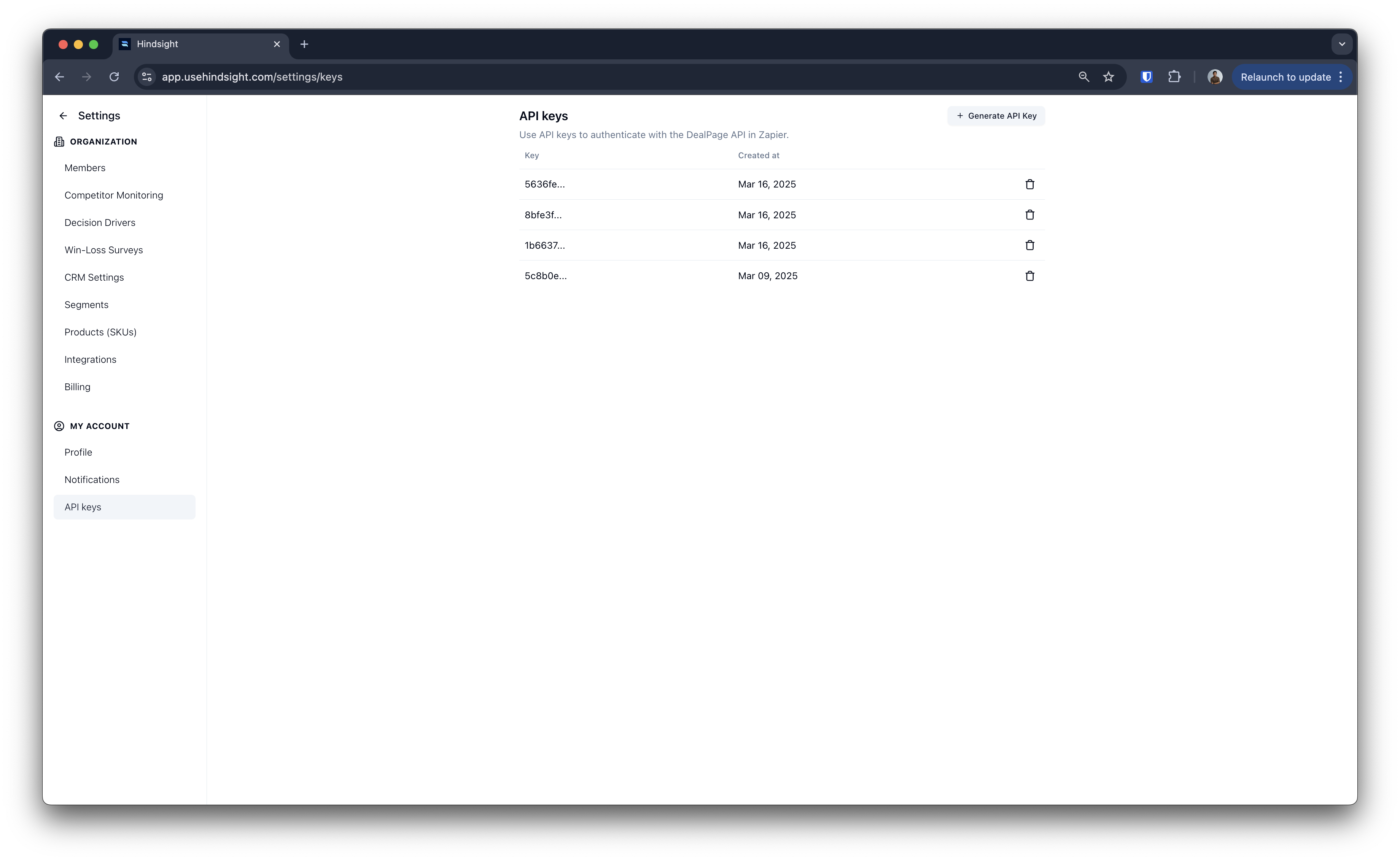 **Chat / Responses Endpoint** — Send messages to Hindsight's AI and get fully synthesized, cited answers — Hindsight handles the tool orchestration for you.
**Streaming Support** — Get real-time streamed responses via SSE for lower-latency integrations.
**Document Upload — Library** — Programmatically upload competitive intelligence and enablement assets to your Hindsight Library, with support for competitor tagging and source tracking.
**Document Upload — Deals** — Associate documents and audio files (auto-transcribed) with specific deals by Hindsight, Salesforce, or HubSpot ID.
Get your API keys from **Settings → API Keys**. See the [API docs](/integrations/api) for endpoint references and request formats.
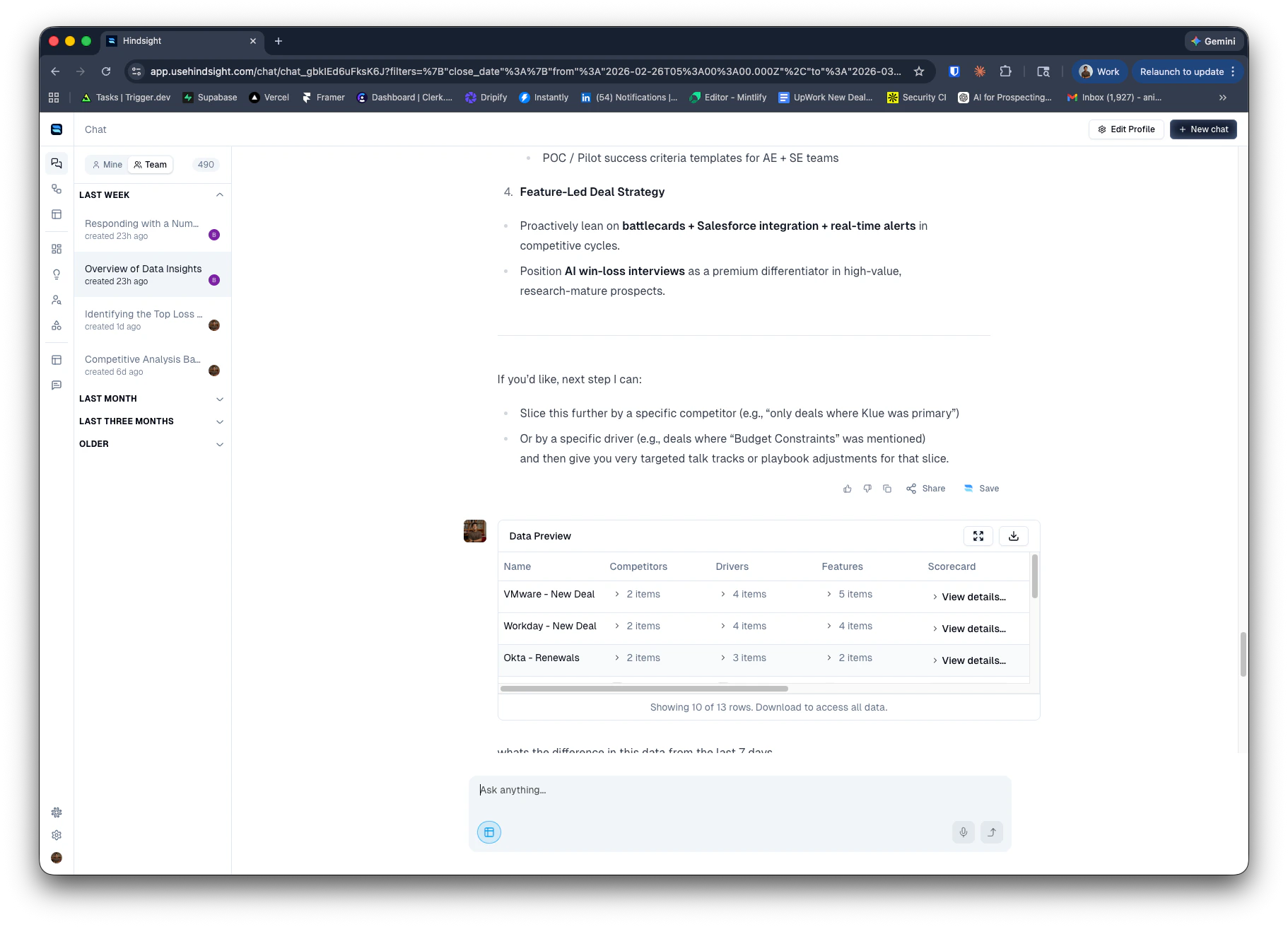
Insert Deal Datasets directly into the chat from the Chat page, giving you more flexibility to bring structured deal data into any conversation — including mid-session.
**Chat / Responses Endpoint** — Send messages to Hindsight's AI and get fully synthesized, cited answers — Hindsight handles the tool orchestration for you.
**Streaming Support** — Get real-time streamed responses via SSE for lower-latency integrations.
**Document Upload — Library** — Programmatically upload competitive intelligence and enablement assets to your Hindsight Library, with support for competitor tagging and source tracking.
**Document Upload — Deals** — Associate documents and audio files (auto-transcribed) with specific deals by Hindsight, Salesforce, or HubSpot ID.
Get your API keys from **Settings → API Keys**. See the [API docs](/integrations/api) for endpoint references and request formats.
Insert Deal Datasets directly into the chat from the Chat page, giving you more flexibility to bring structured deal data into any conversation — including mid-session.
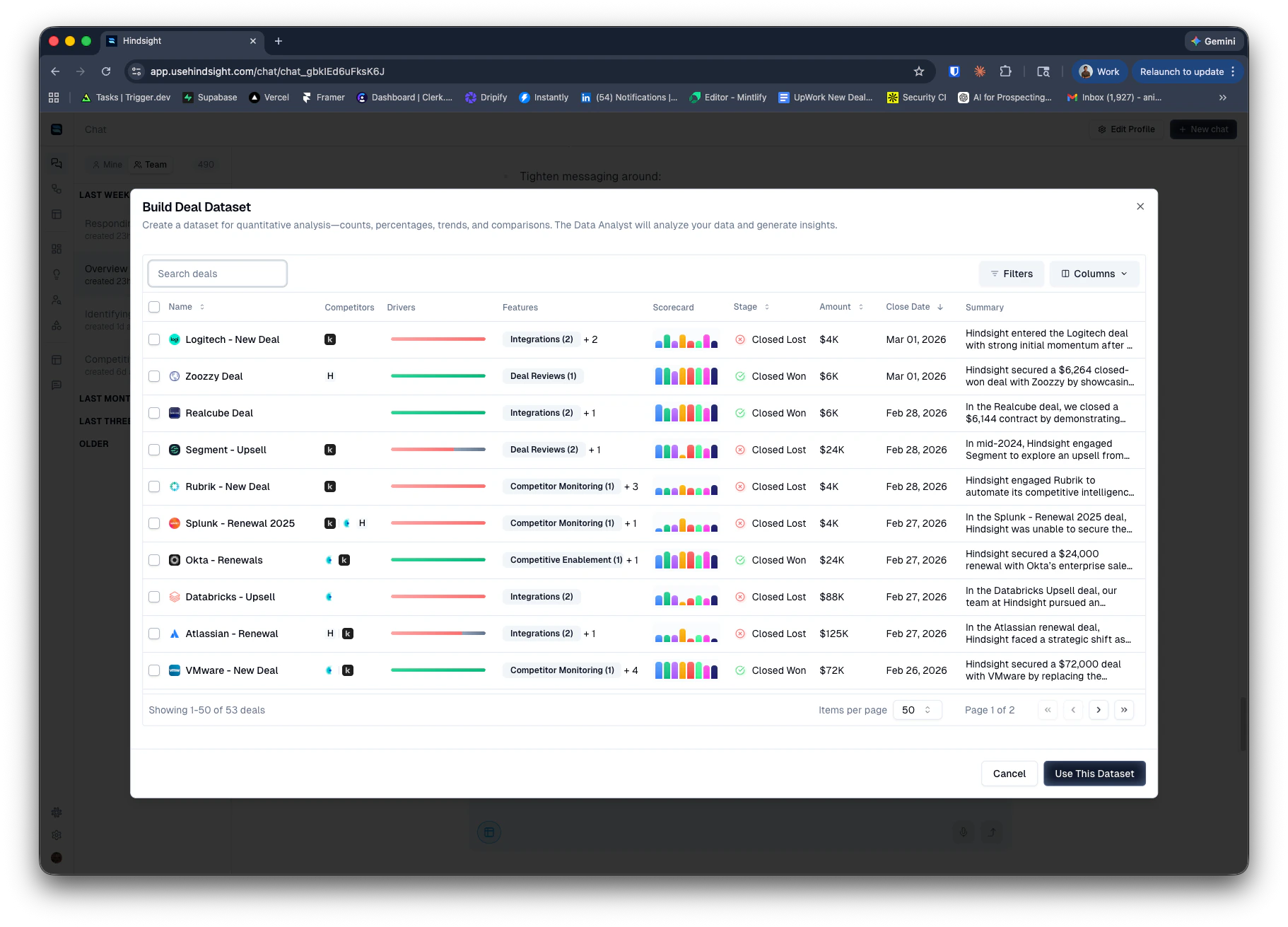 Click the button at the bottom left of the chat input to open the dataset dialog. Apply filters to scope the dataset to the deals you care about, then insert it into the chat. The dataset will be added as context for your current conversation.
 Rolling out updated colors and typography across main pages. More areas of the app will follow over the coming weeks.
**Query preview** — View the exact SOQL query Hindsight generates from your import settings and filters before any deals are pulled in.
**Deal preview** — See the set of deals that will be imported so you can validate your configuration before going live.
**Improved filter logic** — Better support for AND / OR, IN, and NOT IN filters, as well as complex groupings.
**Set member titles** — Admins can now set and edit titles for team members directly within Hindsight.
**Use in agent rules** — Titles are available as a condition in agent rules — for example, routing interview decisions based on whether the owner is an AE.
## February 2026
Another month, another set of powerful updates to Hindsight. This year is all about AI Agents.
More power, more simplicity. For some teams, this may be a breaking change.
### Competitor Monitoring Agent
We've rebuilt competitive monitoring from the ground up, now powered by Hindsight's AI agent and workflows system.
NOTE: this means the older competitor monitoring system (e.g. News Feed) will stop functioning fully in 4 weeks. Please work with your account manager to help ensure a successful transition or use our Guides to set up the new system yourself.
Key capabilities include:
* **Expanded Data Sources**: Access LinkedIn content, G2 reviews, and other web content on your competitors via the AI chat, in your recipes, and from scheduled workflows
* **Full Customization**: Configure your own monitoring schedule, notification style, delivery channels, and more
* **Seamless Migration**: Existing competitor monitoring setups have been automatically migrated to the new system
* **Remixable Recipes**: Each workflow starts with a default Recipe that you can remix and customize to deliver updates exactly the way you want them
### New Research Tools
We've promoted several research tools to production and added new experimental capabilities for deeper web research.
Now generally available:
* **Web Search**: Search the web for real-time competitive intelligence, market trends, and industry news
* **Scrape Tool**: Extract content from any webpage to bring into your analysis
Experimental:
* **Map URL Tool**: Automatically discover and index subpages from a given URL
* **Browse Tool**: Full browser capabilities for research on specialized or bot-protected sources like LinkedIn
### Intel Library
Save the links and resources your Agent discovers to the new Intel Library—a dedicated space for competitive intelligence and research materials.
Find it under the Library tab in the left sidebar.
Key capabilities include:
* **Centralized Organization**: Keep approved, high-quality insights organized and easily accessible
* **Team Access**: Surface materials via the Slack Agent and other enablement workflows
* **Auto-Sync**: Saved pages are automatically indexed and synced on a regular cadence to stay up to date and detect changes
## January 2026
Happy New Year! We're kicking off 2026 with some exciting new features and enhancements to help your team win more deals.
Along with product updates, we're also offering 1:1 onboarding sessions to help you get the most out of Hindsight and all the new capabilities.
If you have a workflow you'd like help setting up, or if you'd like a walkthrough of the new features, please reach out!
### Workflows!
Workflows let you automate the delivery of insights, reports, and assets to your team on a recurring schedule. Build custom workflows that run recipes automatically and deliver results via Slack, email, or directly to your Library.
Key capabilities include:
* **Scheduled Runs**: Set recipes to run daily, weekly, or on a custom cadence
* **Multiple Delivery Channels**: Push insights directly to specific Slack channels, email lists, or Slack DMs
* **Library Integration**: Create or update existing assets and documents in your Library (e.g., battlecards, competitor profiles)
* **External Tool Connections**: Use Zapier to send outputs to your Google Drive, Gamma, or other AI systems
### Metrics Enhancements
We've made several enhancements to our metrics capabilities to provide you with deeper insights and more flexibility in how you evaluate deals.
#### Metrics Scoring Guidelines
You can now choose documents to use as guidelines for the model to reference when scoring a deal. For example, when scoring sales execution,
you might want to provide your sales playbook or coaching guide as a reference to ensure consistent scoring aligned with your organization's standards.
When configuring a Custom Metric, simply select one or more documents from your Library to use as scoring guidelines. The AI will reference these documents when evaluating and scoring each deal.
#### New Metrics
We've added three new default Custom Metrics to help you better evaluate deal dynamics:
* **Customer Fit**: Measures how well your product aligns with the customer's needs and requirements
* **Messaging Fit**: Assesses how effectively your messaging resonates with the customer's pain points and objectives
* **Messaging Accuracy**: Evaluates how accurately your messaging reflects your product's capabilities and differentiators
#### Filtering by Metric Scores
You can now filter deals based on their Custom Metric scores. This allows you to quickly identify deals that meet specific scoring criteria, such as low sales execution or low product fit.
When building datasets or running analyses, simply apply filters based on the desired metric scores to focus on the most relevant deals for your insights. These filtering capabilities allow you to build smarter alerting workflows so you can quickly flag opportunities that need attention.
### Web Search Tool (Experimental)
We've introduced an experimental Web Search tool that allows you to augment AI analyses with real-time information from the web. This is particularly useful for gathering the latest competitive intelligence, market trends, and industry news that may not be present in your existing deal data.
You can ask the Agent to find new material on the internet, and then click to save it the right competitor's CI library.
This improves the customization of your newsletters and other workflows.
### Agent Harness Enhancements
#### Model Upgrade
All Accounts are now upgraded to OpenAI's GPT 5.1.
#### Tool Usage
We've improved the Agent's ability to use tools effectively during analysis. This includes better selection of when to invoke specific tools, improved handling of tool outputs, and enhanced integration with external data sources.
#### Context Management
The Agent can now manage larger contexts more effectively, allowing it to analyze more complex datasets and extract deeper insights without losing track of important details.
#### Enhanced Data Analysis
Agent can now segment data more accurately allowing for more nuanced and insightful reports.
## December 2025
### Data Analyst Agent V2
We've significantly upgraded the Data Analyst Agent in Chat, enabling powerful analytics across your entire deal library.
Key improvements include:
* **Unlimited Dataset Size**: Analyze thousands of deals at once, removing previous limits on dataset size
* **AI-Powered Pattern Recognition**: Leverages outputs from AI Deal Reviews to surface patterns in competition, product fit, sales execution, and more
* **Dynamic Visualizations**: AI automatically builds charts and graphs to illustrate key findings
* **Recursive Segmentation**: Automatically segments data to drill down into trends and outliers
* **Quantitative + Qualitative Insights**: Combines statistical analysis with contextual understanding for comprehensive insights
* **New Dataset UI**: Improved interface for viewing, exploring, and exporting datasets and segments used in analysis
Coming soon:
* **Advanced Segmentation**: More sophisticated segmentation capabilities for deeper analysis
* **Enhanced Visualizations**: Additional chart types and customization options
### Slack Admin & Usage Analytics
New admin controls and usage analytics for the Hindsight Slack Assistant.
Key capabilities include:
* **Custom System Prompt**: Configure a custom system prompt to tailor AI responses in Slack to your team's tone, terminology, and guidelines
* **Competitive Intel Toggle**: Control whether the Slack Assistant can search and surface competitive intelligence data
* **Usage Analytics**: Track how many questions are being asked in Slack over time, identify top topics and competitors being queried, and see which team members are engaging most with the assistant
These settings give admins more control over the Slack experience while providing visibility into how teams are leveraging AI assistance.
### Variables in Recipes
Recipes now support configurable variables, making it easier to create flexible, reusable analysis workflows that can be quickly customized at runtime.
Key capabilities include:
* **Text Variables**: Add simple text inputs that users fill in when running a recipe (e.g., competitor name for a **Top Objections** recipe)
* **Filter Variables**: Let users apply Deal filters at runtime (e.g., filter a **Product Gaps** report to your Enterprise segment, or filter a **Win Themes** report to deals won in the last quarter)
This makes Recipes more accessible for teams who want standardized workflows with the flexibility to adapt each run to their specific needs.
You can configure variables when building or remixing a recipe in the Recipe Builder. You can make variables required or optional, and set default values for both text and filter variables.
## November 2025
### Recipes (Beta)
We've launched Recipes, a powerful new way to create, customize, and run reusable analysis workflows that deliver insights tailored to your team's specific needs.
Key capabilities include:
* **Role-Based Recipe Library**: Pre-built recipes organized by function (Product Management, Marketing, Competitive Intelligence, Sales Enablement, Operations) help teams get started quickly with relevant analyses
* **Two Modes**:
* **Deal Research Agent**: AI agent finds and deeply analyzes relevant data from up to 25 deals at a time, using call transcripts, notes and other deal context without dataset configuration
* **Data Analyst Agent**: Build custom datasets with advanced filtering and column selection, then analyze up to 100 deals at once with your chosen prompt
* **Remix & Customize**: Start with any Hindsight default recipe and remix it to create your own version with custom filters, columns, and prompts that match your specific workflows
* **Recipe Management**: Save, organize, and share recipes across your team for consistent analysis approaches
Coming soon:
* **Scheduled Recipes**: Automatically run recipes on a schedule to keep insights fresh
* **Share Results**: Distribute recipe outputs directly to Slack channels or via email
Recipes make it easy to standardize how your team analyzes deals while maintaining the flexibility to adapt to evolving business needs. Whether you're tracking competitive win rates, analyzing product feedback patterns, or coaching sales execution, Recipes help you get consistent, actionable insights faster.
## October 2025
### Auto-suggested Drivers, Competitors, Features
We now automatically suggest new labels when AI analyzes deals, dramatically expanding your ability to track and analyze deal dynamics without manual configuration.
Key capabilities include:
* **Unlimited Labeling**: Track unlimited competitors, drivers, or features without pre-configuration
* **Smart Detection**: When new topics are detected in deals, we automatically create suggested tags (shown with lightbulb icons to accept/decline)
* **Expanded Competitive Intelligence**: Competitors can include insights on your team vs. DIY, homegrown, or other alternatives
* **Roadmap Integration**: Features can include both current capabilities and roadmap items, plus competitor capabilities
* **Enhanced Accuracy**: More labels provide more detailed insights and improved AI accuracy, as the system has less incentive to match weakly correlated quotes to existing labels
This feature eliminates the need for extensive upfront configuration while ensuring comprehensive deal analysis coverage.
### Trend Analysis
We added comprehensive trend analysis to help you understand how competitive dynamics, decision drivers, and feature importance evolve over time.
Features include:
* **Multi-timeframe Views**: Switch between 7-day, 30-day, 90-day, Year-to-Date, and All-time statistics
* **Visual Change Indicators**: Clear visual indicators showing changes and trends over time
* **Decision Driver Trends**: See how often specific decision drivers are cited in deals over time
* **Competitive Deal Volume and Win Rate Trends**: See how deal volume and win rates for competitors and drivers change over selected timeframes
* **Feature Mention Trends**: Track how often specific features are mentioned in deals over time
This enables teams to identify emerging patterns, seasonal trends, and long-term shifts in market dynamics.
### Decision Driver Table
We launched a dedicated Decision Drivers page (`/drivers`) for comprehensive driver management and analytics.
The new interface provides:
* **Centralized Driver Stats**: View performance metrics and usage statistics for all decision drivers
* **Driver Configuration**: Streamlined setup and management of custom decision drivers
* **Enhanced Organization**: Better categorization and bulk management tools for large driver libraries
This complements our existing Decision Drivers functionality with improved visibility and management capabilities.
### Reports (Beta)
We've graduated our Reports functionality from Alpha to Beta with significant improvements to the analysis engine and user experience. Reports now provide more sophisticated AI-powered insights and enhanced dataset customization options.
Key improvements include:
* **Enhanced AI Analysis**: Improved pattern recognition and insight generation with structured reporting templates
* **Advanced Dataset Builder**: More granular filtering options including custom properties, deal segments, and timeframe controls
* **Expanded Report Types**: Pre-built templates for win/loss analysis, competitive intelligence, product feedback, and sales execution
* **Report Management**: Complete reports library with saving, sharing, and collaboration features
* **CSV Export**: Download configured datasets for custom analysis in external tools
* **Conversational Follow-up**: Continue refining analysis through chat interface after report generation
The beta release supports analysis of up to 100 deals at once and includes comprehensive prompt customization for tailored business insights. See full documentation: [/platform/activate/custom-reports](/platform/activate/custom-reports)
## September 2025
### Competitive Intelligence Revamp
We refreshed our competitive tracking workflow to improve usability, controls, and human-in-the-loop processes. Key updates include:
* Ability to configure completely custom URL tracking for competitors. Track any webpage on a custom scraping schedule to meet your needs
* Improved event detection with AI, including deduplication of similar events and better extraction of event details
* New event triage workflow to review, edit, and approve detected events before they are shared with your team
* Slack notifications to alert competitor owners when new events are detected and ready for triage
### Chat with this Data (Beta)
We added an integrated chat experience built around the various data tables in Hindsight. This allows users to create custom .csv files with win/loss and competitive data,
then pass that data to Hindsight's AI assistant to answer questions, extract insights, and build reports.
### Reports (Alpha)
We released an early version of Hindsight's native Reports functionality. Reports allow users to use powerful, pre-built prompt templates to generate reports based on their deal data.
* 4 default reports released, spanning Win/Loss, Competitive Intel, Product, Marketing, and Sales topics
* Ability to customize report data by filtering to any custom criteria (e.g. region, product, time period)
* Completely customizable reports via prompting and further data exploration with help of AI assistant
* Reports library for creating, managing, and sharing reports across your Team
### RBAC (Role-Based Access Control)
We launched Role-Based Access Control (RBAC) to help admins manage user permissions and data access. Members are assigned limited permissions to perform specific actions, while Admins have full access to all features and settings.
## August 2025
### Push to CRM (Beta)
We added Push to CRM functionality for Custom Answers and Custom Metrics, enabling automatic syncing of qualitative insights and scoring frameworks directly to your CRM. This ensures that critical deal information is consistently updated in your CRM, enhancing visibility and alignment across sales teams.
### Clari Copilot Integration
We launched a native integration with Clari Copilot, allowing seamless integration of Clari Copilot call transcripts with the Hindsight platform
### Outreach Kaia Integration
We launched an integration with Outreach Kaia call transcripts, enabling users to leverage Outreach Kaia's call transcripts and insights within the Hindsight platform.
### Chat with this Deal
We added an integrated chat window on individual deal reports, allowing users to interact with AI in the context of a specific deal without having to leave the page. This allows for simple queries and workflows built off of deal review data.
## July 2025
### Assets
We introduced Chat-to-Asset creation so you can convert any AI chat response into a permanent, shareable document in your Library. Titles and optional competitor tags improve organization and discovery, while a markdown editor lets you refine content before sharing.
Assets integrate with Slack so teams can surface relevant materials in-channel, and a centralized Library makes search and access simple. Common use cases include battlecards, objection guides, product comparisons, one-pagers, and other sales collateral. See full notes: [/release-notes/assets](/release-notes/assets)
### Custom Answers
Custom Answers lets you define prompts once and automatically run them across all deals to fill qualitative data gaps. Answers can be true/false, one sentence, or paragraph length, and are derived from full deal context (CRM, transcripts, summaries, interviews). You can review, export, and optionally push answers to CRM.
This standardizes “free-form” insights like main objection, champion identified, decision maker, or coaching takeaways—enabling consistent analysis at scale. See full notes: [/release-notes/custom-answers](/release-notes/custom-answers)
### Custom Metrics
Create 1–5 scoring frameworks tailored to your business with rubrics, categories, and rules for when to score. Five enhanced default metrics (Sales Execution, Relationship, Pricing Fit, Product Fit, Competitive Performance) help you start fast, and scores come with explanations and manual overrides.
Metrics are visualized in Analytics with bar/line charts, multi-select comparisons, and segment filters, so you can spot trends, correlate with outcomes, and guide coaching. See full notes: [/release-notes/custom-metrics](/release-notes/custom-metrics)
### Decision Drivers Upgrade
We launched a pre-built library of decision drivers organized into six categories (Sales Execution, Relationship, Pricing & Packaging, Product & Features, Implementation & Support, Buyer Behavior). This makes setup dramatically faster, while retaining full customization and backward compatibility with existing drivers.
The new interface improves discovery, bulk selection, and organization, helping teams standardize definitions and improve analysis coverage. See full notes: [/release-notes/decision-drivers-2.0](/release-notes/decision-drivers-2.0)
### Feature Tracking 2.0
A rebuilt feature tracking system adds a dedicated Features dashboard, AI-powered detection of feature mentions in deals, better analytics (mentions, sentiment, revenue impact), and improved competitive analysis with evidence-backed comparisons. Data is consolidated for performance and accuracy, with a cleaner UX and automatic migration for existing data.
The result is clearer visibility into which capabilities drive revenue, cleaner comparisons against competitors, and more actionable feedback loops for product and sales. See full notes: [/release-notes/feature-tracking-2.0](/release-notes/feature-tracking-2.0)
Rolling out updated colors and typography across main pages. More areas of the app will follow over the coming weeks.
**Query preview** — View the exact SOQL query Hindsight generates from your import settings and filters before any deals are pulled in.
**Deal preview** — See the set of deals that will be imported so you can validate your configuration before going live.
**Improved filter logic** — Better support for AND / OR, IN, and NOT IN filters, as well as complex groupings.
**Set member titles** — Admins can now set and edit titles for team members directly within Hindsight.
**Use in agent rules** — Titles are available as a condition in agent rules — for example, routing interview decisions based on whether the owner is an AE.
## February 2026
Another month, another set of powerful updates to Hindsight. This year is all about AI Agents.
More power, more simplicity. For some teams, this may be a breaking change.
### Competitor Monitoring Agent
We've rebuilt competitive monitoring from the ground up, now powered by Hindsight's AI agent and workflows system.
NOTE: this means the older competitor monitoring system (e.g. News Feed) will stop functioning fully in 4 weeks. Please work with your account manager to help ensure a successful transition or use our Guides to set up the new system yourself.
Key capabilities include:
* **Expanded Data Sources**: Access LinkedIn content, G2 reviews, and other web content on your competitors via the AI chat, in your recipes, and from scheduled workflows
* **Full Customization**: Configure your own monitoring schedule, notification style, delivery channels, and more
* **Seamless Migration**: Existing competitor monitoring setups have been automatically migrated to the new system
* **Remixable Recipes**: Each workflow starts with a default Recipe that you can remix and customize to deliver updates exactly the way you want them
### New Research Tools
We've promoted several research tools to production and added new experimental capabilities for deeper web research.
Now generally available:
* **Web Search**: Search the web for real-time competitive intelligence, market trends, and industry news
* **Scrape Tool**: Extract content from any webpage to bring into your analysis
Experimental:
* **Map URL Tool**: Automatically discover and index subpages from a given URL
* **Browse Tool**: Full browser capabilities for research on specialized or bot-protected sources like LinkedIn
### Intel Library
Save the links and resources your Agent discovers to the new Intel Library—a dedicated space for competitive intelligence and research materials.
Find it under the Library tab in the left sidebar.
Key capabilities include:
* **Centralized Organization**: Keep approved, high-quality insights organized and easily accessible
* **Team Access**: Surface materials via the Slack Agent and other enablement workflows
* **Auto-Sync**: Saved pages are automatically indexed and synced on a regular cadence to stay up to date and detect changes
## January 2026
Happy New Year! We're kicking off 2026 with some exciting new features and enhancements to help your team win more deals.
Along with product updates, we're also offering 1:1 onboarding sessions to help you get the most out of Hindsight and all the new capabilities.
If you have a workflow you'd like help setting up, or if you'd like a walkthrough of the new features, please reach out!
### Workflows!
Workflows let you automate the delivery of insights, reports, and assets to your team on a recurring schedule. Build custom workflows that run recipes automatically and deliver results via Slack, email, or directly to your Library.
Key capabilities include:
* **Scheduled Runs**: Set recipes to run daily, weekly, or on a custom cadence
* **Multiple Delivery Channels**: Push insights directly to specific Slack channels, email lists, or Slack DMs
* **Library Integration**: Create or update existing assets and documents in your Library (e.g., battlecards, competitor profiles)
* **External Tool Connections**: Use Zapier to send outputs to your Google Drive, Gamma, or other AI systems
### Metrics Enhancements
We've made several enhancements to our metrics capabilities to provide you with deeper insights and more flexibility in how you evaluate deals.
#### Metrics Scoring Guidelines
You can now choose documents to use as guidelines for the model to reference when scoring a deal. For example, when scoring sales execution,
you might want to provide your sales playbook or coaching guide as a reference to ensure consistent scoring aligned with your organization's standards.
When configuring a Custom Metric, simply select one or more documents from your Library to use as scoring guidelines. The AI will reference these documents when evaluating and scoring each deal.
#### New Metrics
We've added three new default Custom Metrics to help you better evaluate deal dynamics:
* **Customer Fit**: Measures how well your product aligns with the customer's needs and requirements
* **Messaging Fit**: Assesses how effectively your messaging resonates with the customer's pain points and objectives
* **Messaging Accuracy**: Evaluates how accurately your messaging reflects your product's capabilities and differentiators
#### Filtering by Metric Scores
You can now filter deals based on their Custom Metric scores. This allows you to quickly identify deals that meet specific scoring criteria, such as low sales execution or low product fit.
When building datasets or running analyses, simply apply filters based on the desired metric scores to focus on the most relevant deals for your insights. These filtering capabilities allow you to build smarter alerting workflows so you can quickly flag opportunities that need attention.
### Web Search Tool (Experimental)
We've introduced an experimental Web Search tool that allows you to augment AI analyses with real-time information from the web. This is particularly useful for gathering the latest competitive intelligence, market trends, and industry news that may not be present in your existing deal data.
You can ask the Agent to find new material on the internet, and then click to save it the right competitor's CI library.
This improves the customization of your newsletters and other workflows.
### Agent Harness Enhancements
#### Model Upgrade
All Accounts are now upgraded to OpenAI's GPT 5.1.
#### Tool Usage
We've improved the Agent's ability to use tools effectively during analysis. This includes better selection of when to invoke specific tools, improved handling of tool outputs, and enhanced integration with external data sources.
#### Context Management
The Agent can now manage larger contexts more effectively, allowing it to analyze more complex datasets and extract deeper insights without losing track of important details.
#### Enhanced Data Analysis
Agent can now segment data more accurately allowing for more nuanced and insightful reports.
## December 2025
### Data Analyst Agent V2
We've significantly upgraded the Data Analyst Agent in Chat, enabling powerful analytics across your entire deal library.
Key improvements include:
* **Unlimited Dataset Size**: Analyze thousands of deals at once, removing previous limits on dataset size
* **AI-Powered Pattern Recognition**: Leverages outputs from AI Deal Reviews to surface patterns in competition, product fit, sales execution, and more
* **Dynamic Visualizations**: AI automatically builds charts and graphs to illustrate key findings
* **Recursive Segmentation**: Automatically segments data to drill down into trends and outliers
* **Quantitative + Qualitative Insights**: Combines statistical analysis with contextual understanding for comprehensive insights
* **New Dataset UI**: Improved interface for viewing, exploring, and exporting datasets and segments used in analysis
Coming soon:
* **Advanced Segmentation**: More sophisticated segmentation capabilities for deeper analysis
* **Enhanced Visualizations**: Additional chart types and customization options
### Slack Admin & Usage Analytics
New admin controls and usage analytics for the Hindsight Slack Assistant.
Key capabilities include:
* **Custom System Prompt**: Configure a custom system prompt to tailor AI responses in Slack to your team's tone, terminology, and guidelines
* **Competitive Intel Toggle**: Control whether the Slack Assistant can search and surface competitive intelligence data
* **Usage Analytics**: Track how many questions are being asked in Slack over time, identify top topics and competitors being queried, and see which team members are engaging most with the assistant
These settings give admins more control over the Slack experience while providing visibility into how teams are leveraging AI assistance.
### Variables in Recipes
Recipes now support configurable variables, making it easier to create flexible, reusable analysis workflows that can be quickly customized at runtime.
Key capabilities include:
* **Text Variables**: Add simple text inputs that users fill in when running a recipe (e.g., competitor name for a **Top Objections** recipe)
* **Filter Variables**: Let users apply Deal filters at runtime (e.g., filter a **Product Gaps** report to your Enterprise segment, or filter a **Win Themes** report to deals won in the last quarter)
This makes Recipes more accessible for teams who want standardized workflows with the flexibility to adapt each run to their specific needs.
You can configure variables when building or remixing a recipe in the Recipe Builder. You can make variables required or optional, and set default values for both text and filter variables.
## November 2025
### Recipes (Beta)
We've launched Recipes, a powerful new way to create, customize, and run reusable analysis workflows that deliver insights tailored to your team's specific needs.
Key capabilities include:
* **Role-Based Recipe Library**: Pre-built recipes organized by function (Product Management, Marketing, Competitive Intelligence, Sales Enablement, Operations) help teams get started quickly with relevant analyses
* **Two Modes**:
* **Deal Research Agent**: AI agent finds and deeply analyzes relevant data from up to 25 deals at a time, using call transcripts, notes and other deal context without dataset configuration
* **Data Analyst Agent**: Build custom datasets with advanced filtering and column selection, then analyze up to 100 deals at once with your chosen prompt
* **Remix & Customize**: Start with any Hindsight default recipe and remix it to create your own version with custom filters, columns, and prompts that match your specific workflows
* **Recipe Management**: Save, organize, and share recipes across your team for consistent analysis approaches
Coming soon:
* **Scheduled Recipes**: Automatically run recipes on a schedule to keep insights fresh
* **Share Results**: Distribute recipe outputs directly to Slack channels or via email
Recipes make it easy to standardize how your team analyzes deals while maintaining the flexibility to adapt to evolving business needs. Whether you're tracking competitive win rates, analyzing product feedback patterns, or coaching sales execution, Recipes help you get consistent, actionable insights faster.
## October 2025
### Auto-suggested Drivers, Competitors, Features
We now automatically suggest new labels when AI analyzes deals, dramatically expanding your ability to track and analyze deal dynamics without manual configuration.
Key capabilities include:
* **Unlimited Labeling**: Track unlimited competitors, drivers, or features without pre-configuration
* **Smart Detection**: When new topics are detected in deals, we automatically create suggested tags (shown with lightbulb icons to accept/decline)
* **Expanded Competitive Intelligence**: Competitors can include insights on your team vs. DIY, homegrown, or other alternatives
* **Roadmap Integration**: Features can include both current capabilities and roadmap items, plus competitor capabilities
* **Enhanced Accuracy**: More labels provide more detailed insights and improved AI accuracy, as the system has less incentive to match weakly correlated quotes to existing labels
This feature eliminates the need for extensive upfront configuration while ensuring comprehensive deal analysis coverage.
### Trend Analysis
We added comprehensive trend analysis to help you understand how competitive dynamics, decision drivers, and feature importance evolve over time.
Features include:
* **Multi-timeframe Views**: Switch between 7-day, 30-day, 90-day, Year-to-Date, and All-time statistics
* **Visual Change Indicators**: Clear visual indicators showing changes and trends over time
* **Decision Driver Trends**: See how often specific decision drivers are cited in deals over time
* **Competitive Deal Volume and Win Rate Trends**: See how deal volume and win rates for competitors and drivers change over selected timeframes
* **Feature Mention Trends**: Track how often specific features are mentioned in deals over time
This enables teams to identify emerging patterns, seasonal trends, and long-term shifts in market dynamics.
### Decision Driver Table
We launched a dedicated Decision Drivers page (`/drivers`) for comprehensive driver management and analytics.
The new interface provides:
* **Centralized Driver Stats**: View performance metrics and usage statistics for all decision drivers
* **Driver Configuration**: Streamlined setup and management of custom decision drivers
* **Enhanced Organization**: Better categorization and bulk management tools for large driver libraries
This complements our existing Decision Drivers functionality with improved visibility and management capabilities.
### Reports (Beta)
We've graduated our Reports functionality from Alpha to Beta with significant improvements to the analysis engine and user experience. Reports now provide more sophisticated AI-powered insights and enhanced dataset customization options.
Key improvements include:
* **Enhanced AI Analysis**: Improved pattern recognition and insight generation with structured reporting templates
* **Advanced Dataset Builder**: More granular filtering options including custom properties, deal segments, and timeframe controls
* **Expanded Report Types**: Pre-built templates for win/loss analysis, competitive intelligence, product feedback, and sales execution
* **Report Management**: Complete reports library with saving, sharing, and collaboration features
* **CSV Export**: Download configured datasets for custom analysis in external tools
* **Conversational Follow-up**: Continue refining analysis through chat interface after report generation
The beta release supports analysis of up to 100 deals at once and includes comprehensive prompt customization for tailored business insights. See full documentation: [/platform/activate/custom-reports](/platform/activate/custom-reports)
## September 2025
### Competitive Intelligence Revamp
We refreshed our competitive tracking workflow to improve usability, controls, and human-in-the-loop processes. Key updates include:
* Ability to configure completely custom URL tracking for competitors. Track any webpage on a custom scraping schedule to meet your needs
* Improved event detection with AI, including deduplication of similar events and better extraction of event details
* New event triage workflow to review, edit, and approve detected events before they are shared with your team
* Slack notifications to alert competitor owners when new events are detected and ready for triage
### Chat with this Data (Beta)
We added an integrated chat experience built around the various data tables in Hindsight. This allows users to create custom .csv files with win/loss and competitive data,
then pass that data to Hindsight's AI assistant to answer questions, extract insights, and build reports.
### Reports (Alpha)
We released an early version of Hindsight's native Reports functionality. Reports allow users to use powerful, pre-built prompt templates to generate reports based on their deal data.
* 4 default reports released, spanning Win/Loss, Competitive Intel, Product, Marketing, and Sales topics
* Ability to customize report data by filtering to any custom criteria (e.g. region, product, time period)
* Completely customizable reports via prompting and further data exploration with help of AI assistant
* Reports library for creating, managing, and sharing reports across your Team
### RBAC (Role-Based Access Control)
We launched Role-Based Access Control (RBAC) to help admins manage user permissions and data access. Members are assigned limited permissions to perform specific actions, while Admins have full access to all features and settings.
## August 2025
### Push to CRM (Beta)
We added Push to CRM functionality for Custom Answers and Custom Metrics, enabling automatic syncing of qualitative insights and scoring frameworks directly to your CRM. This ensures that critical deal information is consistently updated in your CRM, enhancing visibility and alignment across sales teams.
### Clari Copilot Integration
We launched a native integration with Clari Copilot, allowing seamless integration of Clari Copilot call transcripts with the Hindsight platform
### Outreach Kaia Integration
We launched an integration with Outreach Kaia call transcripts, enabling users to leverage Outreach Kaia's call transcripts and insights within the Hindsight platform.
### Chat with this Deal
We added an integrated chat window on individual deal reports, allowing users to interact with AI in the context of a specific deal without having to leave the page. This allows for simple queries and workflows built off of deal review data.
## July 2025
### Assets
We introduced Chat-to-Asset creation so you can convert any AI chat response into a permanent, shareable document in your Library. Titles and optional competitor tags improve organization and discovery, while a markdown editor lets you refine content before sharing.
Assets integrate with Slack so teams can surface relevant materials in-channel, and a centralized Library makes search and access simple. Common use cases include battlecards, objection guides, product comparisons, one-pagers, and other sales collateral. See full notes: [/release-notes/assets](/release-notes/assets)
### Custom Answers
Custom Answers lets you define prompts once and automatically run them across all deals to fill qualitative data gaps. Answers can be true/false, one sentence, or paragraph length, and are derived from full deal context (CRM, transcripts, summaries, interviews). You can review, export, and optionally push answers to CRM.
This standardizes “free-form” insights like main objection, champion identified, decision maker, or coaching takeaways—enabling consistent analysis at scale. See full notes: [/release-notes/custom-answers](/release-notes/custom-answers)
### Custom Metrics
Create 1–5 scoring frameworks tailored to your business with rubrics, categories, and rules for when to score. Five enhanced default metrics (Sales Execution, Relationship, Pricing Fit, Product Fit, Competitive Performance) help you start fast, and scores come with explanations and manual overrides.
Metrics are visualized in Analytics with bar/line charts, multi-select comparisons, and segment filters, so you can spot trends, correlate with outcomes, and guide coaching. See full notes: [/release-notes/custom-metrics](/release-notes/custom-metrics)
### Decision Drivers Upgrade
We launched a pre-built library of decision drivers organized into six categories (Sales Execution, Relationship, Pricing & Packaging, Product & Features, Implementation & Support, Buyer Behavior). This makes setup dramatically faster, while retaining full customization and backward compatibility with existing drivers.
The new interface improves discovery, bulk selection, and organization, helping teams standardize definitions and improve analysis coverage. See full notes: [/release-notes/decision-drivers-2.0](/release-notes/decision-drivers-2.0)
### Feature Tracking 2.0
A rebuilt feature tracking system adds a dedicated Features dashboard, AI-powered detection of feature mentions in deals, better analytics (mentions, sentiment, revenue impact), and improved competitive analysis with evidence-backed comparisons. Data is consolidated for performance and accuracy, with a cleaner UX and automatic migration for existing data.
The result is clearer visibility into which capabilities drive revenue, cleaner comparisons against competitors, and more actionable feedback loops for product and sales. See full notes: [/release-notes/feature-tracking-2.0](/release-notes/feature-tracking-2.0)