

Most teams rely on reps to fill out dropdown lists and type notes when deals close. This approach has several problems:
- Inaccurate data — Reps rush through forms or forget details
- Biased responses — Self-reporting creates inherent bias
- Hard to act on — Generic fields don’t capture nuanced insights
- Incomplete coverage — Only covers deals reps remember to update
How Hindsight Solves This
Hindsight makes win-loss analysis effortless by automating personalized interviews for every deal. The AI analyzes your calls, CRM data, emails, and notes to understand each deal’s context, then conducts tailored interviews with your team.- Hindsight verifies data by comparing multiple data sources
- Hindsight identifies gaps in your win-loss data and crafts personalized questions
- Hindsight conducts quick, natural conversations with reps via Slack to fill in said gaps
Key Benefits
- Complete coverage — Interview every deal, not just a sample
- Unbiased insights — AI pulls objective insights without human bias
- Personalized questions — Context-aware interviews based on deal specifics
- Quick for reps — 1-2 minute conversations vs lengthy CRM forms
- Actionable data — Rich insights you can actually use for strategy
The Interview Agent
The core of Hindsight’s interview system is a dedicated Interview Agent — an AI that autonomously coordinates win-loss interviews for every deal after it closes. Rather than relying on someone to remember to send requests, the agent handles the entire process end-to-end: sending internal Slack interviews to your team, reaching out to buyers by email, chasing approvals, and following up with non-responders. Teams using the Interview Agent see 20–30% more interviews completed because nothing falls through the cracks. The agent also makes each interview more time-efficient by tailoring outreach to what actually matters for each deal — so your reps aren’t answering generic questions about things the AI already knows.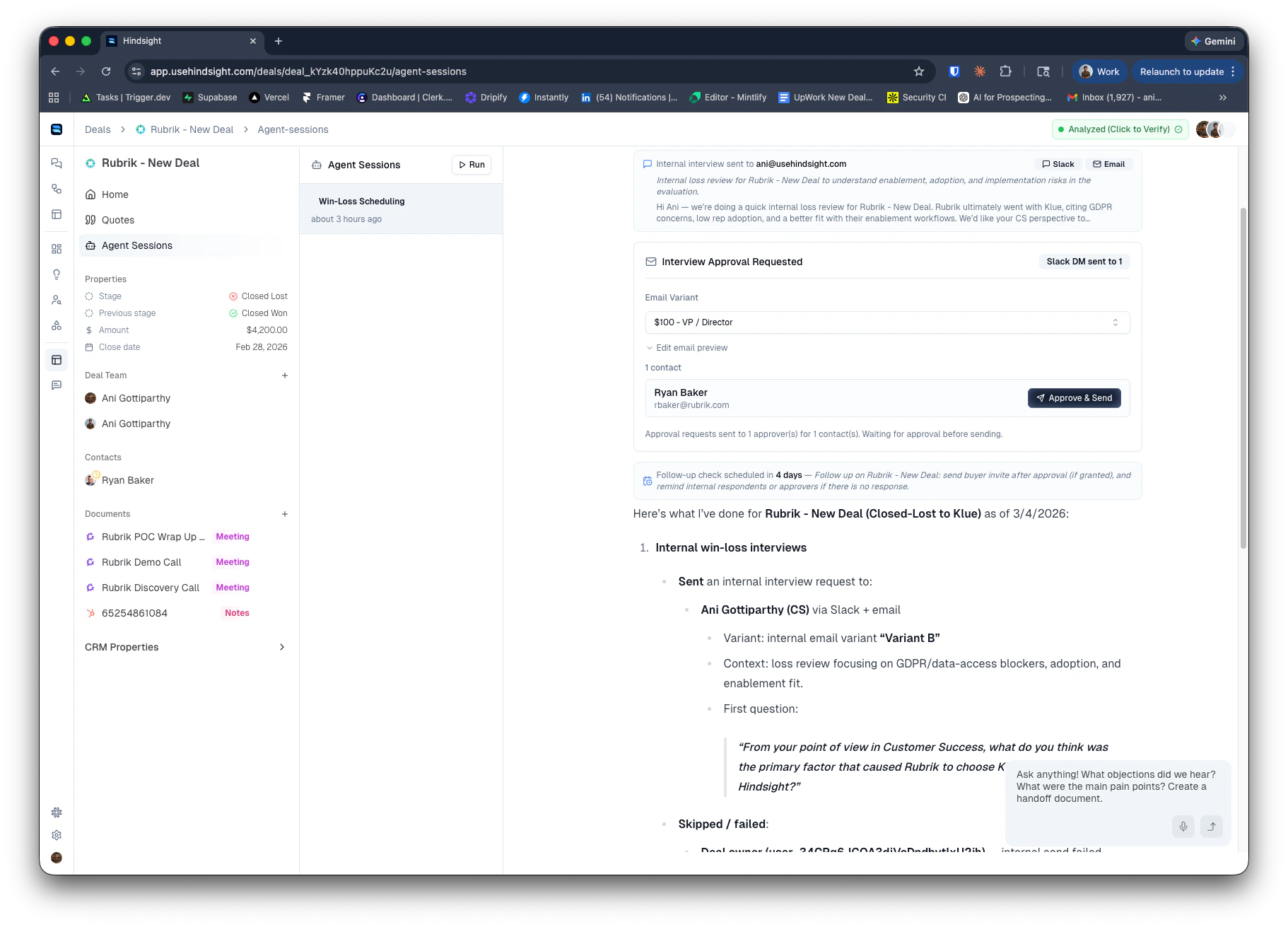
What the Agent Does Automatically
When a deal closes, the agent:- Reads the deal — reviews the deal summary, CRM data, and the team members involved
- Sends internal interviews — immediately sends a personalized Slack DM (plus email) to the deal owner and collaborators, with a targeted first question based on the deal outcome and each person’s role
- Reaches out to buyers — sends interview requests to buyer-side contacts via email, using the best-fit template from your configured variants
- Handles approvals — if approval is required, notifies approvers via Slack DM and email before any buyer outreach goes out
- Follows up automatically — schedules a follow-up check to re-ping non-responders and remind approvers who haven’t acted yet
How It Works
Internal Interviews (Your Team)
When a deal closes, the agent sends a personalized Slack DM to the deal owner and all collaborators — no action required from your team to kick this off. The message includes an opening question crafted specifically for that deal (e.g. for a lost deal: “What was the main reason you feel we lost this one?”), so reps can respond immediately without any warm-up. The full interview takes 1–2 minutes and happens entirely in Slack as a natural back-and-forth conversation. Transcripts are automatically imported and analyzed. Internal interviews are never gated by approval — they go out as soon as the agent runs, regardless of your approval settings (which only apply to external buyer outreach).External Interviews (Buyers)
The agent sends email outreach to buyer-side contacts associated with the deal. It selects the most appropriate template from your enabled email variants (see Email Templates below). If you have approval enabled, the agent first notifies your designated approvers via Slack and email. Once an approver clicks Approve, the agent automatically sends the buyer outreach and schedules follow-up checks.Approval Workflow
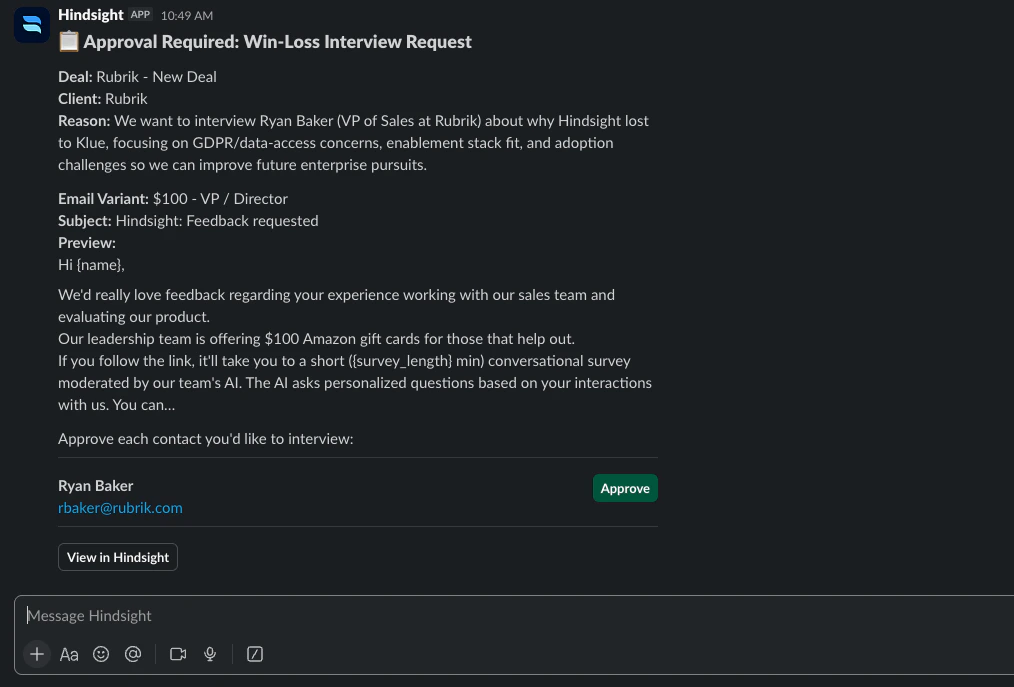
When approval is required:- The agent sends a Slack DM and email to your selected approvers (and optionally the deal owner) with context on which contacts it wants to reach out to and why
- Approvers click Approve directly from the notification
- The agent immediately sends the buyer interview request and schedules a follow-up check
- If an approver hasn’t responded after the configured reminder window, the agent sends them a reminder automatically
Follow-Up Handling
The agent schedules follow-up checks automatically after sending requests. On each check it:- Re-pings buyers who haven’t responded to the interview invite
- Reminds approvers who haven’t yet approved pending requests
- Sends pending invites if approval was granted but the outreach hasn’t gone out yet
- Skips anyone who has already responded or already received a reminder
Setting Up the Interview Agent
Go to Settings → Interview Agent to configure the agent for your organization.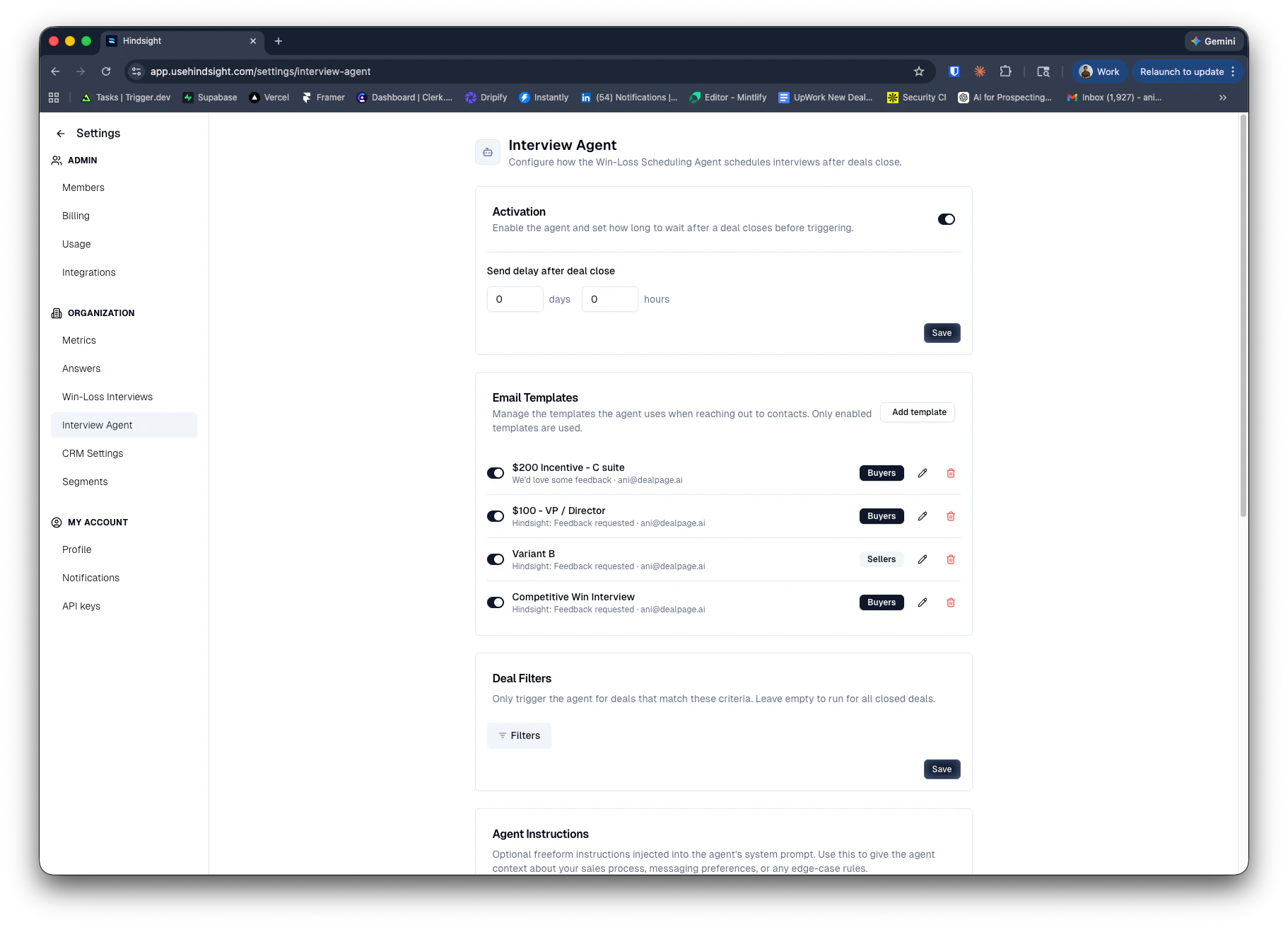
Activation
Toggle the agent on and set a send delay — the amount of time to wait after a deal closes before the agent runs. A short delay (e.g. a few hours to 1 day) gives CRM data time to sync and lets the deal settle before outreach goes out.Email Templates
Create and manage the email templates the agent uses for buyer outreach. Each template (“variant”) includes:- Audience — Buyers (external) for buyer outreach, or Sellers (internal) for team member emails
- Sending email — the email address the message comes from (your connected Gmail or the Hindsight default)
- Subject line and body — supports dynamic variables:
{name},{deal_name},{survey_length},{link},{booking_link} - Survey length — target number of questions for the interview
- Send reminder after — how many days to wait before the agent sends a follow-up to non-responders
- Booking link (optional) — a Calendly or similar link for contacts who prefer a live conversation
Approval
When enabled, the agent will request approval from your designated team members before sending any buyer outreach. Approvers receive a Slack DM and email with context on the contacts being reached out to.- Approvers — select one or more Hindsight users who must approve before buyer emails go out. At least one must be selected when approval is on.
- Also notify deal owner — send the approval request to the deal’s assigned owner as well (in addition to your selected approvers)
Deal Filters
Scope the agent to a specific subset of deals. For example, you can restrict it to deals above a certain value, in specific stages, or owned by certain reps. Leave filters empty to run for all closed deals.Agent Instructions
A freeform text field injected directly into the agent’s system prompt. Use this to encode custom routing rules, messaging preferences, or edge-case logic that the agent should follow. Example instructions:Best Practices
Internal Interviews
- The agent sends to the deal owner and all collaborators by default — make sure deal collaborators are kept up to date in Hindsight so the right people get reached out to
- Add custom instructions to route interviews to specific roles (e.g. only SEs on technical deals, only AEs on commercial deals)
- Keep your internal variants short and conversational — the agent includes a tailored first question to get the conversation started
External Interviews
- Set a delay of at least a few hours after deal close to give CRM data time to sync
- Use approval workflows when your team wants visibility into buyer outreach before it goes out — especially useful for named accounts
- Create multiple variants and use custom instructions to tell the agent when to use each one (e.g. higher-incentive variant for enterprise, standard for mid-market)
- Include a
{booking_link}in your templates to give buyers the option to schedule a live conversation instead of filling out a survey