

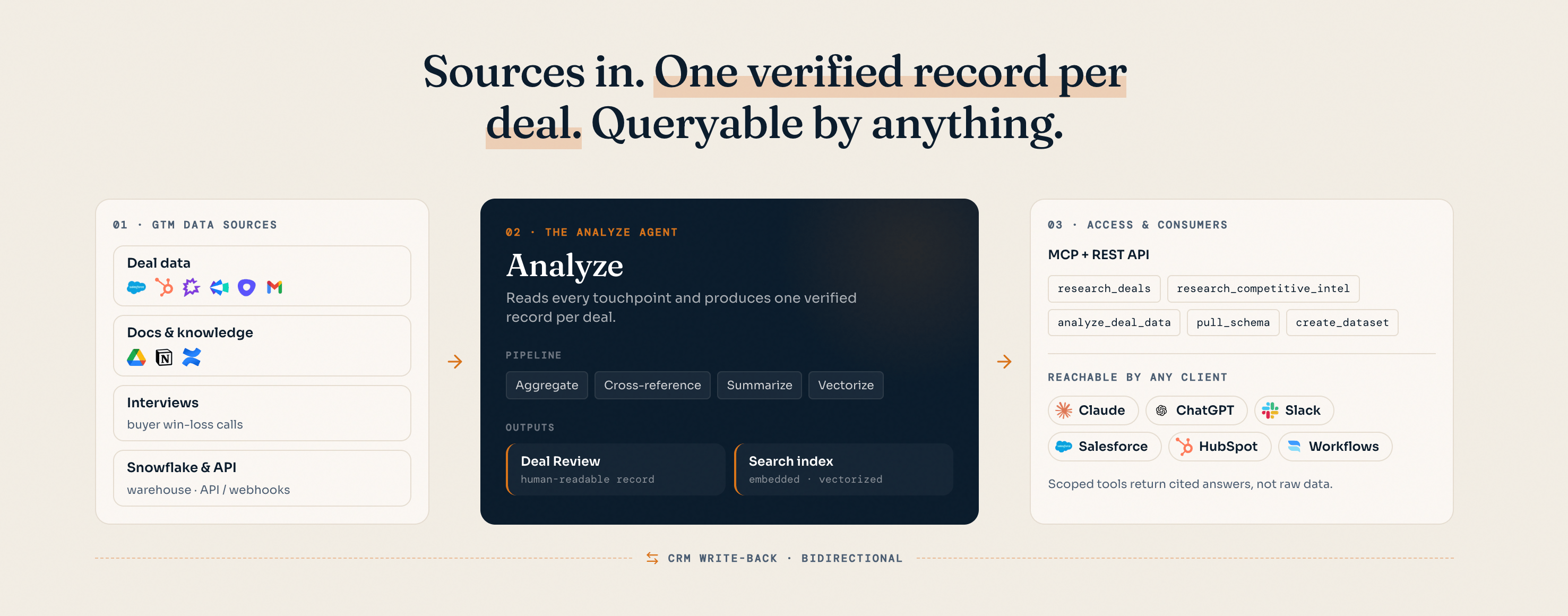
GTM evidence in. Verified account and deal memory out. Queryable by people, agents, and workflows.
Why deal memory
Every opportunity generates experience, but most organizations cannot reuse it. The evidence is distributed, inconsistently labeled, and difficult for a person—or an agent—to evaluate in the context of the next deal.Fragmentation
Deal context is split across call recordings, email threads, CRM fields, documents, and systems of record—without a canonical view of the opportunity.
Unreliability
CRM fields are incomplete, terms vary by team, and transcripts are noisy. Raw retrieval alone cannot establish what actually happened or which evidence supports a conclusion.
Experience does not compound
Prior wins and losses stay trapped in source systems. Teams repeatedly research the same objections, buyer requirements, and execution risks instead of applying proven experience.
How Hindsight builds deal memory
At the core is the Analyze Engine. For each deal, it aggregates related calls, emails, CRM records, documents, and other available evidence. It reconciles that evidence into an account and deal record that captures the commercial context, outcome, and supporting sources. The memory captures dimensions that make past experience comparable and reusable: buyer and stakeholder context, product signals, competitive position, decision drivers, commercial fit, and sales execution. As new evidence arrives and deals advance, Hindsight refreshes the record rather than leaving a point-in-time summary behind. Every tool reads from this memory layer. Retrieval, reconciliation, and evidence linking happen server-side, so agents can work from clean, cited context instead of reprocessing raw transcripts on every call.Verified, not inferred
Each conclusion remains linked to source evidence and confidence signals, so users can inspect what was actually said and resolve uncertainty.
Always current
The memory evolves as opportunities progress, close, and receive new context—so the next workflow can use the most current available experience.
Data sources
Your CRM is the backbone — and the only required source. Connect Salesforce or HubSpot and Hindsight pulls each opportunity and its associated objects, along with the related account and contact objects. You control exactly which properties come across from the CRM settings page in your dashboard. For many teams that’s enough on its own—the CRM is already the centralizer, and Hindsight builds the verified deal memory from what is there. Context sources are optional enrichment. When you want more than what lives on the CRM record — full call transcripts and the actual content behind a deal — connect dedicated sources and Hindsight ingests the full signal:
Hindsight is format-flexible: PDFs, Office files, Markdown, audio, and video are all ingested, and call recordings are transcribed automatically.
Warehouse your data in Snowflake? On the Enterprise plan, Hindsight can ingest directly via a Snowflake data share — no manual exports or uploads required.
Sync & analysis cadence
By default, Hindsight pulls the latest from connected integrations every 12 hours while a deal is open and continues for 14 days after it closes. By default, deal analysis re-runs on every stage change and whenever new context sources are uploaded—so the deal memory stays current as the opportunity moves. You control when deal analysis runs. Enterprise customers can also configure custom integration sync schedules to match their data-refresh and operating requirements.Query and apply the memory
Hindsight is API-first. Query account and deal memory through two integration surfaces, then use the resulting experience in your agents, applications, and operating workflows.MCP
A composable tool surface your AI assistant orchestrates directly. Use it to inspect deal context, find comparable experience, retrieve evidence, and analyze pipeline data in Claude, ChatGPT, Cursor, Cline, or your own MCP client. Start here for agent use cases.
REST API
A single endpoint that runs Hindsight’s agent server-side and returns a complete, cited answer. Best for Glean, Slack bots, embedded search, and workflows that want a finished response.
Tools available
The MCP server exposes the deal memory layer as a focused set of tools. They fall into seven groups. Most agent workflows start withfetch_hindsight_context to learn the workspace’s competitors and deal stages, then branch into the relevant group.
Context & schema
Orient the agent before it queries — what competitors and stages exist, and what fields the deal grid has.Deals & pipeline
Find, triage, and read individual deals and their underlying documents.Competitive intelligence
Query your competitive content and saved intel.Knowledge base
Live web research
Reach beyond stored data for current market and competitor information.Quantitative analysis
Build and analyze structured datasets from the deal grid for win-rate, trend, and segment questions.Write back
Tool availability is role-based. By default, workspace admins can use every tool; managers can use the read tools plus the data-analysis tools; and members can use the read tools. Workspace admins can customize these permissions in Settings → MCP Tools.
The canonical tool list is generated from the live MCP server. Names and parameters can change between releases — call
tools/list against the MCP endpoint for the exact current surface.What this enables
RevOps & enablement
An operational memory for win-loss, competitive attribution, and rep execution. Identify which patterns matter, find comparable deals, and improve the next motion without hand-maintaining a secondary system of record.
AI engineers & builders
A clean, cited tool surface for agents and applications. Give workflows access to grounded deal experience over MCP or REST instead of implementing a bespoke retrieval and verification pipeline.
Trust & governance
User-scoped OAuth and role-based access control help ensure every answer is scoped to your workspace and traceable to its source documents.Next steps
Connect over MCP
Wire Hindsight into Claude, ChatGPT, Cursor, or your own MCP client.
Use the REST API
Get complete, cited answers from a single endpoint.
Get an API key
Generate a workspace-scoped key from the dashboard.