

Documentation Index
Fetch the complete documentation index at: https://docs.usehindsight.com/llms.txt
Use this file to discover all available pages before exploring further.
March 2026
Video interviews, automatic gift card redemptions, richer manual sending controls, a smarter Slack agent, and a handful of platform improvements.Win-Loss Interviews
Full video and audio support
Video & audio recording — Buyers can now complete interviews via video or audio recording, alongside the existing text flow.Updated interview UI — Cleaner, more polished experience for buyers throughout.Centralized responses — All responses, including recordings, are saved to the Responses library for easy review and filtering.
Automatic gift card redemptions
Automatic fulfillment — Set a gift card budget in your interview settings and Hindsight handles fulfillment automatically via Tremendous.No manual tracking — Incentives go out as soon as a buyer completes their interview. Configure your Budget in the Settings menu.
Win-Loss Interview Scheduling Agent
The Interview Agent now handles end-to-end interview coordination automatically — no manual outreach required. When a deal closes, the agent reads deal context, sends personalized Slack interviews to your team, reaches out to buyers by email, manages approvals, and follows up with non-responders.Automated Internal Interviews — Personalized Slack DMs go out to the deal owner and collaborators as soon as the agent runs, with a tailored opening question based on the deal outcome — no warm-up needed.Buyer Outreach — Sends email interview requests to buyer-side contacts using your configured templates, with support for multiple variants (e.g. different incentive levels or buyer segments).Approval Workflows — Optionally gate buyer outreach behind an approval step — approvers get notified via Slack and email and can approve with a single click.Automatic Follow-Ups — The agent re-pings non-responders and reminds approvers who haven’t acted, so nothing falls through the cracks.Custom Instructions — Inject freeform routing logic directly into the agent’s prompt — for example, route interviews to specific roles, use higher-incentive templates for enterprise accounts, or skip external outreach for SMB losses.Configure the agent under Settings → Interview Agent. See the Win-Loss Interviews guide for full setup details.
Manual sending and exports
New options on the
/feedback/send page give you more control over how interview requests go out.Queue requests manually — Add requests to the interview agent’s queue, including follow-up scheduling and approval handling.One-off requests — Send requests with custom topics outside of your standard interview template.CSV export — Export custom requests to import into Apollo, Outreach, or any other sequencing tool.Slack Agent
Updated Slack agent
The Slack agent has moved to the main agent harness and now runs as a competitive intelligence subagent, with support for subagent-level rules.Richer search — Can now search the web, your asset library, and stored intel to answer questions in context.Multi-step queries — Better handling of queries that require multiple sources or reasoning steps.Faster responses — Improved answer formatting and noticeably faster response times.
Competitive Intelligence
Competitor research URL rules
Add URL-based restrictions to control which sources the research agent can pull from for a given competitor. This lets you limit the agent to only pull from specific domains or subdomains that you trust as authoritative for that competitor, so that the research results are scoped appropriately.Scope to trusted sources — Limit a competitor’s research to specific domains or subdomains, such as their own docs subdomain.Setup — Hit the 3-dots menu next to any competitor in the Competitors list and select Edit URL rules.
Platform
Hindsight API
You can now integrate Hindsight’s competitive intelligence, win-loss insights, and deal data directly into your AI agents, MCP servers, Glean, Slack bots, or custom applications.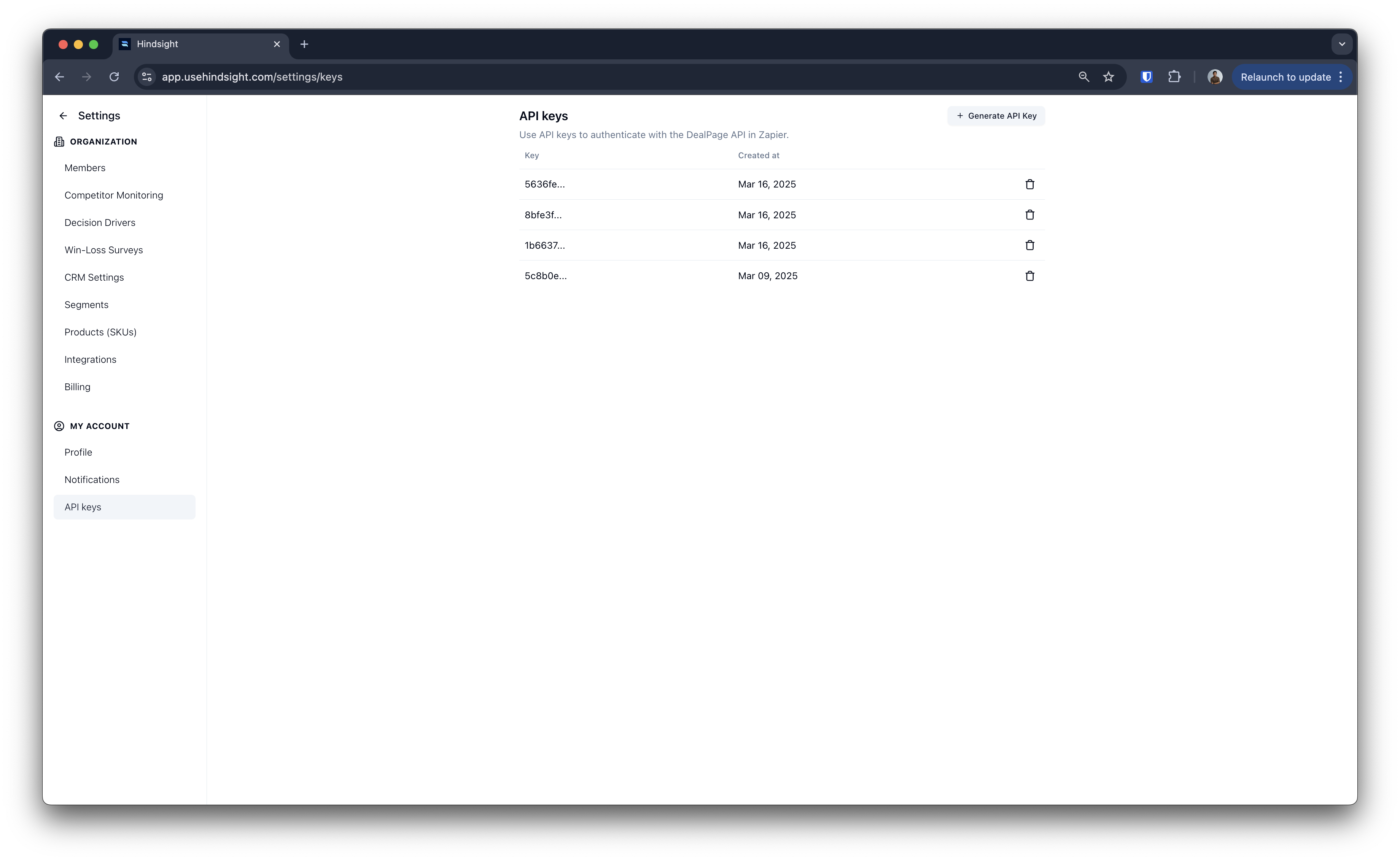
Deal Datasets in Chat
Insert Deal Datasets directly into the chat from the Chat page, giving you more flexibility to bring structured deal data into any conversation — including mid-session.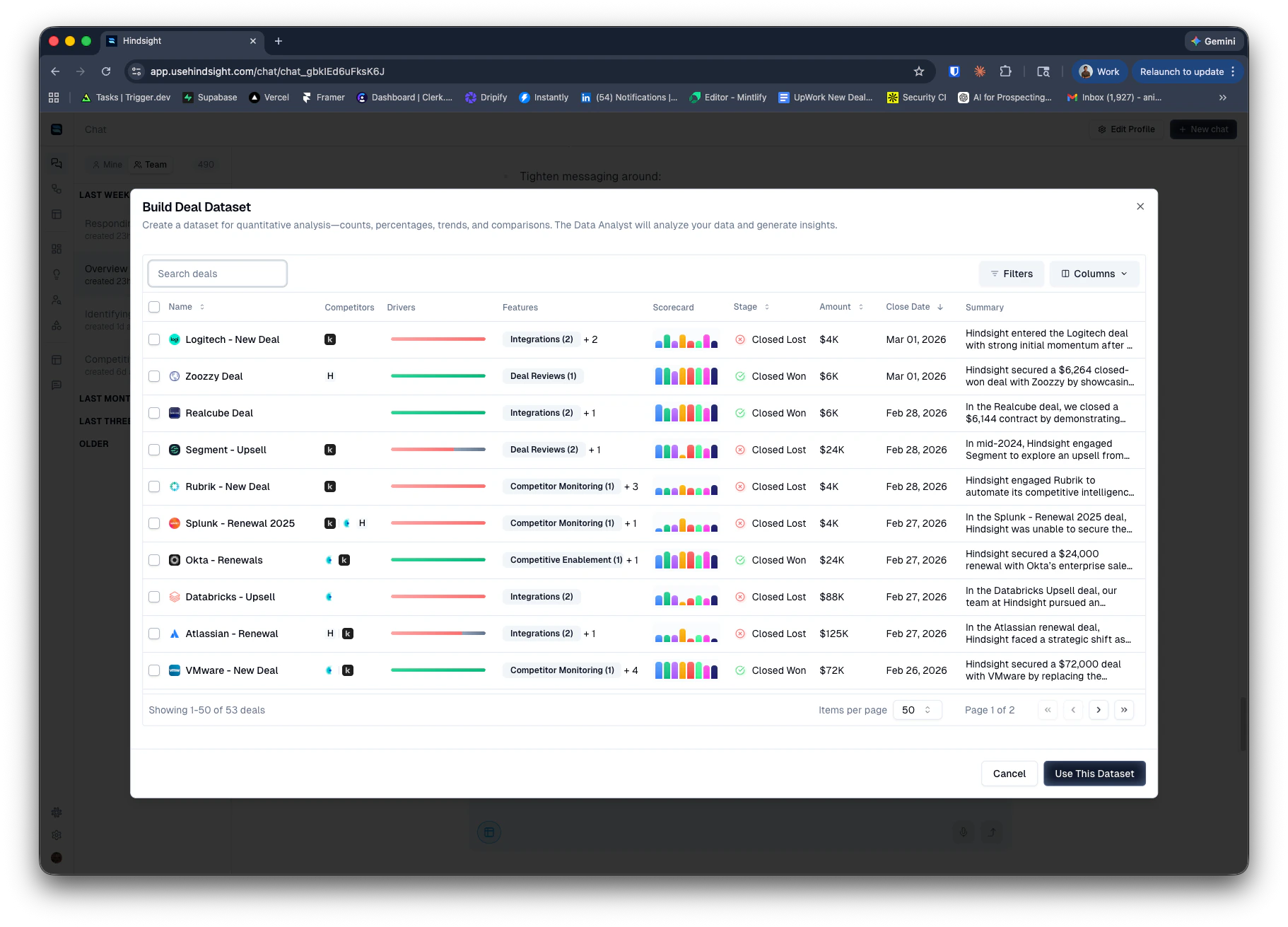
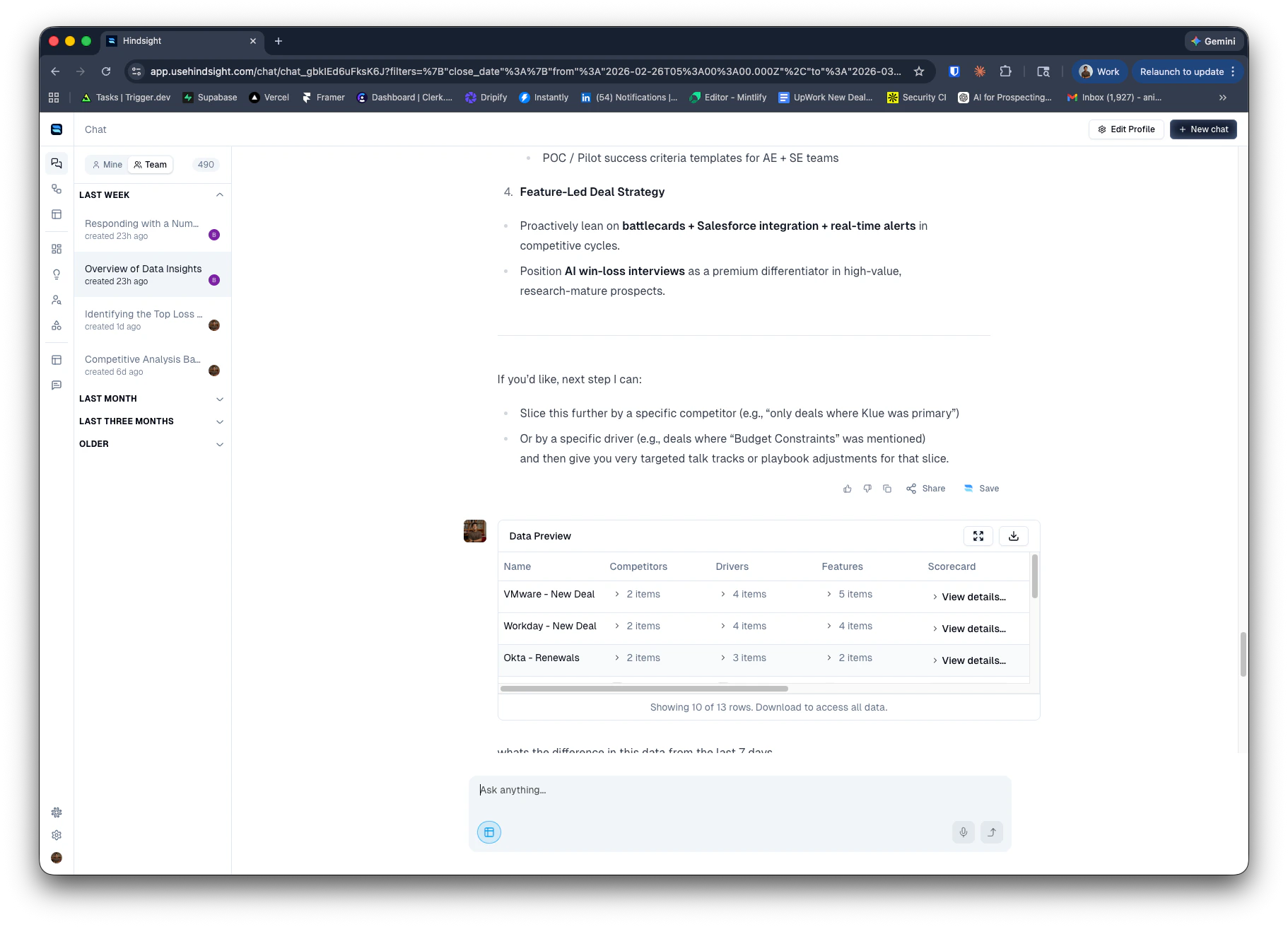
UI refresh
Rolling out updated colors and typography across main pages. More areas of the app will follow over the coming weeks.
SOQL query preview
Query preview — View the exact SOQL query Hindsight generates from your import settings and filters before any deals are pulled in.Deal preview — See the set of deals that will be imported so you can validate your configuration before going live.Improved filter logic — Better support for AND / OR, IN, and NOT IN filters, as well as complex groupings.
Member title management
Set member titles — Admins can now set and edit titles for team members directly within Hindsight.Use in agent rules — Titles are available as a condition in agent rules — for example, routing interview decisions based on whether the owner is an AE.
February 2026
Another month, another set of powerful updates to Hindsight. This year is all about AI Agents. More power, more simplicity. For some teams, this may be a breaking change.Competitor Monitoring Agent
We’ve rebuilt competitive monitoring from the ground up, now powered by Hindsight’s AI agent and workflows system. NOTE: this means the older competitor monitoring system (e.g. News Feed) will stop functioning fully in 4 weeks. Please work with your account manager to help ensure a successful transition or use our Guides to set up the new system yourself. Key capabilities include:- Expanded Data Sources: Access LinkedIn content, G2 reviews, and other web content on your competitors via the AI chat, in your recipes, and from scheduled workflows
- Full Customization: Configure your own monitoring schedule, notification style, delivery channels, and more
- Seamless Migration: Existing competitor monitoring setups have been automatically migrated to the new system
- Remixable Recipes: Each workflow starts with a default Recipe that you can remix and customize to deliver updates exactly the way you want them
New Research Tools
We’ve promoted several research tools to production and added new experimental capabilities for deeper web research. Now generally available:- Web Search: Search the web for real-time competitive intelligence, market trends, and industry news
- Scrape Tool: Extract content from any webpage to bring into your analysis
- Map URL Tool: Automatically discover and index subpages from a given URL
- Browse Tool: Full browser capabilities for research on specialized or bot-protected sources like LinkedIn
Intel Library
Save the links and resources your Agent discovers to the new Intel Library—a dedicated space for competitive intelligence and research materials. Find it under the Library tab in the left sidebar. Key capabilities include:- Centralized Organization: Keep approved, high-quality insights organized and easily accessible
- Team Access: Surface materials via the Slack Agent and other enablement workflows
- Auto-Sync: Saved pages are automatically indexed and synced on a regular cadence to stay up to date and detect changes
January 2026
Happy New Year! We’re kicking off 2026 with some exciting new features and enhancements to help your team win more deals. Along with product updates, we’re also offering 1:1 onboarding sessions to help you get the most out of Hindsight and all the new capabilities. If you have a workflow you’d like help setting up, or if you’d like a walkthrough of the new features, please reach out!Workflows!
Workflows let you automate the delivery of insights, reports, and assets to your team on a recurring schedule. Build custom workflows that run recipes automatically and deliver results via Slack, email, or directly to your Library. Key capabilities include:- Scheduled Runs: Set recipes to run daily, weekly, or on a custom cadence
- Multiple Delivery Channels: Push insights directly to specific Slack channels, email lists, or Slack DMs
- Library Integration: Create or update existing assets and documents in your Library (e.g., battlecards, competitor profiles)
- External Tool Connections: Use Zapier to send outputs to your Google Drive, Gamma, or other AI systems
Metrics Enhancements
We’ve made several enhancements to our metrics capabilities to provide you with deeper insights and more flexibility in how you evaluate deals.Metrics Scoring Guidelines
You can now choose documents to use as guidelines for the model to reference when scoring a deal. For example, when scoring sales execution, you might want to provide your sales playbook or coaching guide as a reference to ensure consistent scoring aligned with your organization’s standards. When configuring a Custom Metric, simply select one or more documents from your Library to use as scoring guidelines. The AI will reference these documents when evaluating and scoring each deal.New Metrics
We’ve added three new default Custom Metrics to help you better evaluate deal dynamics:- Customer Fit: Measures how well your product aligns with the customer’s needs and requirements
- Messaging Fit: Assesses how effectively your messaging resonates with the customer’s pain points and objectives
- Messaging Accuracy: Evaluates how accurately your messaging reflects your product’s capabilities and differentiators
Filtering by Metric Scores
You can now filter deals based on their Custom Metric scores. This allows you to quickly identify deals that meet specific scoring criteria, such as low sales execution or low product fit. When building datasets or running analyses, simply apply filters based on the desired metric scores to focus on the most relevant deals for your insights. These filtering capabilities allow you to build smarter alerting workflows so you can quickly flag opportunities that need attention.Web Search Tool (Experimental)
We’ve introduced an experimental Web Search tool that allows you to augment AI analyses with real-time information from the web. This is particularly useful for gathering the latest competitive intelligence, market trends, and industry news that may not be present in your existing deal data. You can ask the Agent to find new material on the internet, and then click to save it the right competitor’s CI library. This improves the customization of your newsletters and other workflows.Agent Harness Enhancements
Model Upgrade
All Accounts are now upgraded to OpenAI’s GPT 5.1.Tool Usage
We’ve improved the Agent’s ability to use tools effectively during analysis. This includes better selection of when to invoke specific tools, improved handling of tool outputs, and enhanced integration with external data sources.Context Management
The Agent can now manage larger contexts more effectively, allowing it to analyze more complex datasets and extract deeper insights without losing track of important details.Enhanced Data Analysis
Agent can now segment data more accurately allowing for more nuanced and insightful reports.December 2025
Data Analyst Agent V2
We’ve significantly upgraded the Data Analyst Agent in Chat, enabling powerful analytics across your entire deal library. Key improvements include:- Unlimited Dataset Size: Analyze thousands of deals at once, removing previous limits on dataset size
- AI-Powered Pattern Recognition: Leverages outputs from AI Deal Reviews to surface patterns in competition, product fit, sales execution, and more
- Dynamic Visualizations: AI automatically builds charts and graphs to illustrate key findings
- Recursive Segmentation: Automatically segments data to drill down into trends and outliers
- Quantitative + Qualitative Insights: Combines statistical analysis with contextual understanding for comprehensive insights
- New Dataset UI: Improved interface for viewing, exploring, and exporting datasets and segments used in analysis
- Advanced Segmentation: More sophisticated segmentation capabilities for deeper analysis
- Enhanced Visualizations: Additional chart types and customization options
Slack Admin & Usage Analytics
New admin controls and usage analytics for the Hindsight Slack Assistant. Key capabilities include:- Custom System Prompt: Configure a custom system prompt to tailor AI responses in Slack to your team’s tone, terminology, and guidelines
- Competitive Intel Toggle: Control whether the Slack Assistant can search and surface competitive intelligence data
- Usage Analytics: Track how many questions are being asked in Slack over time, identify top topics and competitors being queried, and see which team members are engaging most with the assistant
Variables in Recipes
Recipes now support configurable variables, making it easier to create flexible, reusable analysis workflows that can be quickly customized at runtime. Key capabilities include:- Text Variables: Add simple text inputs that users fill in when running a recipe (e.g., competitor name for a Top Objections recipe)
- Filter Variables: Let users apply Deal filters at runtime (e.g., filter a Product Gaps report to your Enterprise segment, or filter a Win Themes report to deals won in the last quarter)
November 2025
Recipes (Beta)
We’ve launched Recipes, a powerful new way to create, customize, and run reusable analysis workflows that deliver insights tailored to your team’s specific needs. Key capabilities include:- Role-Based Recipe Library: Pre-built recipes organized by function (Product Management, Marketing, Competitive Intelligence, Sales Enablement, Operations) help teams get started quickly with relevant analyses
- Two Modes:
- Deal Research Agent: AI agent finds and deeply analyzes relevant data from up to 25 deals at a time, using call transcripts, notes and other deal context without dataset configuration
- Data Analyst Agent: Build custom datasets with advanced filtering and column selection, then analyze up to 100 deals at once with your chosen prompt
- Remix & Customize: Start with any Hindsight default recipe and remix it to create your own version with custom filters, columns, and prompts that match your specific workflows
- Recipe Management: Save, organize, and share recipes across your team for consistent analysis approaches
- Scheduled Recipes: Automatically run recipes on a schedule to keep insights fresh
- Share Results: Distribute recipe outputs directly to Slack channels or via email
October 2025
Auto-suggested Drivers, Competitors, Features
We now automatically suggest new labels when AI analyzes deals, dramatically expanding your ability to track and analyze deal dynamics without manual configuration. Key capabilities include:- Unlimited Labeling: Track unlimited competitors, drivers, or features without pre-configuration
- Smart Detection: When new topics are detected in deals, we automatically create suggested tags (shown with lightbulb icons to accept/decline)
- Expanded Competitive Intelligence: Competitors can include insights on your team vs. DIY, homegrown, or other alternatives
- Roadmap Integration: Features can include both current capabilities and roadmap items, plus competitor capabilities
- Enhanced Accuracy: More labels provide more detailed insights and improved AI accuracy, as the system has less incentive to match weakly correlated quotes to existing labels
Trend Analysis
We added comprehensive trend analysis to help you understand how competitive dynamics, decision drivers, and feature importance evolve over time. Features include:- Multi-timeframe Views: Switch between 7-day, 30-day, 90-day, Year-to-Date, and All-time statistics
- Visual Change Indicators: Clear visual indicators showing changes and trends over time
- Decision Driver Trends: See how often specific decision drivers are cited in deals over time
- Competitive Deal Volume and Win Rate Trends: See how deal volume and win rates for competitors and drivers change over selected timeframes
- Feature Mention Trends: Track how often specific features are mentioned in deals over time
Decision Driver Table
We launched a dedicated Decision Drivers page (/drivers) for comprehensive driver management and analytics.
The new interface provides:
- Centralized Driver Stats: View performance metrics and usage statistics for all decision drivers
- Driver Configuration: Streamlined setup and management of custom decision drivers
- Enhanced Organization: Better categorization and bulk management tools for large driver libraries
Reports (Beta)
We’ve graduated our Reports functionality from Alpha to Beta with significant improvements to the analysis engine and user experience. Reports now provide more sophisticated AI-powered insights and enhanced dataset customization options. Key improvements include:- Enhanced AI Analysis: Improved pattern recognition and insight generation with structured reporting templates
- Advanced Dataset Builder: More granular filtering options including custom properties, deal segments, and timeframe controls
- Expanded Report Types: Pre-built templates for win/loss analysis, competitive intelligence, product feedback, and sales execution
- Report Management: Complete reports library with saving, sharing, and collaboration features
- CSV Export: Download configured datasets for custom analysis in external tools
- Conversational Follow-up: Continue refining analysis through chat interface after report generation
September 2025
Competitive Intelligence Revamp
We refreshed our competitive tracking workflow to improve usability, controls, and human-in-the-loop processes. Key updates include:- Ability to configure completely custom URL tracking for competitors. Track any webpage on a custom scraping schedule to meet your needs
- Improved event detection with AI, including deduplication of similar events and better extraction of event details
- New event triage workflow to review, edit, and approve detected events before they are shared with your team
- Slack notifications to alert competitor owners when new events are detected and ready for triage
Chat with this Data (Beta)
We added an integrated chat experience built around the various data tables in Hindsight. This allows users to create custom .csv files with win/loss and competitive data, then pass that data to Hindsight’s AI assistant to answer questions, extract insights, and build reports.Reports (Alpha)
We released an early version of Hindsight’s native Reports functionality. Reports allow users to use powerful, pre-built prompt templates to generate reports based on their deal data.- 4 default reports released, spanning Win/Loss, Competitive Intel, Product, Marketing, and Sales topics
- Ability to customize report data by filtering to any custom criteria (e.g. region, product, time period)
- Completely customizable reports via prompting and further data exploration with help of AI assistant
- Reports library for creating, managing, and sharing reports across your Team